
Introduction
This manual provides comprehensive instructions for the setup, operation, maintenance, and troubleshooting of your JBL T280A Stereo Ear Headphones. Please read this manual thoroughly before using the product to ensure proper function and longevity.

Image: The JBL T280A Stereo Ear Headphones, featuring two black earbuds with the JBL logo prominently displayed on their outer surface. The earbuds are connected by a black cable.
Key Features:
- JBL Pure Bass Sound: Engineered to deliver deep, powerful bass.
- Single Button Mic and Remote: Allows for easy control of music playback and call management.
- High Quality Materials: Features aluminum housing, silicone ear tips, and a durable tangle-resistant flat cable.
- High Performance 9mm Drivers: Provides clear and precise sound.
- Built-in Microphone: For hands-free communication.
Package Contents
Verify that all items are present in the package:
- JBL T280A Stereo Ear Headphones
- Multiple sizes of silicone ear tips
- Carrying Pouch
- User Manual (this document)

Image: The retail packaging for the JBL T280A headphones, a clear plastic box showcasing the black earbuds inside, with "PUREBASS T280A" printed on the white cardboard base.

Image: A black fabric carrying pouch with a drawstring closure, featuring the white JBL logo printed on its front surface.
Setup
- Select Ear Tips: Choose the silicone ear tips that provide the most comfortable and secure fit for your ears. A proper seal is crucial for optimal sound quality and bass response. Gently push the ear tips onto the earbud nozzles until they are securely attached.
- Connect to Device: Insert the 3.5mm audio jack of the headphones into the headphone port of your audio device (smartphone, tablet, laptop, etc.). Ensure the jack is fully inserted.
- Wear Headphones: Place the earbuds into your ears. The left earbud is typically marked with an 'L' and the right with an 'R'. Ensure they are seated comfortably.

Image: The JBL T280A headphones laid out, showing both black earbuds, the flat tangle-resistant cable, the inline remote with a single button and microphone, and the 3.5mm audio jack.
Operating Instructions
The JBL T280A headphones feature an inline remote and microphone for convenient control of your audio and calls.
Music Control:
- Play/Pause: Press the single button once.
- Next Track: Press the single button twice quickly.
- Previous Track: Press the single button three times quickly.
Call Control:
- Answer/End Call: Press the single button once.
- Reject Call: Press and hold the single button for approximately 2 seconds.
Note: Functionality may vary slightly depending on your connected device's operating system and specific applications.
Maintenance and Care
- Cleaning: Use a soft, dry cloth to clean the earbuds and cable. Do not use liquid cleaners or solvents. For ear tips, they can be removed and gently wiped with a damp cloth, then allowed to air dry completely before reattaching.
- Storage: When not in use, store the headphones in the provided carrying pouch to protect them from dust, dirt, and tangling. Avoid wrapping the cable too tightly.
- Avoid Moisture: While the product specifications list "Waterproof" for water resistance, it is generally best practice to avoid exposing electronic devices to excessive moisture. Do not submerge the headphones in water.
- Temperature: Do not expose the headphones to extreme temperatures (hot or cold) or high humidity.
- Cable Care: Avoid pulling on the cable when disconnecting from a device. Always grasp the 3.5mm jack itself.
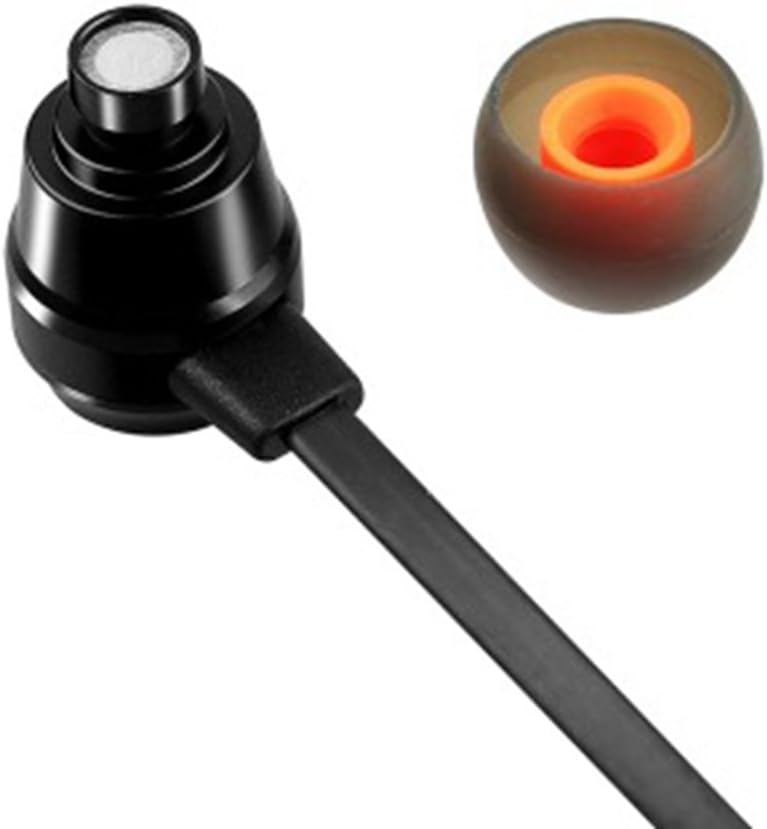
Image: A detailed close-up of a JBL earbud, showing the silicone ear tip removed to reveal the internal driver and sound port. An orange inner ring is visible within the ear tip.
Troubleshooting
| Problem | Possible Cause | Solution |
|---|---|---|
| No sound or low volume |
|
|
| Microphone not working |
|
|
| Sound distortion |
|
|
Specifications
| Feature | Detail |
|---|---|
| Model Name | T280A |
| Brand | JBL |
| Connectivity Technology | Wired |
| Headphones Jack | 3.5 mm Jack |
| Frequency Response | 22000 Hz |
| Frequency Range | 20 Hz - 22 kHz |
| Impedance | 16 Ohm |
| Audio Driver Type | Dynamic Driver |
| Ear Placement | In Ear |
| Form Factor | In Ear |
| Control Type | Media Control, Remote |
| Material | Silicone (ear tips), Aluminum (housing) |
| Item Weight | 9 Grams (0.317 ounces) |
| Water Resistance Level | Waterproof |
| Compatible Devices | Cellphones |
Warranty and Support
JBL products are designed and manufactured to the highest standards. For specific warranty information regarding your JBL T280A headphones, please refer to the warranty card included with your purchase or visit the official JBL website.
For technical support, product inquiries, or service, please visit the official JBL support page or contact their customer service directly. You can find more information and support resources on the JBL Store on Amazon.


