
Introduction
This manual provides essential information for the safe and effective use of Maxell CR1620 3V Lithium Button Cell Batteries. Please read these instructions carefully before use and retain them for future reference.
Product Overview
Maxell CR1620 batteries are high-quality 3V lithium button cells designed for various electronic devices. They offer reliable power and a low self-discharge rate, ensuring a long shelf life.

Image: A blister pack containing five Maxell CR1620 3V lithium button cell batteries. The packaging clearly displays the Maxell brand and battery specifications.
Key Features:
- Output: DC 3V
- Chemistry: Lithium
- Low self-discharge rate for extended shelf life
- Suitable for watches, calculators, toys, fitness devices, healthcare devices, and other small electronic devices.
- Authentic Maxell product with holographic packaging.
Setup and Installation
Follow these general steps for installing the CR1620 battery into your device. Always refer to your device's specific instruction manual for detailed battery replacement procedures.
- Identify Battery Compartment: Locate the battery compartment on your electronic device.
- Open Compartment: Use a small screwdriver or appropriate tool if necessary to open the battery compartment cover.
- Remove Old Battery (if applicable): Carefully remove the old battery, noting its orientation (positive (+) and negative (-) terminals).
- Insert New Battery: Insert the new Maxell CR1620 battery with the positive (+) side facing the direction indicated by your device (usually upwards or as marked).
- Secure Compartment: Close the battery compartment cover securely.
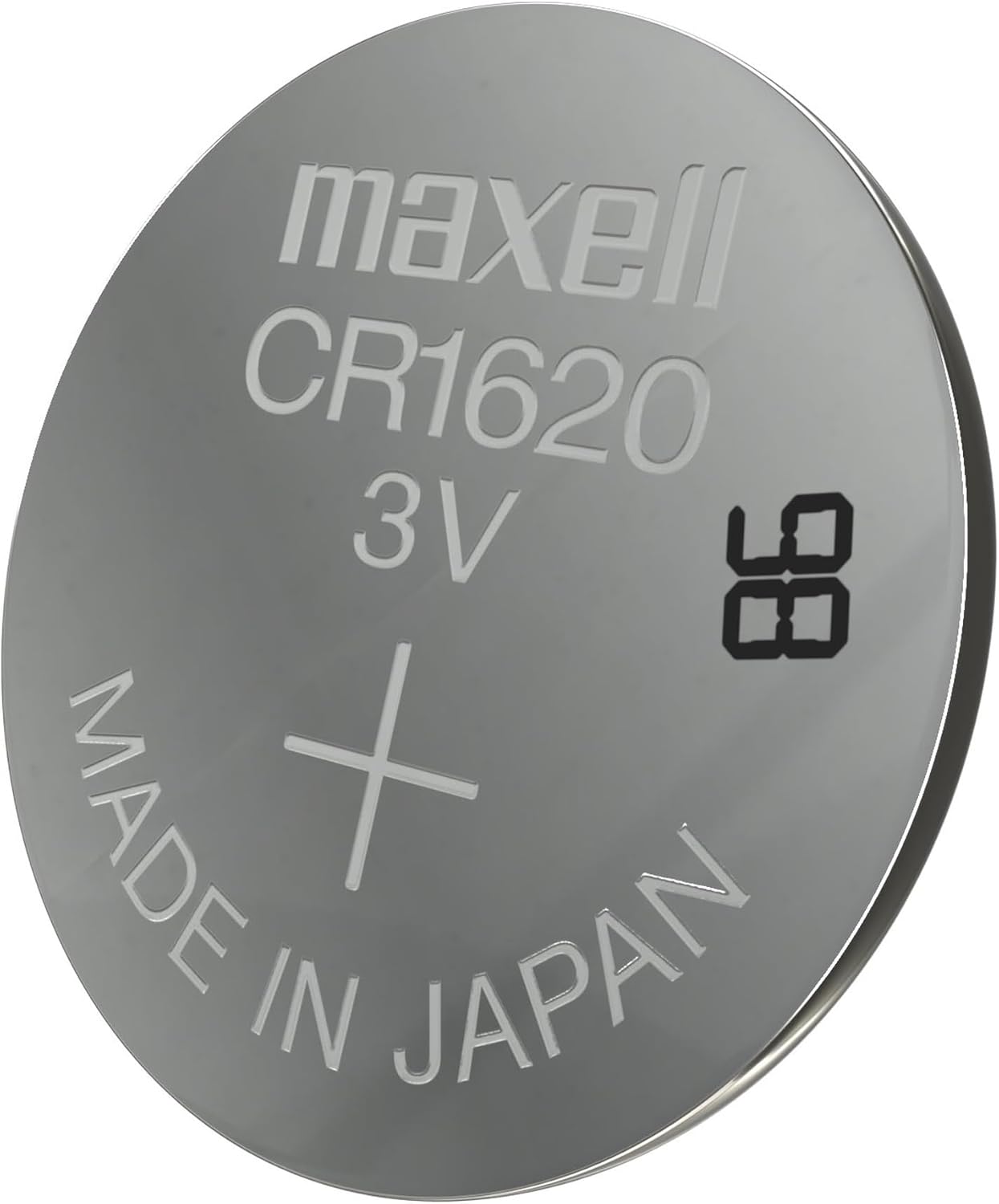
Image: A detailed view of a single Maxell CR1620 battery, showing the "maxell CR1620 3V" marking and "MADE IN JAPAN" text, along with the positive (+) terminal indicator.
Operating Instructions
Once correctly installed, the Maxell CR1620 battery will provide power to your compatible electronic device. No specific operating instructions are required for the battery itself, as its function is to supply power to the device it is installed in.
Ensure your device is turned on according to its own manual. If the device does not power on, verify correct battery installation and check if the battery is fresh.
Maintenance and Storage
- Storage: Store unused batteries in their original packaging in a cool, dry place, away from direct sunlight and extreme temperatures.
- Handling: Avoid touching the battery terminals with bare hands, as oils and dirt can affect performance.
- Disposal: Dispose of used batteries according to local regulations. Do not incinerate or mutilate batteries.
- Expiration: Check the expiration date on the packaging to ensure optimal performance.
Safety Information
WARNING: KEEP BATTERIES OUT OF REACH OF CHILDREN.
Swallowing a button cell battery can cause severe internal burns in as little as 2 hours, leading to serious injury or death. If you suspect a battery has been swallowed, seek immediate medical attention.
- Do not recharge, disassemble, heat, or dispose of in fire.
- Do not mix old and new batteries, or different types of batteries.
- Ensure correct polarity (+ and -) when installing.
- If battery fluid leaks and comes into contact with skin or eyes, rinse immediately with plenty of water and seek medical advice.

Image: An image illustrating the difference between authentic Maxell CR1620 battery packaging (right, marked with a green check) and potentially counterfeit or unsafe packaging (left, marked with a red cross and "DANGER" warnings in multiple languages). Note that packaging with UPC 4902580131333 may indicate a non-genuine product, as shown in the warning image. Always verify authenticity.
Troubleshooting
- Device Not Working:
- Check if the battery is inserted with correct polarity (+/-).
- Ensure the battery compartment is securely closed.
- Replace the battery with a new one to rule out a depleted battery.
- Consult your device's manual for specific troubleshooting steps.
- Short Battery Life:
- Ensure the battery is not past its expiration date.
- Verify the device is not consuming excessive power.
- Store batteries properly to prevent premature discharge.
Specifications
| Attribute | Value |
|---|---|
| Model Number | CR1620 |
| Brand | Maxell |
| Battery Cell Type | Lithium Metal |
| Voltage | 3 Volts |
| Amperage | 3 Amps |
| Reusability | Single Use |
| Battery Weight | 1 Grams (per battery) |
| Unit Count | 5.0 Count (in package) |
| Compatible Devices | Watches, Calculators, Toys, Fitness/Healthcare Devices |
| UPC | 063657005620 |
| Date First Available | June 18, 2015 |
Warranty and Support
Maxell batteries are manufactured to high-quality standards. For specific warranty information or support inquiries, please refer to the official Maxell website or contact their customer service directly.
Manufacturer: Maxell
For further assistance, please visit the Maxell Store on Amazon.


