1. Product Overview
The TRIPP LITE P516-006-HR is a 6-foot (1.83-meter) VGA Monitor Y Splitter Cable designed to duplicate a single VGA video signal from a computer's HD15 port to two separate high-resolution monitors. This cable is suitable for applications requiring the same image to be displayed simultaneously on two screens, such as presentations or mirroring a laptop display to a larger monitor.
It supports resolutions up to 1600 x 1200, utilizing 75-ohm coax conductors for RGBHV signals to ensure clear video quality. The cable features one HD15 male connector and two HD15 female connectors with hex nuts for secure connections.

Figure 1: Tripp Lite P516-006-HR VGA Y Splitter Cable. This image shows the full length of the black VGA Y splitter cable with one male HD15 connector and two female HD15 connectors.
2. What's in the Box
- One (1) TRIPP LITE P516-006-HR VGA Monitor Y Splitter Cable
3. Setup Instructions
Follow these steps to connect your VGA Y splitter cable:
- Power Off Devices: Ensure your computer (source device) and both monitors (display devices) are powered off before making any connections.
- Connect to Source: Plug the single HD15 male connector of the P516-006-HR cable into the VGA output port of your computer or laptop. Secure the connection by tightening the hex nuts if available on your device.
- Connect to Monitors: Plug each of the two HD15 female connectors of the P516-006-HR cable into the VGA input ports of your two monitors. Secure these connections by tightening the hex nuts on the cable.
- Power On Devices: Power on your monitors first, then power on your computer.
- Verify Display: Your computer's display should now be mirrored on both connected monitors.
Important Note: This cable is designed to split a single VGA signal, meaning both connected monitors will display the same image. It does not extend your desktop to show different content on each monitor. For extending your desktop, a different type of adapter or graphics card with multiple outputs is required.
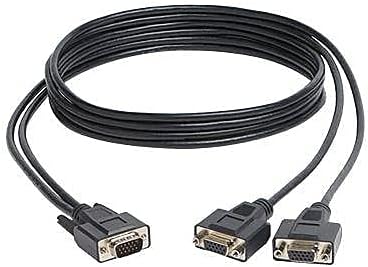
Figure 2: Close-up view of the HD15 male and female connectors. The male connector plugs into the computer, and the two female connectors attach to the monitors.
4. Operating Instructions
Once properly connected as described in the Setup Instructions, the TRIPP LITE P516-006-HR cable operates automatically. It is a passive cable, meaning it does not require external power or software. The video signal from your source device will be duplicated and sent to both connected monitors.
Ensure your display settings on your computer are configured to "Duplicate" or "Mirror" displays if you encounter issues, although this is typically the default behavior when using a passive splitter.
5. Maintenance
To ensure the longevity and optimal performance of your VGA Y splitter cable, follow these maintenance guidelines:
- Handle with Care: Avoid bending the cable sharply or putting excessive strain on the connectors.
- Keep Clean: Periodically wipe the cable and connectors with a soft, dry cloth to remove dust and debris. Do not use liquid cleaners directly on the connectors.
- Store Properly: When not in use, coil the cable loosely and store it in a dry, cool place away from direct sunlight and extreme temperatures.
- Inspect Connectors: Regularly check the HD15 connectors for any signs of damage, bent pins, or corrosion.
6. Troubleshooting
If you encounter issues while using your TRIPP LITE P516-006-HR cable, refer to the following common troubleshooting steps:
- No Display on Monitors:
- Ensure all connections are secure and the hex nuts are tightened.
- Verify that both monitors are powered on and set to the correct input source (VGA).
- Check your computer's display settings to ensure the output is enabled and configured for mirroring.
- Test the monitors individually with a direct VGA connection to the computer to rule out monitor issues.
- Blurry or Distorted Image:
- This cable is designed for short distance applications only. Using it over longer distances or with very high resolutions might introduce signal degradation.
- Ensure the resolution set on your computer is within the cable's supported range (up to 1600 x 1200).
- Check for any bent pins on the HD15 connectors.
- Try reducing the display resolution on your computer to see if the image clarity improves.
- Only One Monitor Displays:
- Confirm both female HD15 connectors are securely plugged into their respective monitors.
- Test each monitor connection individually to ensure both monitor inputs are functional.
For applications requiring longer distances or higher resolutions, consider using a powered VGA splitter or signal booster, such as Tripp Lite B114-002-R or B114-004.
7. Specifications
| Feature | Detail |
|---|---|
| Brand | TRIPP LITE |
| Model Name | P516-006-HR |
| Cable Type | VGA |
| Connector Type | HD15 Male to 2x HD15 Female |
| Cable Length | 6 Foot / 1.83 Meters |
| Supported Resolutions | Up to 1600 x 1200 (SXGA/UXGA) |
| Conductor Material | 75-ohm coax for RGBHV signals |
| Color | Black |
| Item Weight | 4.8 ounces (0.3 Pounds) |
| Product Dimensions | 0.5 x 7 x 9 inches |
| UPC | 037332187789 |
| Indoor/Outdoor Usage | Indoor, Outdoor |
| Maximum Voltage | 700 Millivolts |
8. Warranty and Support
Warranty Information
The TRIPP LITE P516-006-HR VGA Monitor Y Splitter Cable comes with a Lifetime Limited Warranty. Please refer to the official TRIPP LITE website or your product packaging for full warranty terms and conditions.
Customer Support
For technical assistance, product inquiries, or warranty claims, please contact TRIPP LITE customer support. Contact information can typically be found on the TRIPP LITE official website or on the product packaging.


