
1. Product Overview
The Aircast AirSelect Walker Brace/Walking Boot is designed to provide protection, comfort, and support for various lower leg and foot injuries. This advanced walking boot features a durable, semi-rigid shell and overlapping Duplex air cells for intermittent pneumatic compression, which aids in reducing edema. SoftStrike technology helps absorb shock, and the lightweight rocker sole promotes a natural gait. Its open-frame design ensures ventilation, and the universal fit allows use on either the left or right foot.
- Durable Semi-Rigid Shell: Provides limb support and full-shell protection.
- Duplex Air Cells: Overlapping air cells offer intermittent pneumatic compression for edema reduction.
- SoftStrike Technology: Absorbs and dissipates shock during ambulation.
- Lightweight Rocker Sole: Encourages a natural walking pattern.
- Open-Frame Design: Enhances ventilation for user comfort.
- Universal Fit: Compatible with both left and right feet.
2. Safety Information
Please read all instructions carefully before using the Aircast AirSelect Walker Brace/Walking Boot. Improper use may lead to injury or product damage.
- Consult a Healthcare Professional: Always consult with a physician or qualified healthcare professional before using this device, especially if you have pre-existing medical conditions or are unsure about its suitability for your injury.
- Proper Fit: Ensure the boot is correctly sized and fitted according to the instructions. An ill-fitting boot can cause discomfort, skin irritation, or inadequate support.
- Inflation Pressure: Do not over-inflate the air cells. Excessive pressure can restrict circulation or cause discomfort. Adjust inflation to a comfortable and supportive level.
- Walking Surface: Exercise caution when walking on uneven, slippery, or wet surfaces. The rocker sole may alter your balance.
- Inspect Regularly: Periodically inspect the boot for wear, tear, or damage. Discontinue use if any damage is observed and contact your supplier or healthcare professional.
- Skin Monitoring: Regularly check your skin under the boot for any signs of irritation, redness, pressure sores, or swelling. If any issues arise, loosen the boot or discontinue use and consult your healthcare professional.
- Do Not Modify: Do not attempt to modify the boot or its components. Unauthorized modifications may compromise the device's safety and effectiveness.
3. Setup and Application
Follow these steps to properly set up and apply your Aircast AirSelect Walker Brace/Walking Boot.
3.1 Initial Preparation
- Unpack: Carefully remove the boot from its packaging.
- Inspect: Check all components for any signs of damage or defects.
- Open Straps: Release all straps and open the liner.
3.2 Applying the Boot
- Position Foot: While seated, place your foot and lower leg into the boot. Ensure your heel is seated firmly at the back of the boot.
- Secure Liner: Wrap the soft liner around your foot and leg, ensuring it is snug and smooth against the skin.
- Attach Front Panel: Position the front panel over the liner, aligning it centrally.
- Fasten Straps: Starting from the bottom (foot) and working upwards, fasten each strap securely. Do not overtighten. The straps should be firm enough to hold the boot in place without causing discomfort or restricting circulation.

Figure 1: Front view of the Aircast AirSelect Walker Boot. This image shows the overall structure of the boot with its grey straps and white frame.
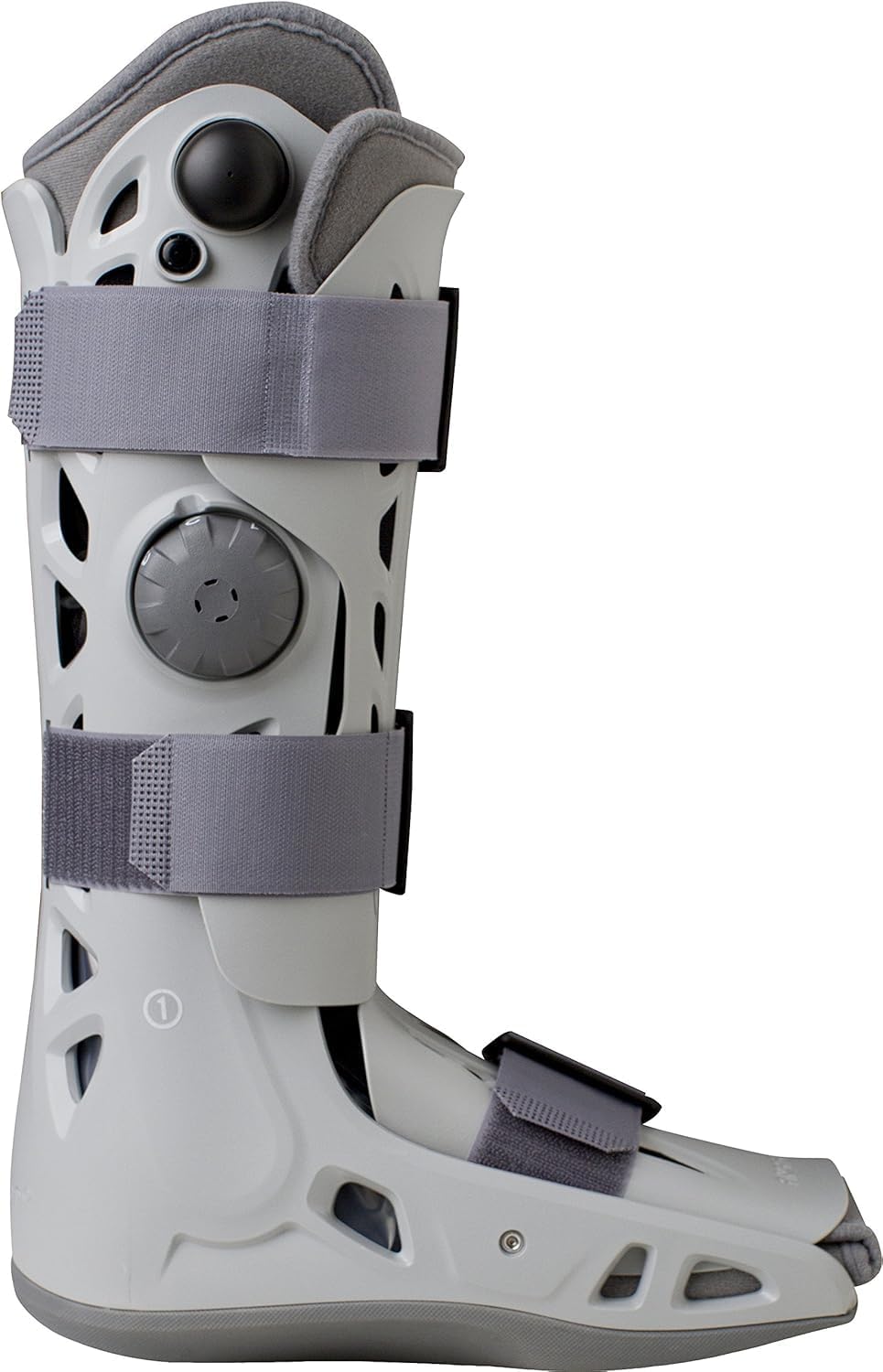
Figure 2: Side view of the Aircast AirSelect Walker Boot, highlighting the inflation pump and release valve. The grey straps are visible across the white frame.

Figure 3: Frontal perspective of the Aircast AirSelect Walker Boot, showing the arrangement of the three grey straps and the central air pump dial.
4. Operating Instructions
Once the boot is applied, adjust the air cells for optimal support and comfort.
4.1 Air Cell Inflation
- Locate Pump: Identify the integrated inflation pump, typically a bulb or dial on the side of the boot.
- Inflate: Press the inflation pump repeatedly until the air cells are firm and provide comfortable compression. Do not over-inflate. The boot should feel supportive, not painful.
- Adjust: You may need to adjust the inflation level throughout the day based on activity and swelling.
4.2 Air Cell Deflation
- Locate Release Valve: Find the air release valve, usually a small button or lever near the inflation pump.
- Deflate: Press and hold the release valve to slowly deflate the air cells. Deflate completely before removing the boot.
4.3 Walking with the Boot
- Gradual Weight Bearing: Follow your healthcare professional's instructions regarding weight-bearing.
- Natural Gait: The rocker sole is designed to promote a natural walking motion. Take small, controlled steps initially.
- Footwear: Consider wearing a shoe with a similar heel height on your unaffected foot to minimize gait discrepancies.
5. Maintenance
Proper maintenance ensures the longevity and hygiene of your Aircast AirSelect Walker Brace/Walking Boot.
- Cleaning the Liner: The soft liner can be hand-washed in cold water with mild soap. Air dry thoroughly before reinserting into the boot. Do not machine wash or tumble dry.
- Cleaning the Shell: Wipe the rigid shell and straps with a damp cloth and mild soap. Do not immerse the boot in water.
- Drying: Ensure all components are completely dry before reassembly and use to prevent skin irritation and bacterial growth.
- Storage: Store the boot in a cool, dry place away from direct sunlight and extreme temperatures when not in use.
6. Troubleshooting
Refer to this section for common issues and their potential solutions.
| Issue | Possible Cause | Solution |
|---|---|---|
| Discomfort or Pain | Boot too tight, over-inflated air cells, improper fit, skin irritation. | Loosen straps, deflate air cells slightly, re-adjust boot position, check skin for redness. Consult a healthcare professional if pain persists. |
| Air Cells Not Inflating | Air release valve open, pump malfunction, air leak. | Ensure release valve is closed. If issue persists, contact your supplier for assistance. |
| Air Cells Deflating Quickly | Air leak in the system or valve. | Check for any visible damage to the air cells or tubing. Ensure the release valve is fully closed. If a leak is suspected, contact your supplier. |
| Boot Feels Loose | Straps not tight enough, air cells under-inflated, swelling has reduced. | Tighten straps, inflate air cells to a comfortable level. Re-evaluate fit if swelling has significantly decreased. |
If you experience persistent issues or concerns not addressed here, please contact your healthcare provider or the product manufacturer for further assistance.
7. Specifications
| Brand | Aircast |
| Model Number | 69610 |
| Style | Elite |
| Size | X-Small |
| Material | Rubber (Note: This refers to the sole material, other parts are composite) |
| Item Weight | 16 ounces (approx. 0.45 kg) |
| Item Dimensions (LxWxH) | 12 x 6 x 2 inches (approximate, for the X-Small size) |
| Specific Uses | Swelling, Foot/Ankle Immobilization |
| Age Range | Adult |
8. Warranty and Support
Aircast products are manufactured to high-quality standards. For specific warranty information, please refer to the documentation included with your purchase or visit the official Aircast website.
For product support, technical assistance, or to inquire about replacement parts, please contact your supplier or the manufacturer directly. Keep your purchase receipt and model number (69610) available when contacting support.
Manufacturer: DJO Global
Website: www.djoglobal.com

