
Hatco HBGB-3618
Hatco HBGB-3618 Heated Black Glass Shelf Instruction Manual
Model: HBGB-3618
1. Product Overview
The Hatco HBGB-3618 Heated Black Glass Shelf is a high-quality, built-in unit designed to maintain food at optimal serving temperatures. Its sleek ceramic glass surface provides uniform heat distribution, ensuring food safety and quality. This model is ideal for commercial food service environments requiring reliable and efficient food holding solutions.
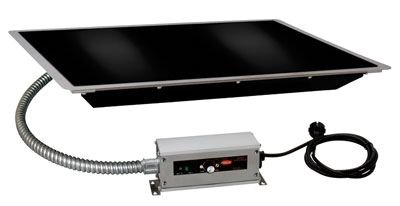
Figure 1: Hatco HBGB-3618 Heated Black Glass Shelf. This image shows the black ceramic glass heating surface, the integrated control box with a thermostatic dial and rocker switch, and the power cord. The unit is designed for built-in installation.
2. Setup and Installation
The HBGB-3618 is a built-in unit and requires professional installation to ensure proper functionality and safety. Adhere to all local electrical and building codes.
2.1 Site Preparation
- Ensure the installation area is clean, dry, and level.
- Verify that the counter or surface where the unit will be installed can support its weight and dimensions (19.63 x 37.63 x 2.16 inches; 40 Pounds).
- Provide adequate ventilation around the unit as specified by installation diagrams (not provided here, refer to official Hatco installation guide).
2.2 Electrical Connection
- The unit operates with a thermostatic control. Ensure the electrical supply matches the unit's requirements (refer to product label for specific voltage/amperage).
- A dedicated circuit is recommended for optimal performance and safety.
- All electrical connections must be performed by a qualified electrician.
3. Operating Instructions
Follow these steps for safe and effective operation of your heated glass shelf.
3.1 Powering On/Off
- To turn the unit ON, locate the lighted rocker switch on the control box and press it to the 'ON' position. The light will illuminate.
- To turn the unit OFF, press the rocker switch to the 'OFF' position. The light will extinguish.
3.2 Temperature Control
- The unit features a thermostatic control with a temperature range of 100°F to 200°F (38°C to 93°C).
- Rotate the temperature dial on the control box to set the desired holding temperature.
- Allow approximately 15-20 minutes for the glass surface to reach the set temperature before placing food items.
3.3 Food Placement
- Place food items directly on the ceramic glass surface or in appropriate food pans.
- Ensure food is already at the desired serving temperature before placing it on the shelf for holding. This unit is designed for holding, not cooking or reheating.
- Avoid overcrowding the surface to allow for even heat distribution.
WARNING: The glass surface will be hot during operation. Use caution and avoid direct contact with bare skin.
4. Maintenance and Cleaning
Regular cleaning and maintenance will extend the life and performance of your heated glass shelf.
4.1 Daily Cleaning
- Ensure the unit is turned OFF and unplugged (if applicable) and has completely cooled down before cleaning.
- Wipe the ceramic glass surface with a soft cloth or sponge dampened with mild soap and water.
- For stubborn food residue, use a non-abrasive cleaner specifically designed for ceramic glass surfaces.
- Rinse with a clean, damp cloth and dry thoroughly to prevent water spots.
- Do not use abrasive pads, harsh chemicals, or sharp objects on the glass surface.
4.2 General Care
- Regularly inspect the power cord and control box for any signs of damage.
- Keep the area around the control box clean and free of debris.
- Do not immerse the unit or its electrical components in water.
5. Troubleshooting
This section provides solutions to common issues you might encounter.
| Problem | Possible Cause | Solution |
|---|---|---|
| Unit does not heat |
|
|
| Uneven heating |
|
|
If the problem persists after attempting the suggested solutions, do not attempt to repair the unit yourself. Contact Hatco customer service or an authorized service technician.
6. Specifications
| Brand | Hatco |
| Model | HBGB-3618 |
| Product Dimensions | 19.63 x 37.63 x 2.16 inches (L x W x H) |
| Weight | 40 Pounds |
| Surface Material | Ceramic Glass |
| Temperature Control | Thermostatic, 100°F - 200°F (38°C - 93°C) |
| Installation Type | Built-in |
| ASIN | B00Z2C2KJK |
7. Warranty and Support
Specific warranty details for the Hatco HBGB-3618 Heated Black Glass Shelf are not provided in this manual. Please refer to the original purchase documentation or contact Hatco directly for comprehensive warranty information.
For technical support, service, or to locate authorized service centers, please visit the official Hatco website or contact their customer service department. Always provide your model number (HBGB-3618) and serial number (if applicable) when seeking support.
Hatco Contact Information: (Please refer to Hatco's official website for the most current contact details.)
- Website: www.hatcocorp.com
- Customer Service: (Refer to website for phone numbers and email)
Related documentsHBGB-3618


Ask a question about this manual
Ask about setup, troubleshooting, compatibility, parts, safety, or missing instructions. Manuals+ will review the question and use this page’s manual context to help answer it.