
Introduction
This manual provides detailed instructions for the installation, operation, and maintenance of your XTREME DIGITAL LIFESTYLE ACCESSORIES Monster 16.4 ft Smart Indoor and Outdoor Multi-Color Neon LED Light Strip (Model: MLB7-1033-RGB). Please read this manual thoroughly before use to ensure proper functionality and safety.
Safety Information
- Ensure the power supply is disconnected before installation or maintenance.
- Do not cut or modify the LED strip unless explicitly instructed. Unauthorized modifications can damage the product and void the warranty.
- Avoid exposing the power adapter and controller to water or extreme weather conditions, as they are not water-resistant. Only the LED strip itself is water-resistant.
- Keep the product away from heat sources, open flames, and corrosive substances.
- Do not stare directly into the LED lights for extended periods, as this may cause eye strain.
- Ensure the installation surface is clean, dry, and smooth for optimal adhesion if using adhesive mounting.
Package Contents
Verify that all items are present in the package:
- 1 x Monster 16.4 ft (5m) Neon LED Light Strip
- 1 x Power Adapter
- Mounting Clips (if included)
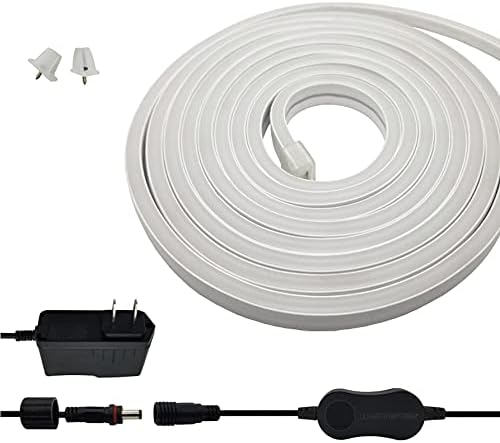
Image: The coiled LED light strip, power adapter, and small white mounting clips are shown, illustrating the typical contents of the product package.
Setup
1. Physical Installation
- Plan Placement: Determine the desired location for your LED strip. The 16.4 ft (5m) length is suitable for various indoor and outdoor applications.
- Clean Surface: Ensure the installation surface is clean, dry, and free of dust or grease.
- Mounting: Use the provided mounting clips to secure the LED strip. The bendable design allows for flexible shaping around corners or objects.
- Outdoor Use: The LED strip is water-resistant, making it suitable for outdoor use. However, ensure the power adapter and controller are protected from direct exposure to water.

Image: The LED strip is shown in a flexible, bent configuration, highlighting its adaptability for various installation shapes.

Image: Water splashes around the LED strip, visually confirming its water-resistant properties for outdoor or damp environments.
2. Power Connection
- Connect the LED strip to the controller.
- Connect the power adapter to the controller.
- Plug the power adapter into a standard electrical outlet. The LED strip should illuminate.
3. App Installation
Download the Monster Smart App on your mobile or tablet device. The app is available on both iOS and Android app stores.
4. Device Pairing
- Open the Monster Smart App and create an account or log in.
- Ensure your mobile device is connected to a 2.4 GHz Wi-Fi network.
- Follow the in-app instructions to add a new device. The app will guide you through the pairing process, which typically involves putting the LED strip into pairing mode (often indicated by a flashing light).
- Once successfully paired, you can control the LED strip via the app.

Image: This image demonstrates the versatility of the LED strip for both indoor and outdoor use, alongside the mobile app interface for controlling the lighting.
Operating Instructions
1. App Control
The Monster Smart App provides comprehensive control over your LED strip:
- Color Selection: Choose from a wide spectrum of colors, including various shades of white (cool, soft, warm).
- Brightness Adjustment: Adjust the light intensity to your preference.
- Scenes and Effects: Select pre-set lighting scenes or customize your own dynamic effects.
- Scheduling: Set timers and schedules for the lights to turn on/off automatically.

Image: The Monster Smart App's color selector is shown on a phone screen, demonstrating how users can choose from multiple colors and white tones for their LED strip lights in various settings.
2. Voice Control
The LED strip is compatible with popular voice assistants:
- Google Assistant: Integrate with Google Home devices. Example command: "Hey Google, turn my lights on at 6 PM."
- Amazon Alexa: Integrate with Amazon Echo devices.
- Siri: Control via Siri Shortcuts on Apple devices.

Image: A user interacts with a voice assistant on their phone, demonstrating the convenience of controlling the LED lights with voice commands.
Maintenance
- Cleaning: Gently wipe the LED strip with a soft, damp cloth to remove dust or dirt. Do not use harsh chemicals or abrasive cleaners.
- Water Resistance: While the strip is water-resistant, avoid submerging it in water. Ensure the power connections and controller remain dry.
- Storage: If storing the light strip, coil it loosely and keep it in a dry, cool place away from direct sunlight.
Troubleshooting
| Problem | Possible Cause | Solution |
|---|---|---|
| Light strip does not turn on. | No power, loose connection, faulty adapter. | Check power outlet, ensure all connections are secure, try a different outlet. |
| Cannot connect to Wi-Fi/App. | Incorrect Wi-Fi band (not 2.4 GHz), incorrect password, device not in pairing mode, Wi-Fi signal too weak. | Ensure your router is broadcasting a 2.4 GHz network. Verify Wi-Fi password. Reset the light strip to enter pairing mode (refer to app instructions). Move closer to the router. |
| Lights flicker or display incorrect colors. | Loose connection, power fluctuation, damaged strip section. | Check all connections. Try plugging into a different power source. If a section is damaged, contact support. |
| Voice control not working. | Incorrect setup with voice assistant, device not linked, internet connectivity issues. | Ensure the Monster Smart App is correctly linked to your voice assistant (Alexa/Google Home). Check internet connection. Verify device name in the app. |
Specifications
- Model Number: MLB7-1033-RGB
- Length: 16.4 ft (5 meters)
- Color: Multi-Color (RGB)
- Indoor/Outdoor Usage: Yes (LED strip is water-resistant)
- Light Source Type: LED
- Power Source: Corded Electric
- Controller Type: App Control
- Control Method: App, Voice (Alexa, Google Assistant, Siri)
- Connectivity: Wi-Fi (2.4 GHz)
- Wattage: 7 watts
- Number of Light Sources: 150
- Material: Metal (likely referring to internal components/housing)
- Product Dimensions: 9 x 7.5 x 3.25 inches (packaging)
- Item Weight: 1.63 pounds
- UPC: 805106892142
Warranty and Support
For warranty information or technical support, please refer to the product packaging or contact XTREME DIGITAL LIFESTYLE ACCESSORIES customer service directly. Keep your purchase receipt for warranty claims.