
1. Introduction
Thank you for choosing the Physionics Multi-Station Strength and Fitness Station, Model FNST02. This manual provides essential information for the safe assembly, operation, and maintenance of your new fitness equipment. Please read this manual thoroughly before assembly and use, and keep it for future reference.
This multi-functional station is designed to provide a comprehensive full-body workout, targeting your back, arms, legs, and core. It integrates a pull-up bar, dip station, leg raise attachment, and a foldable weight bench with a height-adjustable dumbbell rack.
2. Safety Information
Before starting any exercise program, consult with your physician. It is crucial to understand and follow all safety warnings and instructions to prevent injury.
- Always inspect the equipment for loose parts, wear, or damage before each use. Do not use if damaged.
- Ensure all bolts and nuts are securely tightened before and during use.
- Place the station on a flat, stable surface. Use a protective mat underneath to prevent floor damage and increase stability.
- Maintain a clear area of at least 0.6 meters (2 feet) around the equipment during use.
- The maximum user weight for this equipment is approximately 180 kg (396 lbs). Do not exceed this limit.
- Children and pets should be kept away from the equipment during use.
- Perform exercises slowly and in a controlled manner. Avoid sudden, jerky movements.
- Wear appropriate athletic clothing and footwear.
- If you experience pain, dizziness, or shortness of breath, stop exercising immediately and consult a physician.
- This equipment is intended for home use only.
3. Setup and Assembly
The Physionics Multi-Station Strength and Fitness Station requires self-assembly. It is recommended that two adults assemble the unit.
3.1 Unpacking
- Carefully remove all components from the packaging.
- Lay out all parts on a clean, flat surface.
- Verify that all parts listed in the included assembly manual are present. If any parts are missing or damaged, do not proceed with assembly and contact customer support.
3.2 Assembly Instructions
Refer to the detailed, multilingual assembly manual included in your package for step-by-step instructions, diagrams, and a list of all hardware.
- Begin by assembling the main base frame, ensuring all connections are stable.
- Attach the vertical support beams, securing them firmly to the base.
- Install the pull-up bar at the top of the vertical supports.
- Mount the dip station and leg raise armrests at the desired height, ensuring they are level and secure.
- Assemble the foldable weight bench and attach it to the main frame as per the instructions.
- Install the height-adjustable dumbbell rack.
- Once assembled, double-check all bolts, nuts, and connections to ensure they are tight and secure.
Note: Some users have reported discrepancies between the assembly manual's screw descriptions and the actual hardware. Exercise caution and ensure the correct screws are used for each step. Two wrenches are recommended for assembly.
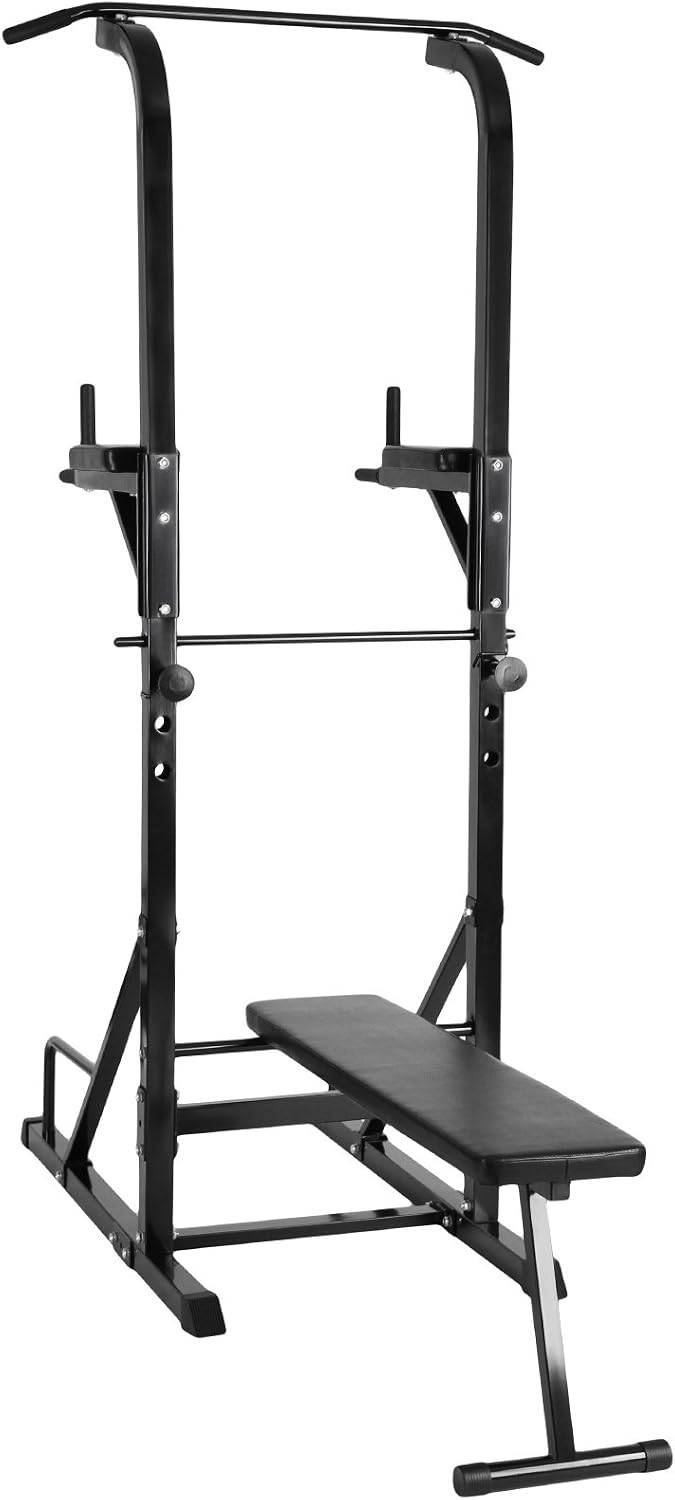
Image: Front view of the assembled Physionics Multi-Station Strength and Fitness Station, showing the pull-up bar, dip handles, and foldable weight bench.

Image: Side view of the assembled Physionics Multi-Station Strength and Fitness Station, highlighting its compact design with the bench.
4. Operating Instructions
The Physionics Multi-Station offers a variety of exercises. Always warm up before exercising and cool down afterwards.
4.1 Pull-ups / Chin-ups
- Grip the pull-up bar with an overhand (pull-up) or underhand (chin-up) grip, hands slightly wider than shoulder-width apart.
- Hang freely, then pull your body upwards until your chin clears the bar.
- Lower yourself slowly and with control.
- Caution: Do not jump to reach the bar. Use the foldable bench as a step if needed to ensure stability and prevent tipping.

Image: A user demonstrating a pull-up exercise on the integrated pull-up bar.

Image: Rear view of a user performing a pull-up, showing the full range of motion.
4.2 Dips
- Grip the dip handles with both hands, supporting your body weight.
- Lower your body by bending your elbows until your shoulders are below your elbows.
- Push back up to the starting position.

Image: A user demonstrating a dip exercise using the integrated dip handles.
4.3 Vertical Knee/Leg Raises
- Position yourself with your forearms resting on the padded armrests and your back against the backrest.
- Keep your legs straight or slightly bent, then raise your knees towards your chest or lift your legs straight up.
- Lower your legs slowly and with control.

Image: A user performing vertical leg raises, engaging core muscles with support from the armrests and backrest.
4.4 Weight Bench and Dumbbell Rack
- The integrated weight bench can be folded up when not in use.
- Use the bench for dumbbell exercises (dumbbells not included).
- The dumbbell rack is height-adjustable (approx. 84-102 cm) to accommodate various exercises and user heights.
- Ensure the dumbbell rack is securely locked at the desired height before placing weights on it.

Image: Close-up view of the height-adjustable dumbbell rack, designed for secure placement of barbells or dumbbells.

Image: Detailed view of the padded dip handles and the comfortable, foldable weight bench.
5. Maintenance
Regular maintenance will ensure the longevity and safe operation of your fitness station.
- Cleaning: Wipe down the equipment with a damp cloth after each use to remove sweat and dust. Do not use abrasive cleaners.
- Inspection: Periodically check all bolts, nuts, and connections for tightness. Tighten any loose fasteners.
- Wear and Tear: Inspect padded areas, grips, and structural components for signs of wear, cracks, or damage. Replace worn or damaged parts immediately.
- Storage: Store the equipment in a dry, cool place away from direct sunlight and extreme temperatures.
6. Troubleshooting
If you encounter any issues with your Physionics Multi-Station, refer to the following common solutions.
| Problem | Possible Cause | Solution |
|---|---|---|
| Equipment feels unstable or wobbly. | Loose bolts/nuts; uneven floor surface. | Ensure all fasteners are tightened. Move the equipment to a flat, stable surface or use leveling shims. |
| Squeaking or creaking noises during use. | Loose connections; friction between metal parts. | Tighten all bolts and nuts. Apply a small amount of silicone-based lubricant to moving joints if necessary. |
| Difficulty adjusting height of dumbbell rack. | Adjustment pin not fully disengaged; obstruction. | Ensure the adjustment pin is fully pulled out before attempting to change height. Check for any debris obstructing the holes. |
If the problem persists or you encounter an issue not listed here, please contact Physionics customer support.
7. Specifications
| Feature | Detail |
|---|---|
| Model Number | FNST02 |
| Dimensions (L/W/H) | Approx. 195 cm / 98 cm / 215 cm (76.8 in / 38.6 in / 84.6 in) |
| Weight | Approx. 36.5 kg (80.5 lbs) |
| Maximum Supported Load | Approx. 180 kg (396 lbs) |
| Height-Adjustable Dumbbell Rack | Approx. 84-102 cm (33.1-40.2 in) |
| Material | Steel, Plastic |
| Textile Composition (Padding) | 100% Polyurethane |
| Color | Black |
8. Warranty and Support
For warranty information and customer support, please refer to the documentation included with your purchase or visit the official Physionics website.
If you require assistance with assembly, parts, or operation, please contact Physionics customer service.