
1. Introduction
The Benro Mach3 2 Series Carbon Fiber Tripod (TMA28C) is designed to provide stable and versatile support for your camera equipment. This manual provides essential information for the proper setup, operation, and maintenance of your tripod.
2. Key Features
- Lightweight and Durable: Constructed from 9X carbon fiber, weighing 3.4 lbs with a load capacity of up to 30.9 lbs.
- Adjustable Height: Extends from a minimum height of 12.2 inches up to 61.2 inches.
- 4-Section Legs: Features twist locks for secure and independent leg angle adjustments.
- Interchangeable Feet: Equipped with screw-in rubber feet and stainless steel spiked feet for stability on various terrains.
- Monopod Conversion: A removable leg can be combined with the center column to create a full-size monopod.
- Universal Compatibility: Includes a 3/8"-16 thread on top for attaching compatible tripod heads.
3. Setup
3.1 Unfolding the Tripod
- Grasp the tripod legs and gently pull them outwards until they lock into one of the preset angle positions.
- To adjust the leg angle, press the leg angle adjustment lock and move the leg to the desired position.
3.2 Extending the Legs
- Twist the leg lock counter-clockwise to unlock a leg section.
- Extend the leg section to the desired length.
- Twist the leg lock clockwise to securely fasten the leg section. Repeat for all sections and legs.

Image: Benro Mach3 2 Series Carbon Fiber Tripod with legs spread, ready for use.
3.3 Extending the Center Column
- Loosen the center column locking knob located at the top of the tripod spider.
- Raise the center column to the desired height.
- Tighten the center column locking knob to secure it in place.

Image: Benro Mach3 2 Series Carbon Fiber Tripod with center column fully extended.
3.4 Attaching a Tripod Head
The tripod features a 3/8"-16 threaded screw on the top plate of the center column. Align your compatible tripod head with this screw and rotate clockwise until securely fastened.
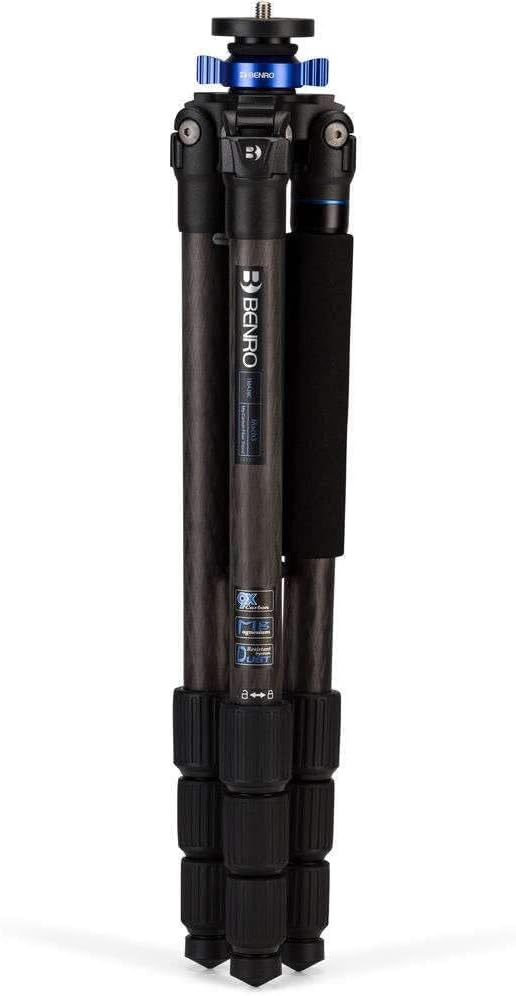
Image: Close-up view of the Benro Mach3 tripod head plate with 3/8-16 inch screw, showing the blue Mach3 collar.
3.5 Monopod Conversion
- Identify the leg with the foam grip. This leg is removable.
- Unscrew this leg from the tripod spider by rotating it counter-clockwise.
- Remove the center column from the tripod by loosening its locking knob and pulling it out.
- Attach the removed leg to the bottom of the center column by screwing it clockwise until secure. This forms a monopod.
4. Operating Instructions
4.1 Securing Your Camera
Ensure your camera is securely mounted to the tripod head according to the head's specific instructions. Always double-check that all connections are tight before leaving your camera unattended.
4.2 Adjusting for Stability
For maximum stability, extend the thickest leg sections first. On uneven terrain, adjust each leg independently to ensure the tripod head is level. Utilize the interchangeable spiked feet for better grip on soft ground.
4.3 Using the Monopod
When converted to a monopod, hold the foam grip for comfortable handling. Extend the sections as needed using the twist locks. The monopod provides quick support for situations where a full tripod is impractical.
5. Maintenance
- Cleaning: Wipe down the tripod with a soft, damp cloth after each use, especially if used in dusty, sandy, or wet conditions. Avoid harsh chemicals.
- Lubrication: Periodically check leg locks and joints for smooth operation. If necessary, apply a small amount of silicone-based lubricant to the threads of the twist locks.
- Storage: Store the tripod in its carrying case in a dry, cool place to prevent damage and prolong its lifespan.
- Inspection: Regularly inspect all parts for wear and tear, loose screws, or damage. Address any issues promptly to maintain optimal performance and safety.
6. Troubleshooting
6.1 Tripod Instability
- Ensure all leg sections are fully extended and their twist locks are securely tightened.
- Verify that the leg angle adjustment locks are engaged.
- Check that the center column locking knob is tight.
- For heavy loads, consider hanging a weight from the center column hook (if available) for added stability.
6.2 Sticky Leg Locks
- Clean any dirt or debris from the leg lock threads.
- Apply a small amount of silicone lubricant to the threads.
7. Specifications
| Feature | Detail |
|---|---|
| Model Name | TMA28C |
| Brand | Benro |
| Material | Carbon Fiber |
| Item Weight | 3.4 pounds |
| Weight Limit | 30.9 pounds |
| Maximum Height | 61.22 inches |
| Product Dimensions | 20.9 x 4.9 x 53.15 inches |
| Compatible Devices | Camera |
| Special Feature | Adjustable, Compact, Lightweight |
8. Warranty and Support
The Benro Mach3 2 Series Carbon Fiber Tripod (TMA28C) comes with a Limited 3-Year Warranty. This warranty can be extended to 5-Years with online registration. For warranty claims, technical support, or further assistance, please visit the official Benro website or contact their customer service department.
For more information, visit the Benro Store on Amazon.


