
Introduction
This manual provides essential information for the proper use and maintenance of your Aircast Replacement Hand Bulb Air Pump. This pump is designed to facilitate the inflation and deflation of air cells within compatible Aircast braces, supports, and walking boots, ensuring a secure and comfortable fit.
Product Overview
The Aircast Hand Bulb Air Pump is a compact, ergonomic device used to adjust the air pressure in your Aircast support. It features clear indicators for 'Inflate' and 'Deflate' functions, making it intuitive to operate.

Image: The Aircast Replacement Hand Bulb Air Pump, blue in color, with 'Inflate' and 'Deflate' arrows clearly marked.
Compatibility
The Aircast Replacement Hand Bulb Air Pump is compatible with the following Aircast products:
- Aircast StabilAir
- Aircast AirLift
- Aircast Walker Brace / Walking Boot (FP, SP, and XP models)
Setup
No extensive setup is required for the Aircast Hand Bulb Air Pump. Ensure the pump is clean and free of debris before connecting it to your Aircast brace or boot. The pump is designed for immediate use upon receipt.
Operating Instructions
Inflating Air Cells
- Locate the inflation port on your Aircast brace or boot.
- Insert the appropriate end of the hand bulb pump into the inflation port. The 'Inflate' arrow on the pump should point towards the brace.
- Squeeze the bulb repeatedly to pump air into the air cells until the desired level of support and comfort is achieved. Do not over-inflate.
- Remove the pump from the port once inflation is complete.

Image: A person demonstrating how to inflate an Aircast walking boot by inserting the pump into the boot's inflation port and squeezing the bulb.
Deflating Air Cells
- Locate the deflation port on your Aircast brace or boot. This may be the same port used for inflation.
- Insert the appropriate end of the hand bulb pump into the deflation port. The 'Deflate' arrow on the pump should point towards the brace.
- Press and hold the bulb to release air from the air cells. You may need to gently squeeze the air cells of the brace to assist deflation.
- Remove the pump from the port once deflation is complete.
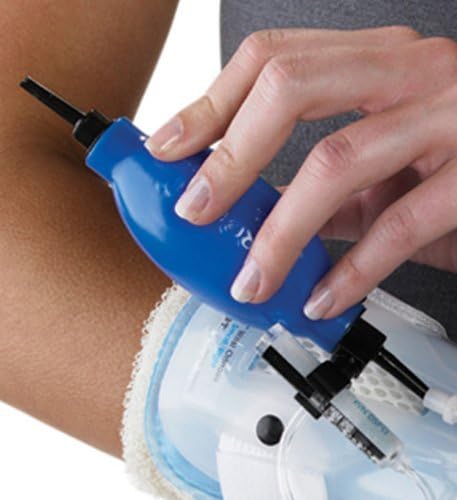
Image: A person demonstrating how to deflate an Aircast arm brace by inserting the pump and pressing the bulb to release air.
Maintenance
To ensure the longevity and proper function of your Aircast Hand Bulb Air Pump:
- Cleaning: Wipe the pump with a damp cloth as needed. Do not submerge in water or use harsh chemical cleaners.
- Storage: Store the pump in a cool, dry place away from direct sunlight and extreme temperatures.
- Inspection: Periodically inspect the pump for any signs of wear, cracks, or damage to the bulb or connectors.
Troubleshooting
If you encounter issues with your Aircast Hand Bulb Air Pump, consider the following:
- Pump not inflating/deflating: Ensure the pump is securely inserted into the brace's port. Check for any blockages in the port or the pump's nozzle.
- Air leakage: Verify that the connection between the pump and the brace is tight. Inspect the pump and the brace's air cells for any punctures or damage.
- Difficulty squeezing: The pump is designed for easy use. If it feels unusually stiff, check for any obstructions or damage to the bulb.
Specifications
| Attribute | Detail |
|---|---|
| Model Number | AC141PA04 |
| Product Dimensions | 6 x 3 x 1 inches |
| Item Weight | 0.32 ounces (9.07 g) |
| Color | Blue |
| Manufacturer | DJO Global |
| Country of Origin | China |
| Date First Available | November 18, 2011 |

Image: A diagram illustrating the dimensions of the Aircast Hand Bulb Air Pump, showing a length of 6.6 inches (16 cm).
Warranty and Support
For information regarding warranty coverage or to obtain support for your Aircast Replacement Hand Bulb Air Pump, please refer to the official Aircast website or contact DJO Global customer service directly. Keep your purchase receipt as proof of purchase.
Legal Disclaimer: Statements regarding dietary supplements have not been evaluated by the FDA and are not intended to diagnose, treat, cure, or prevent any disease or health condition.