
1. Introduction
This manual provides essential information for the safe and effective installation, operation, and maintenance of the Square D PowerPact HJA36100 I-Line Circuit Breaker. Please read this manual thoroughly before attempting any procedures involving the circuit breaker. Retain this manual for future reference.
2. Safety Information
WARNING: Electrical shock hazard. Only qualified personnel should install, operate, and service this equipment. Failure to follow these instructions can result in death or serious injury.
- Always disconnect power before working on or near the circuit breaker.
- Use appropriate personal protective equipment (PPE).
- Ensure all local and national electrical codes are followed.
- Do not operate the circuit breaker if it appears damaged.
3. Product Overview
The Square D PowerPact HJA36100 is a 3-pole, 100 Amp, 600 Volt AC molded case circuit breaker designed for I-Line panelboard applications. It provides overcurrent protection for electrical systems. The model number is HJA36100, and the SKU reference is B282992.
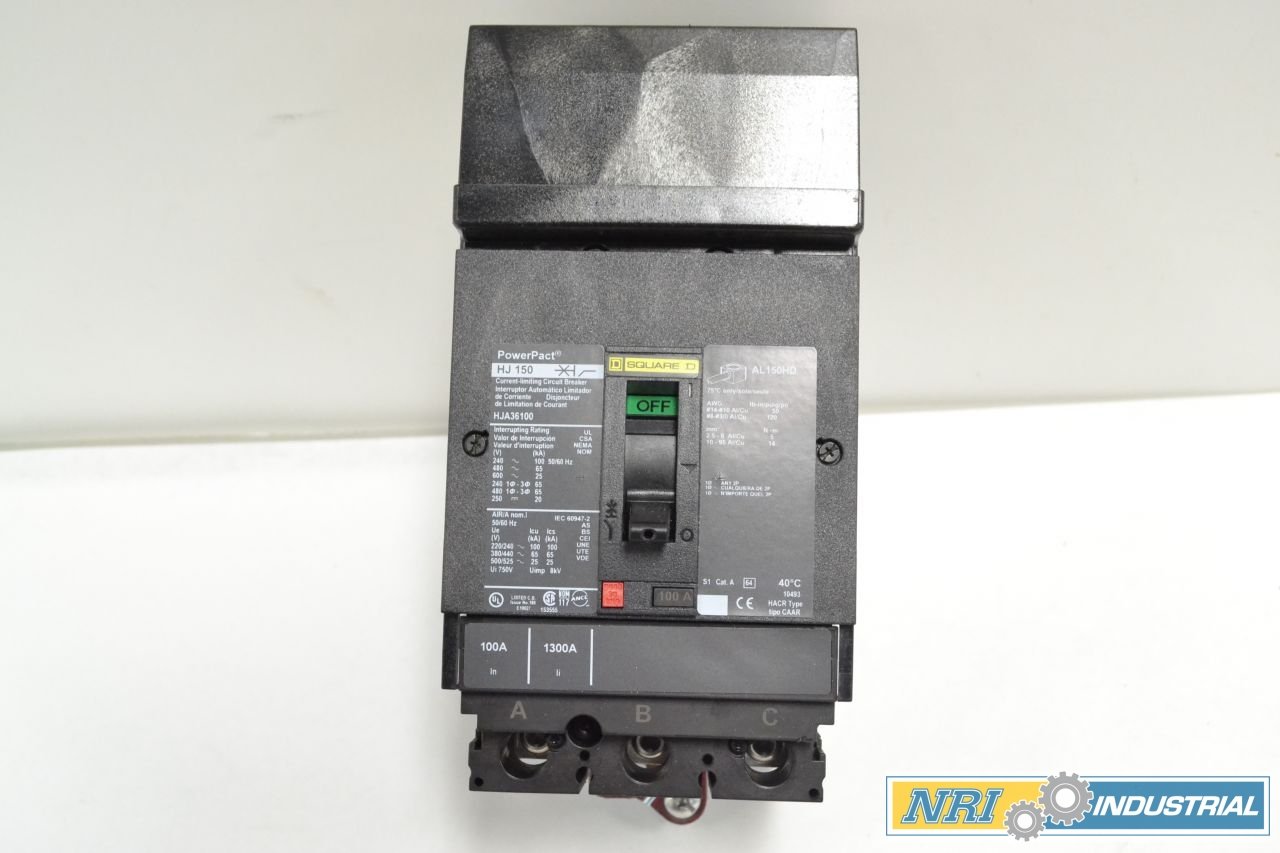
Figure 3.1: Front view of the HJA36100 circuit breaker, showing the operating handle and 'OFF' indicator.

Figure 3.2: Side view illustrating the robust construction and terminal connections of the circuit breaker.

Figure 3.3: Rear view detailing the I-Line mounting interface for secure panelboard integration.

Figure 3.4: Top view displaying the three distinct poles (A, B, C) and their respective connection points.
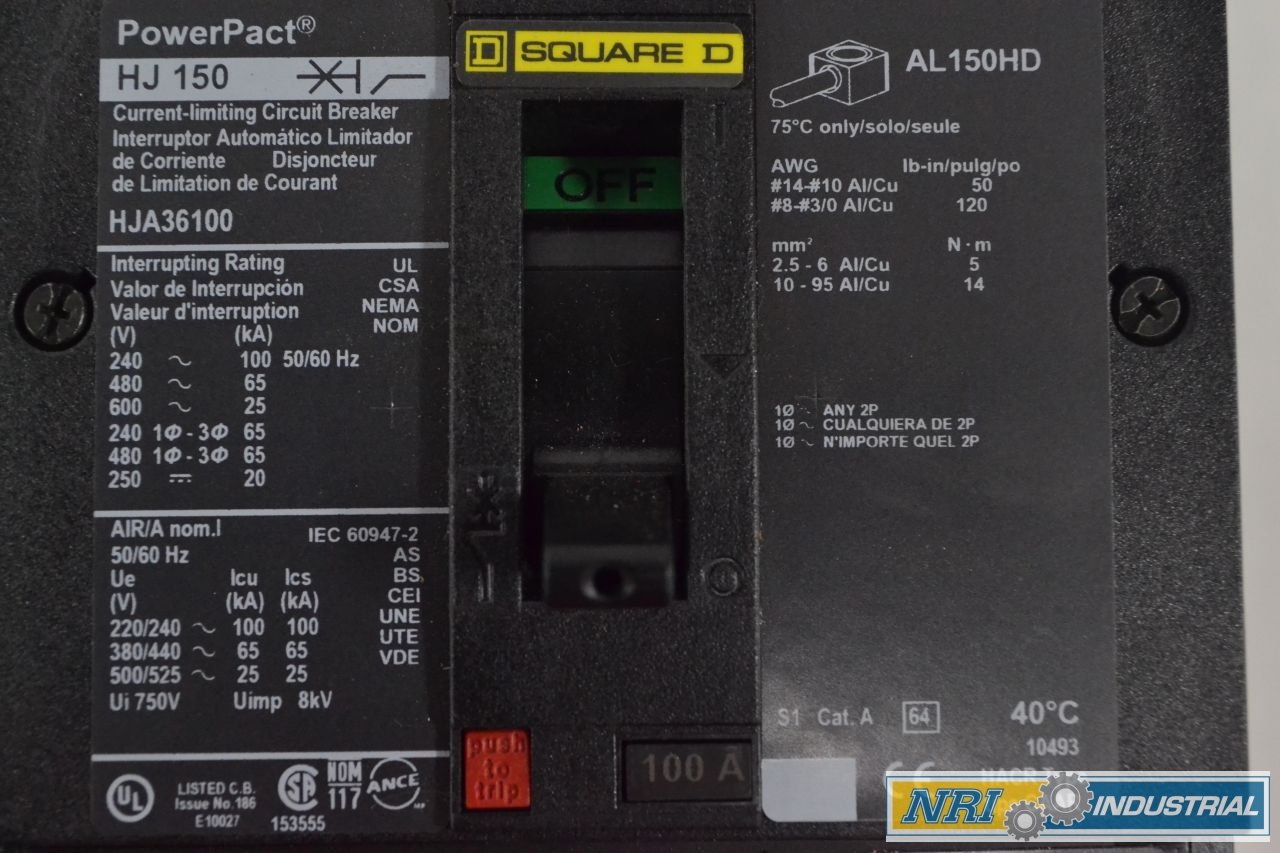
Figure 3.5: Detailed view of the product label, indicating interrupting ratings, voltage, and current specifications.

Figure 3.6: Barcode label with product identification details, including model and SKU B282992.
4. Setup and Installation
The PowerPact HJA36100 circuit breaker is designed for Panel Mount installation. Proper installation is critical for safety and performance.
4.1 Pre-Installation Checks
- Verify that the circuit breaker ratings (voltage, amperage, poles) match the application requirements.
- Inspect the circuit breaker for any signs of physical damage.
- Ensure the panelboard is de-energized and locked out/tagged out before beginning installation.
4.2 Mounting
- Align the circuit breaker with the appropriate I-Line mounting slots in the panelboard.
- Securely fasten the circuit breaker into place according to Square D's specific I-Line mounting procedures. Refer to the panelboard's instruction manual for detailed mounting steps.
4.3 Wiring
- Connect the load conductors to the appropriate terminals (A, B, C) on the circuit breaker.
- Ensure all connections are tight and secure to prevent overheating and arcing. Recommended torque values for terminals should be followed as per product specifications or label (e.g., #14-#10 Al/Cu: 50 lb-in; #8-#3/0 Al/Cu: 120 lb-in).
- Double-check all wiring for correctness and compliance with electrical codes.
5. Operating Instructions
The PowerPact HJA36100 circuit breaker features a simple ON/OFF operating handle.
- To Turn ON: Push the handle firmly to the 'ON' position.
- To Turn OFF: Push the handle firmly to the 'OFF' position.
- Tripped Condition: If an overcurrent condition occurs, the circuit breaker will automatically trip to the center position. To reset a tripped breaker, first move the handle fully to the 'OFF' position, then move it to the 'ON' position.
6. Maintenance
Regular maintenance helps ensure the longevity and reliable operation of your circuit breaker. All maintenance should be performed by qualified personnel with power disconnected.
- Periodic Inspection: Visually inspect the circuit breaker for any signs of damage, discoloration, or loose connections.
- Cleaning: Keep the circuit breaker free from dust, dirt, and moisture. Use a dry, lint-free cloth for cleaning. Do not use solvents or abrasive cleaners.
- Connection Checks: Periodically check terminal connections for tightness. Retorque if necessary, following specified torque values.
7. Troubleshooting
If the circuit breaker trips frequently or fails to operate correctly, consider the following:
- Frequent Tripping: This often indicates an overload or short circuit in the protected circuit. Investigate the connected load for faults or excessive current draw.
- Failure to Reset: If the breaker does not reset after moving the handle to 'OFF' then 'ON', there might be a persistent fault or internal damage to the breaker. Do not force the handle.
- Overheating: Discoloration or a burning smell around the breaker may indicate loose connections or an internal fault. Immediately de-energize the circuit and have it inspected by a qualified electrician.
If troubleshooting steps do not resolve the issue, contact a qualified electrician or Square D technical support.
8. Specifications
| Feature | Specification |
|---|---|
| Brand | Square D |
| Model Number | HJA36100 |
| Type | Molded Case, I-Line |
| Poles | 3 P |
| Amperage | 100 A |
| Voltage | 600 V-AC |
| Current Rating | 100 Amps |
| Circuit Breaker Type | Standard |
| Mounting Type | Panel Mount |
| Product Dimensions | 14 x 10 x 8 inches |
| Weight | 6 Pounds |
| SKU Reference | B282992 |
9. Warranty Information
For specific warranty details regarding the Square D PowerPact HJA36100 circuit breaker, please refer to the official Square D warranty documentation provided at the time of purchase or visit the official Square D website. Warranty terms typically cover manufacturing defects under normal use conditions.
10. Support and Contact
If you require technical assistance, have questions about installation, or need to report an issue, please contact Square D customer support. Contact information can typically be found on the official Square D website or on the product packaging.
For general inquiries or to find a local distributor, visit the Schneider Electric (Square D) official website.


