
URPOWER OD-101
URPOWER Essential Oil Diffuser User Manual
Model: OD-101
Brand: URPOWER
Introduction
The URPOWER 2nd Version Essential Oil Diffuser is an upgraded ultrasonic aroma diffuser designed to enhance your home or office environment. It features adjustable mist modes, waterless auto shut-off for safety, and 7 color LED lights to create a soothing ambiance. This manual provides detailed instructions for setup, operation, and maintenance to ensure optimal performance and longevity of your device.
Product Features
- Enhanced Mist Output: The 2nd generation model produces more mist compared to previous versions, effectively adding moisture and fragrance to small bedrooms, hotel rooms, tabletops, and workplace cubicles.
- Ultrasonic Technology: Utilizes ultrasonic technology to diffuse essential oils without heating, preserving the therapeutic properties of the oils. Safe for use with 100% pure essential oils.
- Adjustable Mist Settings: Offers two mist settings: continuous and intermittent (30 seconds on, 30 seconds off), allowing you to control the intensity and duration of diffusion.
- Waterless Auto Shut-Off: Automatically turns off when the water level is low or runs out, protecting the device and ensuring safety.
- 7 Color LED Lights: Features 7 color-changing LED lights that can cycle automatically or be set to a single preferred color. Can also function as a nightlight.
- Whisper-Quiet Operation: Designed for quiet operation, ensuring it does not interfere with sleep or work.
Package Contents

Image: Package contents showing the diffuser, user manual, charger adapter, and carton.
- 1x URPOWER Essential Oil Diffuser (Model: OD-101)
- 1x Charger Adapter
- 1x User Manual
Specifications
| Brand | URPOWER |
| Model Name | 2nd Version Essential Oil Diffuser |
| Capacity | 100 Milliliters |
| Material | PP Hard plastic |
| Working Time | Up to 6 hours (continuous mode) |
| Auto Shutoff | Yes (when water runs out) |
| Light Source Type | LED (7 colors) |
| Product Dimensions | 3.1"L x 3.1"W x 5.5"H |
| Item Weight | 4.9 ounces |

Image: Product dimensions and button labels for Mist and Light functions.
Setup and Installation
- Unpack: Carefully remove the URPOWER Essential Oil Diffuser and all accessories from its packaging.
- Placement: Place the diffuser on a flat, stable surface away from direct sunlight, heat sources, and electronic devices.
- Open Lid: Gently lift the top cover of the diffuser. The 2nd version features an upgraded design without buckles for easier opening.

Image: Comparison of old and new diffuser lid designs, showing the new version is easier to open.
- Add Water: Fill the water tank with clean tap water up to the maximum water line (100ml). Do not exceed the MAX line, as this may prevent mist production.
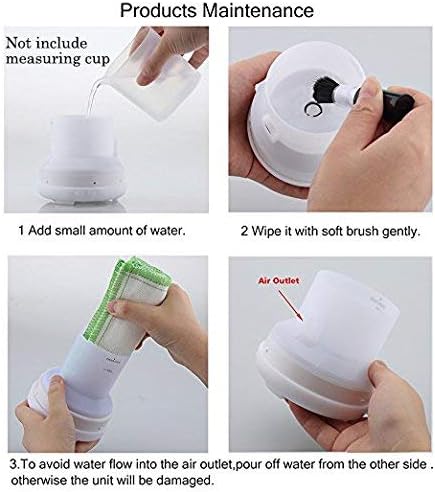
Image: Step 1 of maintenance, showing adding a small amount of water to the diffuser.
- Add Essential Oil: Add 2-3 drops of your favorite 100% pure essential oil directly into the water tank. Adjust the number of drops based on desired fragrance intensity. Avoid essential oils with corrosivity.
- Close Lid: Replace the top cover securely.
- Connect Power: Plug the power adapter into the diffuser's power input, then plug the adapter into a standard electrical outlet. Ensure the outlet voltage does not exceed the maximum voltage specified for the device.
Operation
The diffuser features two control buttons: MIST and LIGHT.
Mist Control:
- Press the MIST button once to turn on the diffuser in continuous mist mode. The indicator light will be red. In this mode, the diffuser will run for approximately 3 hours.
- Press the MIST button a second time to switch to intermittent mist mode (30 seconds on, 30 seconds off). The indicator light will be green. In this mode, the diffuser can run for up to 6 hours.
- Press the MIST button a third time to turn off the mist function.

Image: Mist settings indicated by red (continuous) and green (intermittent) lights.
Light Control:
- Press the LIGHT button once to turn on the LED lights. The lights will automatically cycle through 7 colors.
- Press the LIGHT button again to pause the color cycle and set the light to its current color.
- Continue pressing the LIGHT button to cycle through the individual colors.
- Press and hold the LIGHT button for 2 seconds to turn off the lights.

Image: The diffuser showcasing its 7 LED mood light options.

Image: The URPOWER diffuser with its light on, highlighting the control buttons.
Maintenance
Regular cleaning of your diffuser is essential to ensure optimal performance and extend its lifespan. It is recommended to clean the diffuser after every 5-6 uses or every 3-5 days, especially when changing essential oils.
- Disconnect Power: Always unplug the diffuser from the power outlet before cleaning.
- Empty Water: Remove the top cover and carefully pour out any remaining water from the water tank. Ensure water is poured from the side opposite the air outlet to avoid damaging internal components.
Image: Steps for cleaning the diffuser, including pouring out water and wiping with a soft brush.
- Wipe Clean: Use a soft cloth or cotton swab to wipe the inside of the water tank and the ultrasonic vibration plate. For stubborn residue, add a small amount of white vinegar (about 1 teaspoon) to the tank, let it sit for 5-10 minutes, then drain and wipe clean.
- Dry Thoroughly: Allow all parts to air dry completely before reassembling or storing the diffuser.
Important Note: Do not use corrosive cleaners or harsh chemicals, as they can damage the diffuser. Do not immerse the base unit in water.
Troubleshooting
| Problem | Possible Cause | Solution |
|---|---|---|
| No mist or low mist output. |
|
|
| No power. |
|
|
| Weak or no scent. |
|
|
Safety Information and Precautions
- Always place the diffuser on a stable, level surface.
- Do not move the diffuser while it is operating or contains water.
- Do not touch the ultrasonic vibration plate directly with your hands.
- Keep out of reach of children and pets.
- Avoid direct skin contact with undiluted essential oils.
- Ensure proper ventilation during use.
- Only use the original power adapter provided with the device.
- Do not disassemble or attempt to repair the unit yourself. Contact customer support for assistance.
- Do not block the mist outlet.
- Unplug the device when not in use or before cleaning.
Related documentsOD-101


Ask a question about this manual
Ask about setup, troubleshooting, compatibility, parts, safety, or missing instructions. Manuals+ will review the question and use this page’s manual context to help answer it.