
1. Introduction
Thank you for choosing the ttec 2BH01 SoundMatePlay Portable Speaker. This manual provides essential information for setting up, operating, and maintaining your speaker to ensure an optimal audio experience. Please read these instructions carefully before using the product.
2. Package Contents
Please check the box for the following items:
- 1 x ttec 2BH01 SoundMatePlay Portable Wireless Speaker
- 1 x USB Charging Cable
- 1 x User Manual (this document)
3. Product Overview
The ttec 2BH01 SoundMatePlay is a versatile portable speaker designed for an advanced wireless audio experience. It features a functional design with an integrated phone stand, allowing you to enjoy media hands-free while listening to audio. It supports both Bluetooth wireless connectivity and wired audio input via its built-in AUX cable.
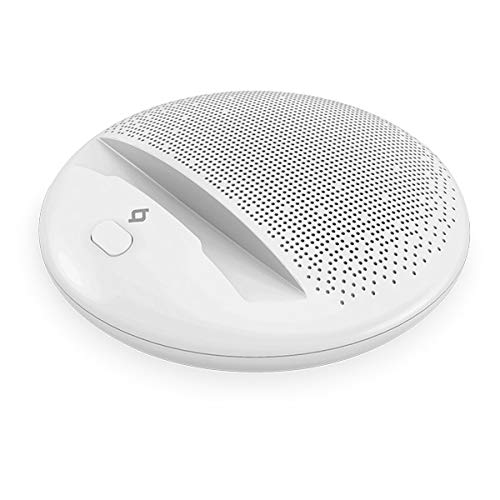
Image: ttec 2BH01 SoundMatePlay Portable Speaker in white, with a black smartphone horizontally placed on its integrated stand. A white AUX cable connects the smartphone to the speaker, illustrating its wired connectivity option. The speaker features a minimalist design with a speaker grille visible at the top and control buttons at the front.
4. Setup
4.1 Initial Charging
Before first use, fully charge your SoundMatePlay speaker. Connect the provided USB charging cable to the speaker's charging port and the other end to a USB power adapter (not included) or a computer's USB port. The charging indicator light will show the charging status and turn off or change color once fully charged. A full charge provides up to 6 hours of battery life, depending on usage and volume level.
4.2 Powering On/Off
- To power on: Press and hold the Power button (usually marked with a power symbol) for a few seconds until you hear an audible prompt or see an indicator light.
- To power off: Press and hold the Power button again for a few seconds until the speaker powers down.
5. Operating Instructions
5.1 Bluetooth Pairing
- Ensure the speaker is powered on and in Bluetooth pairing mode. The Bluetooth indicator light will typically flash.
- On your smartphone or tablet, go to the Bluetooth settings.
- Search for available devices and select "ttec SoundMatePlay" from the list.
- Once paired, the speaker will indicate a successful connection (e.g., a solid indicator light or an audible prompt).
- You can now play audio wirelessly from your device through the speaker.
5.2 AUX (Wired) Connection
The SoundMatePlay speaker includes a built-in AUX audio cable for wired connectivity.
- Locate the integrated AUX cable on the speaker.
- Plug the 3.5mm jack of the AUX cable into the headphone jack or audio output port of your audio device (smartphone, tablet, MP3 player, etc.).
- The speaker will automatically switch to AUX mode or you may need to select it manually if there's a mode button.
- Play audio from your device.
5.3 Using the Phone Stand
The speaker features an integrated stand designed to hold your smartphone or tablet horizontally, providing a convenient viewing angle while enjoying audio or video content.
5.4 Volume Control
Adjust the volume directly from your connected audio device (smartphone, tablet) or using any volume control buttons present on the speaker itself, if applicable.
6. Charging
When the battery is low, the speaker may give an audible warning or an indicator light may flash. Connect the USB charging cable to recharge the speaker. Charging time may vary. Avoid using the speaker while it is charging for optimal battery health, though it is generally safe to do so.
7. Maintenance
- Cleaning: Use a soft, dry cloth to clean the speaker's surface. Do not use abrasive cleaners or solvents.
- Storage: Store the speaker in a cool, dry place away from direct sunlight and extreme temperatures when not in use for extended periods.
- Battery Care: To prolong battery life, avoid fully discharging the speaker frequently. Charge it regularly, even if not in use.
8. Troubleshooting
| Problem | Possible Solution |
|---|---|
| No power | Ensure the speaker is charged. Connect the USB cable and charge for at least 30 minutes. |
| Cannot pair via Bluetooth | Make sure the speaker is in pairing mode. Turn off and on Bluetooth on your device. Move closer to the speaker. |
| No sound | Check volume levels on both the speaker and your connected device. Ensure the correct input mode (Bluetooth/AUX) is selected. |
| Poor sound quality | Move your device closer to the speaker to reduce interference. Ensure the AUX cable is fully inserted if using wired connection. |
9. Specifications
- Model: 2BH01 SoundMatePlay
- Brand: TTEC
- Connectivity Technology: Bluetooth, AUX (Wired)
- Speaker Type: Portable
- Special Features: Bluetooth, Portable, Integrated Phone Stand
- Battery Life: Up to 6 Hours (varies with usage)
- Power Source: Rechargeable Battery (Corded Electric via USB)
- Color: White
10. Safety Information
- Do not expose the speaker to water or excessive moisture.
- Avoid extreme temperatures, direct sunlight, and dusty environments.
- Do not disassemble, repair, or modify the product. This will void the warranty.
- Keep out of reach of children.
- Use only the provided or certified charging cables.
- Listen at moderate volume levels to prevent hearing damage.
11. Warranty and Support
Your ttec 2BH01 SoundMatePlay Portable Speaker is covered by a limited warranty. For detailed warranty terms and conditions, please refer to the warranty card included in your package or visit the official TTEC website. For technical support or customer service, please contact TTEC customer support through their official channels.
Please retain your proof of purchase for warranty claims.


