
1. Product Overview
The Topstar HE200 G20 is an ergonomic office chair designed for comfortable and supportive seating during extended periods. This chair features a mesh backrest, a hollow seat, and various adjustment mechanisms to suit individual user preferences. It is suitable for office environments and recommended for sitting times of 6 to 8 hours.
2. Safety Information
- Ensure all components are securely fastened before use.
- Do not exceed the maximum recommended user weight of 110 kg (242.5 lbs).
- Do not stand on the chair or use it as a step stool.
- Use the chair on a level, stable surface.
- Keep hands and feet clear of moving parts during adjustments.
- This chair is designed for indoor office use on soft floors.
3. Package Contents
The Topstar HE200 G20 office chair is delivered partially disassembled. Please verify that all components are present before beginning assembly.
- Seat assembly
- Backrest assembly
- Gas spring
- Base (star base)
- Double wheels for soft floors (5 pieces)
- Assembly hardware (screws, washers, tools if included)
- Instruction manual (this document)
4. Setup and Assembly
Follow these steps to assemble your Topstar HE200 G20 office chair. It is recommended to assemble the chair on a soft, clean surface to prevent damage.
4.1 Attach Wheels to Base
- Insert each of the five double wheels into the openings at the end of each leg of the star base. Push firmly until they click into place.
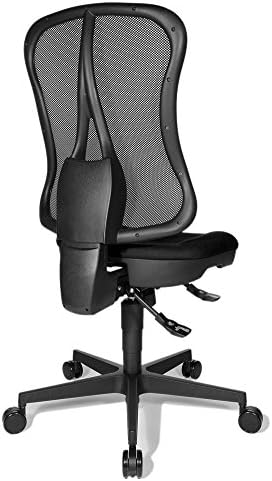
Figure 1: Side view of the assembled Topstar HE200 G20 office chair, showing the base with wheels, seat, and mesh backrest.
4.2 Install Gas Spring
- Place the assembled star base on the floor. Insert the wider end of the gas spring into the central hole of the star base.
4.3 Attach Seat to Gas Spring
- Carefully place the seat assembly onto the narrower end of the gas spring. Apply gentle downward pressure to secure it.
4.4 Attach Backrest
- Align the backrest assembly with the mounting points on the seat mechanism. Secure it using the provided screws and tools. Ensure all screws are tightened firmly but do not overtighten.

Figure 2: Back view of the Topstar HE200 G20 office chair, highlighting the mesh backrest and the backrest adjustment mechanism.
5. Operating and Adjustments
The Topstar HE200 G20 office chair offers several adjustments to optimize your seating comfort.
5.1 Seat Height Adjustment
- To raise the seat: While standing, pull the lever located under the right side of the seat upwards. The seat will rise automatically. Release the lever when the desired height is reached.
- To lower the seat: While seated, pull the lever located under the right side of the seat upwards. The seat will lower. Release the lever when the desired height is reached.
- The seat height can be adjusted between 39.0 cm and 51.0 cm.
5.2 Backrest Tilt Adjustment
- The backrest tilt is adjustable. Locate the lever or knob on the left side under the seat.
- To recline: Pull the lever/knob outwards and lean back. Release the lever/knob to lock the backrest in your preferred position.
- To return to upright position: Lean forward slightly while pulling the lever/knob outwards. The backrest will return to its upright position. Release the lever/knob to lock.
5.3 Recommended Usage
This chair is designed for a recommended sitting time of 6 to 8 hours per day. Take regular breaks to stand and stretch.
6. Maintenance
Proper maintenance will extend the life of your Topstar HE200 G20 office chair.
- Cleaning the Fabric/Mesh: The seat cover is 100% polypropylene. For general cleaning, use a soft cloth dampened with mild soap and water. Do not use harsh chemicals or abrasive cleaners. Allow to air dry completely.
- Cleaning the Plastic Parts: The frame and base are made of plastic. Wipe with a damp cloth and mild detergent.
- Wheel Maintenance: Periodically check the double wheels for accumulated dust, hair, or debris. Clean them as needed to ensure smooth rolling on soft floors.
- Hardware Check: Every few months, check all screws and bolts to ensure they are tight. Retighten if necessary.
7. Troubleshooting
If you encounter any issues with your chair, refer to the following common solutions:
- Chair does not adjust height: Ensure the gas spring is correctly installed and the lever mechanism is not obstructed. If the gas spring is faulty, it may need replacement by a qualified technician.
- Backrest does not lock in place: Check the backrest tilt adjustment lever/knob. Ensure it is fully engaged to lock the backrest.
- Wheels are not rolling smoothly: Inspect the wheels for debris (hair, lint) and clean them thoroughly. Ensure the chair is used on a suitable surface (soft floors).
- Chair feels unstable: Verify that all assembly screws are tightened. Ensure the chair is on a flat, even surface.
8. Specifications
| Feature | Detail |
|---|---|
| Brand | Topstar |
| Model Number | HE200 G20 |
| Product Type Designation | Head Point SY |
| Color | Black |
| Cover Material | 100% Polypropylene |
| Frame/Base Material | Plastic |
| Product Dimensions (D x W x H) | 18.11"D x 19.69"W x 48.43"H (approx. 46cm D x 50cm W x 123-153cm H) |
| Seat Width | 50.0 cm (19.69 inches) |
| Seat Depth | 46.0 cm (18.11 inches) |
| Seat Height Adjustment | 39.0 - 51.0 cm (15.35 - 20.08 inches) |
| Backrest Height | 59.0 cm (23.23 inches) |
| Backrest Features | Mesh backrest, tilt adjustable |
| Recommended Sitting Time | 6 - 8 hours |
| Maximum User Weight | 110.0 kg (242.5 lbs) |
| Maximum User Size | 192.0 cm (6 ft 3.6 inches) |
| Wheels Type | Double wheels for soft floors |
| Assembly Required | Yes |
| Certifications | TÜV tested safety gas spring, GS mark according to EN 1335 1-3 |
| Item Weight | 15.1 kg (33.3 lbs) |
9. Warranty and Support
For warranty information or technical support, please refer to the documentation provided with your purchase or contact Topstar customer service directly. Keep your proof of purchase for warranty claims.
For further assistance, visit the official Topstar website or contact your retailer.


