
1. Introduction
This manual provides detailed instructions for the safe installation, operation, and maintenance of the Dabmar GM650-B-MT Powder Coated Cast Aluminum Architectural Post Top Light Fixture. Please read this manual thoroughly before installation and retain it for future reference.
The Dabmar GM650-B-MT is designed for architectural post top lighting applications, featuring durable cast aluminum construction and a clear, prismatic, polycarbonate lens. It is pre-wired with UL listed wire/cable for ease of installation.
2. Safety Instructions
WARNING: Risk of electric shock. Disconnect power at the fuse or circuit breaker before installation or servicing.
- All electrical connections must be in accordance with local codes, ordinances, or the National Electric Code (NEC).
- Consult a qualified electrician if you are unsure about the installation process.
- Ensure the fixture is properly grounded to avoid potential electrical hazards.
- Do not install this fixture on a dimming circuit unless specifically rated for dimmable operation.
- Wear safety glasses and gloves during installation.
- Do not exceed the maximum wattage specified for the light source.
3. Package Contents
Verify that all components are present before beginning installation:
- Dabmar GM650-B-MT Post Top Light Fixture (1)
- Mounting Hardware (e.g., screws, washers) (1 set)
- Instruction Manual (1)
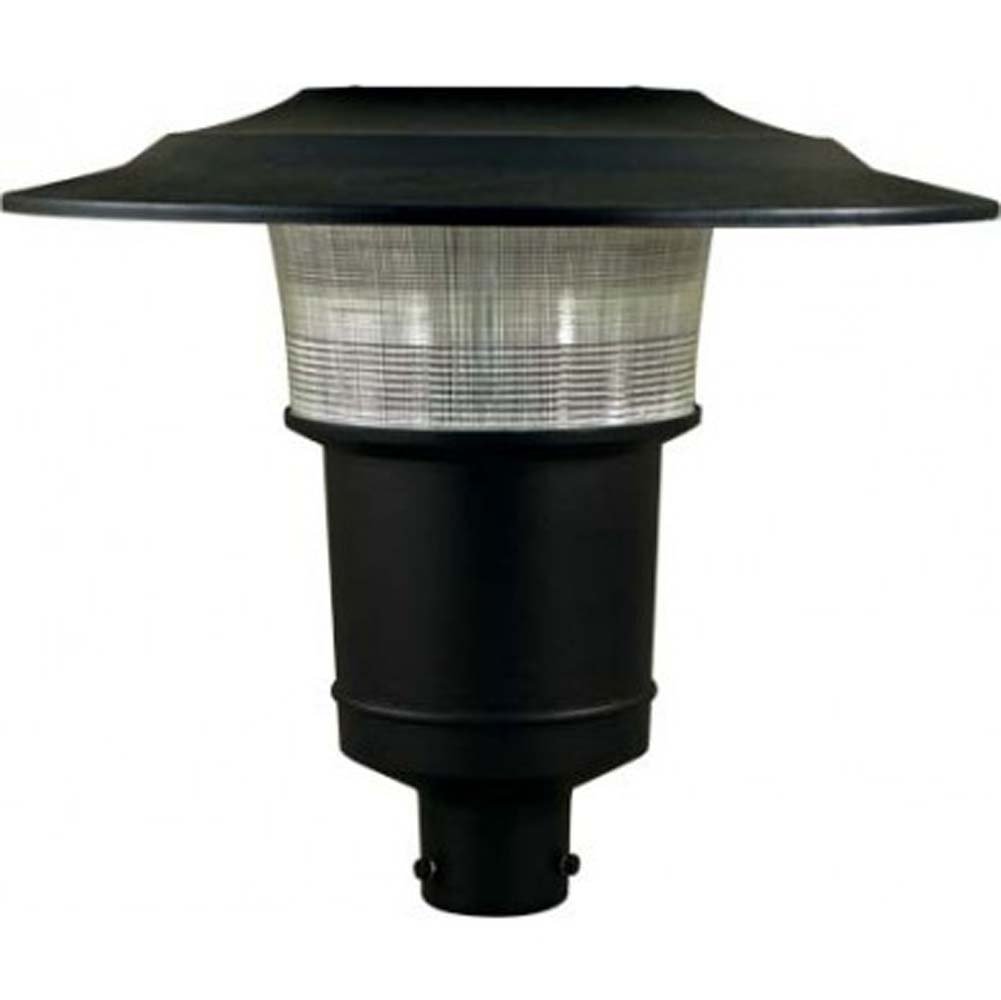
Image 1: Dabmar GM650-B-MT Post Top Light Fixture. This image displays the complete light fixture, showcasing its black finish and architectural design, ready for post-top mounting.
4. Setup and Installation
This fixture is designed for post-top mounting. Ensure the mounting post is securely installed and capable of supporting the fixture's weight.
- Prepare the Installation Site: Turn off power at the circuit breaker or fuse box before starting installation. Ensure the mounting post is stable and free from obstructions.
- Attach Fixture to Post: Carefully place the light fixture onto the top of the mounting post. Secure it using the provided mounting hardware (e.g., set screws) to ensure a snug and stable fit.
- Make Electrical Connections:
- Connect the black wire from the fixture to the black (live) wire from the power supply.
- Connect the white wire from the fixture to the white (neutral) wire from the power supply.
- Connect the green or bare copper (ground) wire from the fixture to the green or bare copper (ground) wire from the power supply.
- Use UL-listed wire connectors to secure all connections.
- Secure Wiring: Carefully tuck all wires into the mounting post or junction box, ensuring no wires are pinched.
- Install Light Source (Bulb): Insert the appropriate light source (not included) into the fixture socket. Refer to the specifications for maximum wattage.
- Restore Power: Once all connections are secure and the fixture is properly assembled, restore power at the circuit breaker.
5. Operating Instructions
The Dabmar GM650-B-MT fixture operates by providing illumination once power is supplied. Operation is typically controlled by an external switch, timer, or photocell (not included) connected to the power supply circuit.
- Ensure the correct light source is installed according to the fixture's specifications.
- Turn on the external power switch to activate the light fixture.
- Turn off the external power switch to deactivate the light fixture.
6. Maintenance
Regular maintenance ensures optimal performance and longevity of your light fixture.
- Cleaning: Periodically clean the exterior of the fixture with a soft, damp cloth. Do not use abrasive cleaners or solvents, as these may damage the finish or lens.
- Bulb Replacement: Disconnect power at the circuit breaker before replacing the light source. Allow the bulb to cool completely before handling. Replace with a bulb of the same type and wattage, not exceeding the maximum specified wattage.
- Inspection: Annually inspect the fixture for any signs of wear, damage, or loose connections. Address any issues promptly.
7. Troubleshooting
| Problem | Possible Cause | Solution |
|---|---|---|
| Fixture does not light up. |
|
|
| Light flickers. |
|
|
| Fixture hums. |
|
|
If troubleshooting steps do not resolve the issue, contact a qualified electrician or Dabmar customer support.
8. Specifications
| Model Number: | GM650-B-MT |
| Brand: | Dabmar |
| Material: | Cast Aluminum, Polycarbonate |
| Finish: | Powder Coated Black Finish |
| Voltage: | 120 Volts |
| Max Wattage: | 70 watts (Light source not included) |
| Mounting Type: | Post Top Mount |
| Item Weight: | 14 Pounds |
| Special Features: | Energy Efficient (depending on light source) |
| Included Components: | Fixture body, mounting hardware |
9. Warranty and Support
Dabmar Lighting products are manufactured to high-quality standards. For warranty information and customer support, please refer to the official Dabmar Lighting website or contact their customer service department directly.
Please retain your proof of purchase for any warranty claims.
Contact Information:
- Manufacturer: Lumtopia--DROPSHIP (for distribution)
- Brand: Dabmar
- Website: www.dabmar.com (Note: This is a placeholder URL, please verify the actual manufacturer's website for support.)