
Introduction
Thank you for purchasing the Seiko PYXIS NR535W Digital Radio Alarm Clock. This clock features a simple design suitable for various settings and includes a calendar and temperature display. This radio-controlled clock automatically adjusts time by receiving standard radio waves. For optimal performance, please read this manual carefully and follow the instructions for setup, operation, and maintenance.
Product Overview
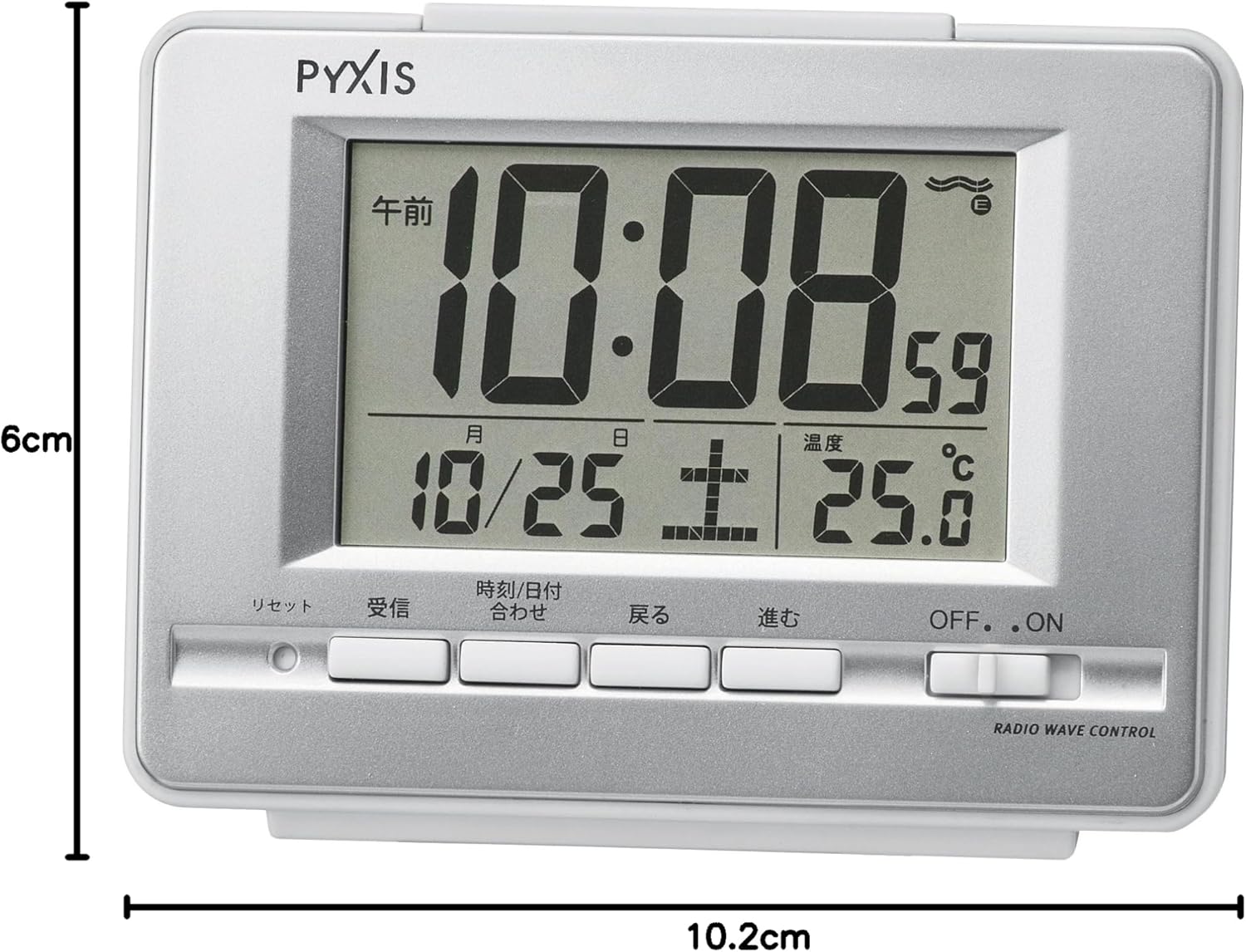
The Seiko PYXIS NR535W is a versatile digital clock designed for convenience and accuracy. It displays time, date, day of the week, and temperature. Key features include a radio wave correction function, an alarm with snooze, and a backlight for visibility in low light conditions.

Setup
1. Battery Installation
The clock requires 2 AA batteries (not included). To install:
- Open the battery compartment cover located on the back of the clock.
- Insert two AA batteries, ensuring the correct polarity (+/-) as indicated inside the compartment.
- Close the battery compartment cover securely.

2. Initial Time Setting and Radio Wave Reception
Upon battery installation, the clock will automatically attempt to receive radio waves to set the correct time. This process may take several minutes.
- Place the clock near a window or in an open area where radio waves can be easily received.
- Avoid locations prone to radio interference (see Troubleshooting section for details).
- If reception is successful, the clock will display the accurate time, date, and day.
- If reception fails, the clock will operate with quartz accuracy. You can manually set the time if needed (refer to Operating Instructions).

Operating Instructions
1. Display Functions
- Time Display: Shows current time in 12-hour or 24-hour format.
- Calendar Display: Shows the current date and day of the week. Features a full auto-calendar.
- Temperature Display: Shows the ambient temperature.
2. Setting the Alarm
The clock features an electronic alarm with a snooze function.
- Press the ALARM SET button (location may vary, typically on the back or side).
- Use the FORWARD and BACKWARD buttons to adjust the alarm time.
- Press ALARM SET again to confirm.
- To activate/deactivate the alarm, use the ALARM ON/OFF switch.
- When the alarm sounds, press the SNOOZE button (usually a large button on top) to temporarily stop the alarm. It will sound again after approximately 5 minutes.
- The alarm has an auto-stop function, stopping automatically after approximately 5 minutes if not manually turned off or snoozed.
3. Backlight Function
Press the LIGHT button (typically on top) to illuminate the display for a few seconds, allowing visibility in the dark.
4. Manual Time Setting (if radio reception is unavailable)
If the clock cannot receive radio waves, you can set the time manually:
- Ensure the RADIO WAVE CONTROL switch is set to OFF.
- Press the TIME SET button (or similar, refer to button labels on your clock).
- Use the FORWARD and BACKWARD buttons to adjust the hour and minute.
- Press TIME SET again to confirm.
This video demonstrates the alarm function and the overall appearance of the Seiko PYXIS NR535W Digital Radio Alarm Clock.
Maintenance
- Clean the clock with a soft, dry cloth. Do not use abrasive cleaners or solvents.
- Avoid exposing the clock to extreme temperatures, direct sunlight, or high humidity.
- Replace batteries promptly when the display dims or functions become erratic.
Troubleshooting
1. Clock not receiving radio waves or displaying incorrect time:
- Location: Ensure the clock is placed near a window or in an open area.
- Interference: Avoid placing the clock near sources of radio interference such as:
- Inside or between buildings, underground areas.
- Near high-voltage lines, TV towers, or train overhead lines.
- Near home appliances (TVs, refrigerators, air conditioners, air purifiers) or office equipment (computers, fax machines).
- Construction sites, near airports, or areas with heavy traffic.
- Inside vehicles (cars, trains, airplanes).
- Near other devices that generate radio noise.
- On or near metal furniture like steel desks.
- Radio Wave Control: Ensure the RADIO WAVE CONTROL switch is set to ON.
- Manual Setting: If radio reception is consistently poor, set the time manually (refer to Operating Instructions). The clock will operate with quartz accuracy.
2. Alarm not sounding:
- Check if the ALARM ON/OFF switch is set to ON.
- Verify that the alarm time is correctly set.
3. Display is dim or blank:
- Replace the batteries with new ones.
Specifications
| Brand | Seiko |
| Model Number | NR535W |
| Color | Metallic Silver |
| Body Size | 9.0 x 12.3 x 4.6 cm (Height x Width x Depth) |
| Body Weight | 0.17 kg |
| Material | Plastic frame (metallic silver paint), Front: Glass |
| Country of Origin | China |
| Movement | Radio wave correction function (40kHz/60kHz automatic selection), Radio wave OFF function, Quartz type |
| Display Type | Digital |
| Features | Alarm, Snooze, Light, Full Auto Calendar, Temperature Display, Alarm Auto-stop (approx. 5 minutes) |
| Power Source | Battery operated (2 AA batteries) |
| Mounting Type | Freestanding |
Warranty and Support
Specific warranty information is not provided in the product details. For warranty claims, technical support, or further assistance, please contact Seiko customer service or refer to the official Seiko website for your region. Keep your purchase receipt as proof of purchase.


