
Bose 718839-0010
Bose QuietComfort 20 Acoustic Noise Cancelling Headphones for Apple Devices
User Manual
Introduction
The Bose QuietComfort 20 Acoustic Noise Cancelling headphones are engineered to provide an enhanced audio experience by significantly reducing surrounding distractions. These headphones offer both full noise cancellation and an Aware mode, allowing you to choose between immersive listening and situational awareness. Designed for compatibility with Apple devices, they feature an inline microphone and remote for convenient control of music and calls.
Package Contents
Verify that all items are present in your package:
- Bose QuietComfort 20 headphones (for Apple devices)
- Three pairs of StayHear+ tips (sizes S, M, L)
- Clothing clip
- Rechargeable lithium-ion battery (built-in)
- USB charging cable
- Carrying case

Image: All components included with the Bose QuietComfort 20 headphones: the earbuds, the control module, a carrying case, a USB charging cable, and three sizes of StayHear+ tips.
Setup
1. Charging the Battery
Before initial use, fully charge the headphone battery. The rechargeable lithium-ion battery provides up to 16 hours of use on a full charge.
- Connect the small end of the USB charging cable to the charging port on the control module.
- Connect the other end of the USB cable to a USB wall charger (not included) or a computer's USB port.
- The battery indicator light on the control module will glow amber during charging and turn green when fully charged. A full charge typically takes approximately 2 hours.

Image: Close-up of the Bose QuietComfort 20 control module, showing the charging port and the connected USB cable.
2. Selecting and Fitting StayHear+ Tips
Proper fit of the StayHear+ tips is crucial for both comfort and optimal noise cancellation performance. Three sizes (S, M, L) are provided.
- Gently insert the earbud into your ear canal.
- Rotate the earbud slightly forward until the wing of the StayHear+ tip tucks securely under the ridge of your ear.
- Test different sizes to find the one that provides a comfortable, secure seal and the best audio quality.

Image: A pair of Bose QuietComfort 20 earbuds, highlighting the design of the StayHear+ tips.
3. Connecting to Your Device
Plug the 3.5mm audio jack from the control module into the headphone jack of your Apple device (iPhone, iPad, or iPod).

Image: The Bose QuietComfort 20 headphones, showing the control module and the 3.5mm audio jack, with the carrying case in the background.
Operating the Headphones
Powering On/Off and Noise Cancellation
- To turn on noise cancellation, slide the power switch on the control module to the ON position. The indicator light will glow green.
- To turn off noise cancellation, slide the power switch to the OFF position. The indicator light will turn off. You can still listen to audio with noise cancellation off, but the sound quality will be different.
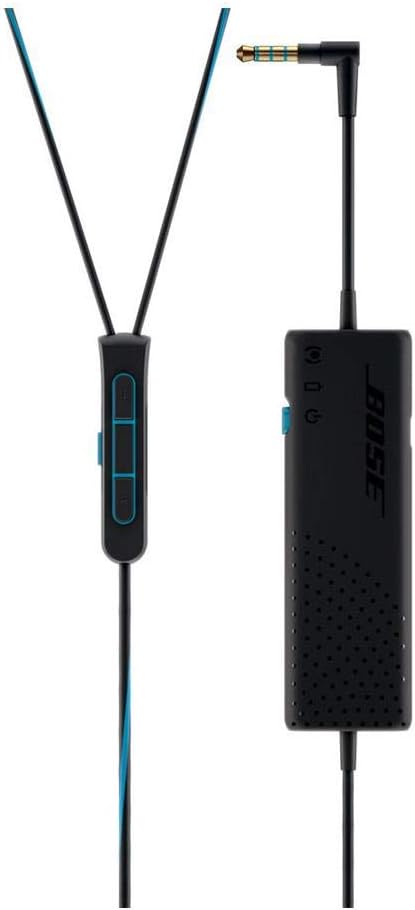
Image: A detailed view of the Bose QuietComfort 20 control module, showing the power switch and the attached 3.5mm audio jack.
Aware Mode
Aware mode allows you to hear your surroundings without removing the headphones, useful for conversations or listening to announcements.
- Press the Aware Mode button on the inline remote. Noise cancellation will be reduced, allowing ambient sounds to pass through.
- Press the Aware Mode button again to return to full noise cancellation.

Image: The inline remote of the Bose QuietComfort 20 headphones, featuring volume controls and the Aware Mode button.
Inline Remote Functions (for Apple Devices)
The inline remote provides control over music playback and calls.
| Action | Button Press |
|---|---|
| Play/Pause | Press center button once |
| Skip Forward | Press center button twice quickly |
| Skip Backward | Press center button three times quickly |
| Volume Up | Press '+' button |
| Volume Down | Press '-' button |
| Answer/End Call | Press center button once |
| Decline Call | Press center button and hold for 2 seconds |
Maintenance
Cleaning the Headphones
- Wipe the surface of the earbuds and control module with a soft, dry cloth.
- The StayHear+ tips can be removed and rinsed with water. Ensure they are completely dry before reattaching them to the earbuds.
- Do not use solvents, chemicals, or cleaning sprays.
Storage
When not in use, store the headphones in the provided carrying case to protect them from damage and dust.
Image: The Bose QuietComfort 20 headphones neatly packed inside their compact carrying case, ready for storage or travel.
Troubleshooting
| Problem | Solution |
|---|---|
| No sound or low volume | Ensure the 3.5mm jack is fully inserted into your device. Check the volume level on both your device and the headphone remote. Ensure the headphones are powered on if using noise cancellation. |
| Noise cancellation not working effectively | Verify the StayHear+ tips are correctly sized and properly sealed in your ear canal. Ensure the noise cancellation feature is turned on. |
| Battery not charging | Confirm the USB cable is securely connected to both the control module and the power source. Try a different USB port or wall adapter. |
| Remote control not responding | Ensure the headphones are fully connected to your Apple device. Restart your device. |
Specifications
- Model Name: QuietComfort 20
- Connectivity Technology: Wired (3.5 mm Jack)
- Noise Control: Active Noise Cancellation
- Compatible Devices: iPhone, iPad, and iPod models
- Battery Life: Up to 16 hours per full charge
- Charging Time: Approximately 2 hours
- Item Weight: 1.55 ounces (0.04 Kilograms)
- Material: Plastic
- Color: Black
- Manufacturer: Bose
- Model Number: 718839-0010
- UPC: 017817658515
Warranty and Support
Bose products are designed for durability and performance. For detailed warranty information specific to your region and product, please refer to the warranty card included with your purchase or visit the official Bose support website. You can also find additional support resources, FAQs, and contact information for customer service there.
For further assistance, please visit the Bose Store on Amazon or the official Bose website.
Related documents718839-0010


Ask a question about this manual
Ask about setup, troubleshooting, compatibility, parts, safety, or missing instructions. Manuals+ will review the question and use this page’s manual context to help answer it.