
1. Product Overview
The TYT MD-380 is a UHF Analog/Digital DMR radio utilizing Time-Division Multi-Access (TDMA) digital technology. It is compatible with Motorola TRBO Tier I & II radios, including those manufactured by Motorola, Hytera, Kenwood, and Vertex Standard. This manual provides essential information for setting up, operating, and maintaining your device.
Key features include priority scan, voice prompt, power-on protection, a color LCD display, DTMF decoding and encoding, text messaging in digital mode, and updated software availability for new features. It supports both analog and digital modes with up to 1000 channels.
2. Package Contents
- TYT MD-380 UHF Analog/Digital DMR Radio
- USB Programming Cable
- AC Charger
- 1700mAh Li-ion Battery
- Belt Clip
- Antenna
- English Manual

Figure 2.1: USB Programming Cable and Software CD for TYT MD-380.
3. Radio Components
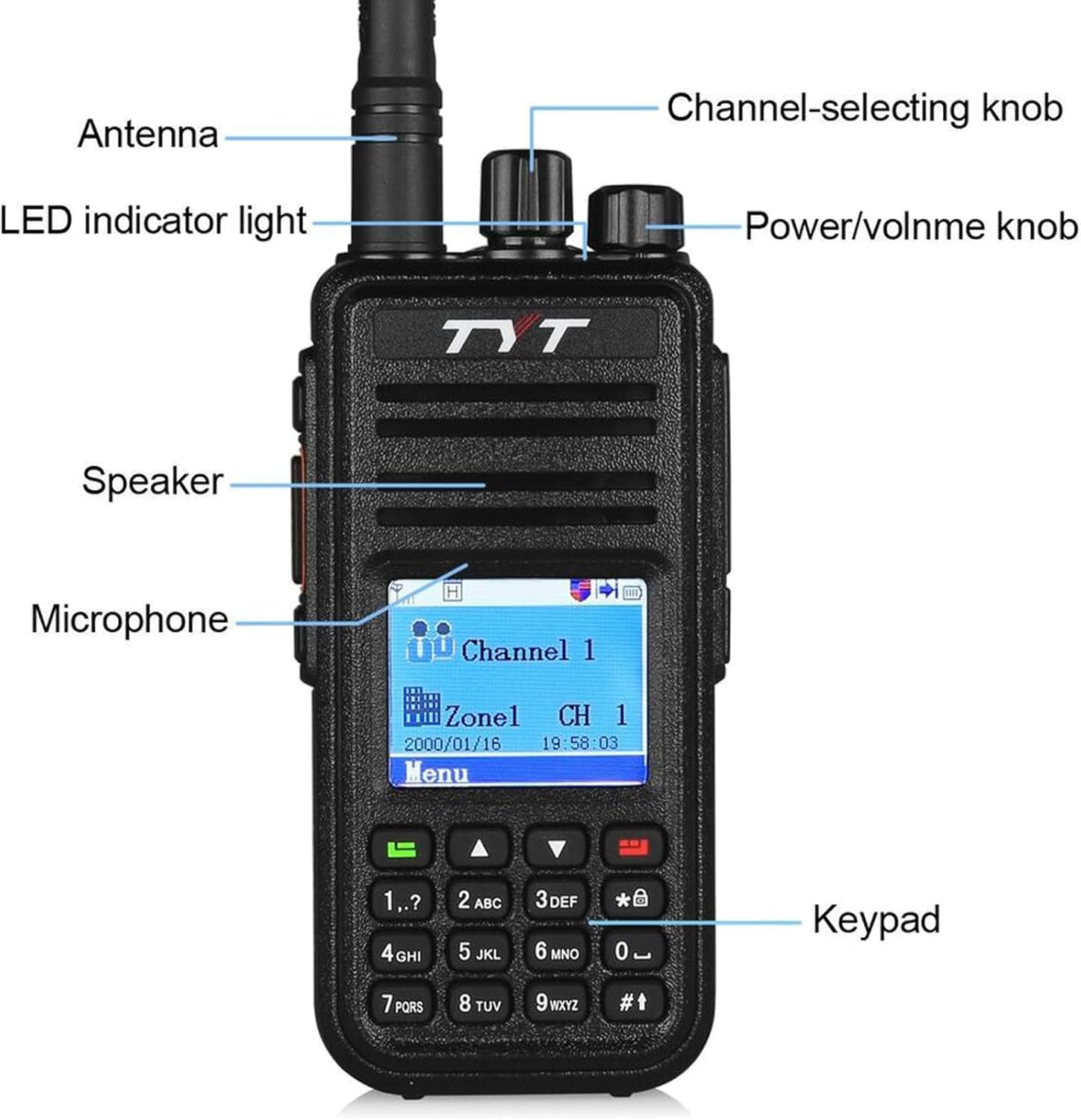
Figure 3.1: Front view of the TYT MD-380 with key components labeled, including the antenna, LED indicator light, channel-selecting knob, power/volume knob, speaker, microphone, and keypad.

Figure 3.2: Side view of the TYT MD-380, highlighting the PTT switch, MONI button, mic/speaker jack (also used for programming), belt clip, and Li-ion battery compartment.

Figure 3.3: Top view of the TYT MD-380, illustrating the channel-selecting knob, power/volume knob, and antenna connection point.
4. Setup
4.1 Battery Installation and Charging
- Align the Li-ion battery with the battery compartment on the back of the radio.
- Slide the battery upwards until it clicks securely into place.
- To charge, connect the AC charger to a power outlet and then to the charging cradle. Place the radio with the battery installed into the cradle. The charging indicator will show the charging status.
4.2 Antenna Attachment
- Screw the antenna clockwise into the connector on the top of the radio until it is firmly seated. Do not overtighten.
4.3 Initial Power-On
- Rotate the Power/Volume knob clockwise to turn on the radio.
- Adjust the volume to a comfortable listening level.
4.4 Programming the Radio (Codeplugs)
The TYT MD-380 requires a 'codeplug' for full functionality, which is a configuration file containing channels, zones, and other settings. This is typically done using programming software on a computer.
- Install the provided USB Programming Cable drivers and software on your computer.
- Connect the radio to your computer using the USB programming cable.
- Launch the programming software to create or load a codeplug.
Video 4.1: An Easy Intro to DMR Codeplugs. This video provides a conceptual understanding and practical steps for creating and managing codeplugs, which are essential for configuring DMR radios like the MD-380.
5. Operating Instructions
5.1 Channel Selection
- Rotate the Channel-Selecting knob to choose your desired channel.
- The selected channel number or name will be displayed on the LCD screen.
5.2 Transmitting and Receiving
- To transmit, press and hold the Push-To-Talk (PTT) button on the side of the radio. Speak clearly into the microphone.
- Release the PTT button to stop transmitting and return to receive mode.
- The LED indicator will glow green when receiving a signal and red when transmitting.
5.3 Menu Navigation
- Press the 'Menu' button to access the radio's main menu.
- Use the Up/Down arrow keys on the keypad to navigate through menu options.
- Press 'Confirm' or 'OK' to select an option.
- Press 'Back' or 'Exit' to return to the previous screen or exit the menu.
Video 5.1: Copying a frequency and sub-tone from another radio. This demonstrates a practical operating function for setting up communication with other devices.
Video 5.2: Overview of DMR Radio functions. This video provides a general introduction to the functionalities common in DMR radios, which can be applied to the TYT MD-380.
Video 5.3: Introduction to Dual Band DMR Radio Functions. While for a different model, this video illustrates common operational features and menu navigation relevant to DMR radios.
Video 5.4: Description of accessory display. This video shows how to interact with the radio's display and accessories, which is useful for general operation.
6. Maintenance
- Keep the radio dry. If it gets wet, wipe it immediately.
- Do not expose the radio to extreme temperatures.
- Clean the radio's surface with a soft, damp cloth. Avoid using harsh chemicals.
- Ensure the battery terminals are clean and free of debris.
7. Troubleshooting
If you encounter issues with your TYT MD-380, consider the following basic troubleshooting steps:
- No Power: Ensure the battery is fully charged and correctly installed. Check the power/volume knob.
- Cannot Transmit/Receive: Verify the antenna is securely attached. Check the selected channel and ensure it is properly programmed in the codeplug. Confirm you are within range of another radio or repeater.
- Programming Issues: Ensure the USB programming cable drivers are correctly installed. Try a different USB port on your computer. Verify the programming software is the correct version for your radio model.
8. Specifications
| Feature | Value |
|---|---|
| Frequency Range | 400-480MHz |
| Channel No. | 1000 |
| Antenna Impedance | 50Ω |
| Operating Voltage | 7.5 vDC |
| Operating Temperature | -30°C~+60°C |
| Dimensions (W x H x D) | 128x61x38mm |
| Battery | 1700mAh Li-ion |
| Transmitter Output Power | ≥5W(H); ≥1W(L) |
| Vocoder Type | TDMA |
| Frequency Stability | ± 1.0 PPM |
| Receiver Digital Sensitivity | 0.3uV/-117.4dBm(BER 5%); 0.22uV/-100dBm(BER 1%) |
| Audio Power | 1W |
| Compatible Devices | Motorola TRBO Tier I & II radios (Motorola, Hytera, Kenwood, Vertex Standard) |
9. Support
For further assistance, please refer to the included English Manual. Software updates for new features are available online. Ensure you download the correct programming software and drivers for your specific model from the official TYT website or authorized distributors.


