
1. Introduction
This manual provides instructions for the installation, operation, and maintenance of your Black Box M1000 Rearview Mirror Dash Cam. The M1000 features an innovative dual camera design with rotating lenses and a built-in 3.5-inch LCD screen for live video playback. It records in Full HD, offering wide-angle views, G-Sensor functionality, WDR for night video, and motion detection capabilities. Please read this manual thoroughly before using the device to ensure proper functionality and safety.
2. Package Contents
Verify that all items listed below are present in your package:
- Black Box M1000 Rearview Dual Camera Mirror
- 16GB SD Card
- SD Card Reader (4-in-1 media reader)
- In-car charging cable
- Mounting Brackets
- USB data cable
- User Manual and Installation Guide (this document)

Figure 2.1: All components included in the Black Box M1000 package.
3. Product Overview
The Black Box M1000 integrates a dash camera system into a rearview mirror. It features two independently rotating cameras and a central LCD display.
3.1 Front View
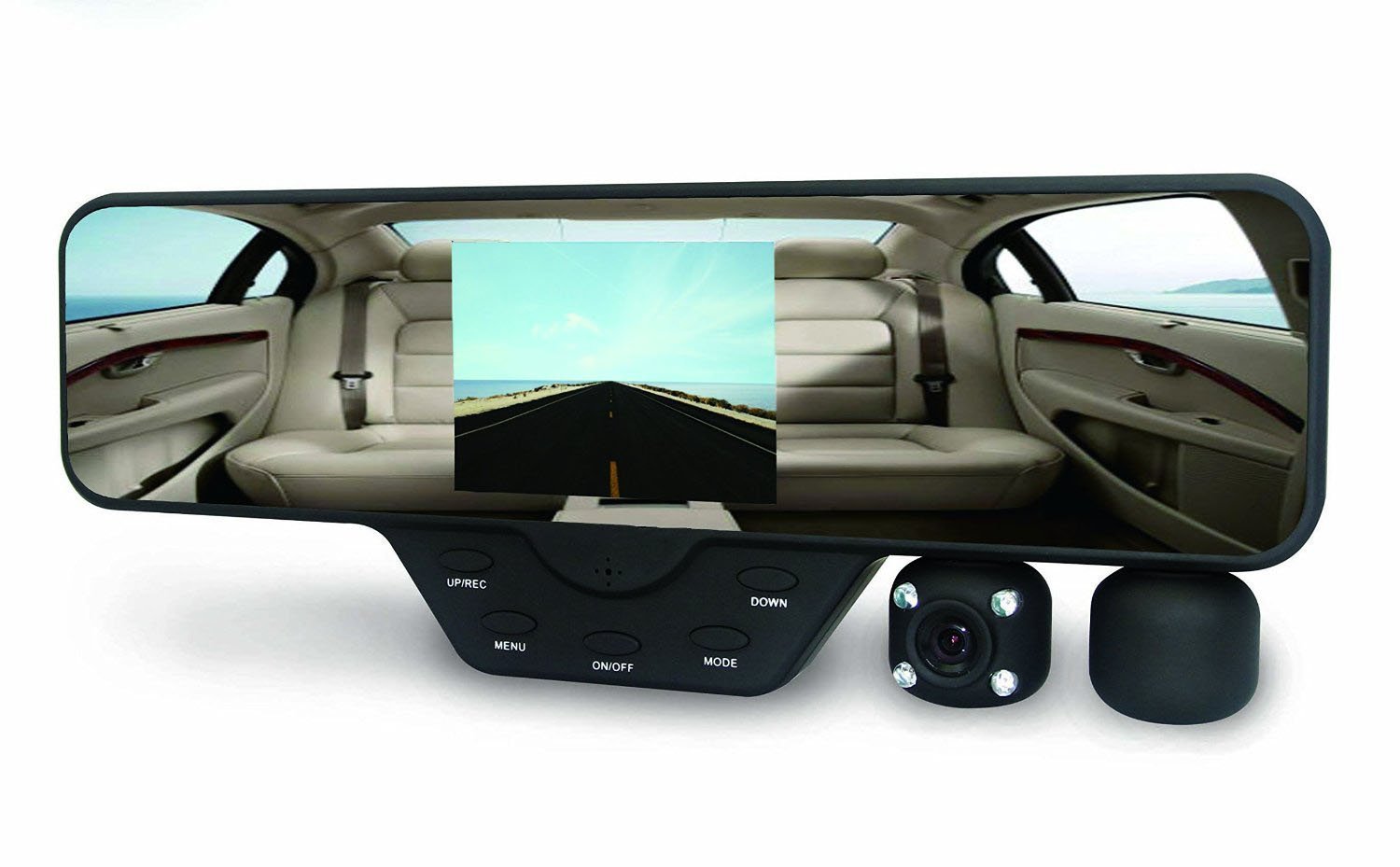
Figure 3.1: Front view of the M1000, showing the mirror surface, integrated LCD screen, control buttons, and dual rotating camera lenses.
The front of the device includes the mirror surface, a 3.5-inch LCD screen for live view and playback, and control buttons (UP, DOWN, MENU/REC, ON/OFF, MODE) located below the screen. The dual camera lenses are positioned on the right side, each capable of 180-degree rotation.
3.2 Side View and Ports

Figure 3.2: Side view of the M1000, highlighting the SD card slot and HDMI port.
The right side of the unit houses the SD card slot (supports up to 32GB, 16GB included) and an HDMI output port for connecting to external displays. The bottom edge features a USB port, DC 5V power input, and a reset button.

Figure 3.3: Bottom view of the M1000, showing the USB port, DC 5V power input, and reset button.
4. Setup and Installation
Follow these steps to install your Black Box M1000 Dash Cam:
- Insert SD Card: Gently insert the provided 16GB Micro SD card into the SD card slot on the side of the device until it clicks into place. Ensure the card is oriented correctly.
- Attach Mounting Brackets: Secure the included mounting brackets to the back of the M1000 unit. These brackets are designed to clip onto your existing rearview mirror.
- Mount to Rearview Mirror: Carefully attach the M1000 to your vehicle's rearview mirror using the mounting brackets. Ensure it is securely fastened and does not obstruct your view of the road.
- Connect Power: Connect the in-car charging cable to the DC 5V input port on the bottom of the M1000 and plug the other end into your vehicle's cigarette lighter socket.
- Adjust Camera Lenses: Rotate the dual camera lenses to your desired viewing angles. The front-facing camera should capture the road ahead, while the interior-facing camera can be adjusted to monitor the vehicle's cabin. Each lens rotates 180 degrees.

Figure 4.1: Rear view of the M1000, illustrating the mounting clips for attachment to the vehicle's rearview mirror.
5. Operating Instructions
5.1 Power On/Off
- Automatic Operation: The M1000 is designed to automatically power on and begin recording when your vehicle starts, and power off when the vehicle is turned off.
- Manual Operation: Press the ON/OFF button to manually power the device on or off.
5.2 Recording Modes
The M1000 supports both dual camera and single camera recording modes.
- Dual Camera Mode: Records simultaneously from both front and interior cameras at 720p HD resolution per lens.
- Single Camera Mode: Records from a single camera at 1440 x 1080 resolution.
- Switching Modes: Use the MODE button to cycle through available recording modes and playback.
5.3 Loop Recording
The device features seamless continuous loop recording. When the SD card is full, the oldest footage will automatically be overwritten by new recordings. This ensures continuous operation without manual intervention.
5.4 G-Sensor
The built-in G-Sensor detects sudden impacts or collisions. In the event of an accident, the current video segment will be automatically locked to memory, preventing it from being overwritten by loop recording. This footage is crucial for accident investigation.
5.5 Motion Detection
When enabled, motion detection allows the camera to start recording automatically if movement is detected in front of the lens while the vehicle is parked. This feature provides surveillance for your parked vehicle.
5.6 Playback
Recorded data can be played back directly on the 3.5-inch LCD screen using the UP and DOWN buttons to navigate and the MENU/REC button to select. Alternatively, you can remove the SD card and use the included 4-in-1 card reader to view footage on a PC, or connect the M1000 to a TV using an HDMI cable.
6. Key Features
- 180-degree rotating 120-degree viewing angle high-resolution wide-angle lens.
- 3.5-inch LCD screen for live preview and recorded footage playback.
- Night vision for interior clips and shots; Built-in microphone / speaker function.
- Supports up to 32GB high-capacity SD cards; TV and HDMI HD output.
- Loop recording: Old files are automatically replaced with new files for continuous recording.
- Automatic Start with Record & Auto Off: No touch required; starts/stops with car ignition.
- G-Sensor: Automatically locks footage during impacts.
- Wide Dynamic Range (WDR) Technology for enhanced night vision.
7. Maintenance
- Cleaning: Use a soft, dry cloth to clean the device, especially the lenses and screen. Avoid abrasive cleaners or solvents.
- SD Card Care: Periodically format the SD card (at least once a month) to maintain optimal recording performance and prevent data corruption. Back up important footage before formatting.
- Temperature: Avoid exposing the device to extreme temperatures, which can affect battery life and performance.
- Firmware Updates: Check the manufacturer's website for any available firmware updates to ensure your device has the latest features and bug fixes.
8. Troubleshooting
If you encounter issues with your Black Box M1000, refer to the following common problems and solutions:
- Device does not power on:
- Ensure the in-car charging cable is securely connected to both the device and the vehicle's power outlet.
- Check if the vehicle's power outlet is functioning (e.g., by testing with another device).
- Press and hold the ON/OFF button for a few seconds.
- Recording stops or footage is corrupted:
- Format the SD card regularly.
- Ensure you are using a high-quality Micro SD card (Class 10 or higher recommended).
- The SD card may be full; loop recording should overwrite old files, but a full card can sometimes cause issues.
- Video quality is poor:
- Clean the camera lenses.
- Ensure the protective film has been removed from the lenses.
- Check settings to ensure you are recording at the desired resolution.
- G-Sensor is too sensitive/not sensitive enough:
- Adjust the G-Sensor sensitivity setting in the device's menu.
- Screen is blank or frozen:
- Press the RESET button using a thin object (like a paperclip).
- Power cycle the device by disconnecting and reconnecting the power cable.
9. Specifications
| Brand | Black Box |
| Model Number | M1000 |
| Chipset | Novatek + Aptina Lens High End CMOS Sensor |
| Lens | 120 degree Ultra Wide Angle Lens w/ Wide Dynamic (WDR) Technology |
| Screen Size | 3.5 Inches LCD |
| Video Resolution (Dual Camera) | 1920 x 720 (720p HD per lens) |
| Video Resolution (Single Camera) | 1440 x 1080 |
| Video Codec | H.264/MPEG4 |
| Photo Format | 5M High Quality JPEG |
| Memory | Supports up to 32GB Micro SD card (16GB Included) |
| Audio | Built-in Microphone/Speaker (AAC) |
| Ports | USB, HDMI, Micro SD card slot |
| Special Features | Auto Start/Off, Rotating Dual Cameras, G-Sensor, WDR, Motion Detection, Loop Recording |
| Item Weight | 4 Ounces |
| Color | Black |
| UPC | 703510548054 |
10. Warranty and Support
The Black Box M1000 Rearview Mirror Dash Cam includes a manufacturer warranty. For detailed information regarding warranty terms, coverage, and how to make a claim, please refer to the warranty card included in your package or visit the official Black Box product support website.
For technical support, troubleshooting assistance, or any other inquiries, please contact Black Box customer service through their official channels.


