
1. Product Overview
The Jamara Observer AHP is a 2.4 GHz quadcopter equipped with a camera, designed for both beginners and experienced pilots. It features self-stabilizing attitude control and a robust, lightweight EPP frame reinforced with carbon. The quadcopter offers two flight modes and a 360-degree flip stunt function for dynamic aerial maneuvers.

Image 1.1: Top view of the Jamara Observer AHP Quadcopter, showcasing its four rotors and central body.
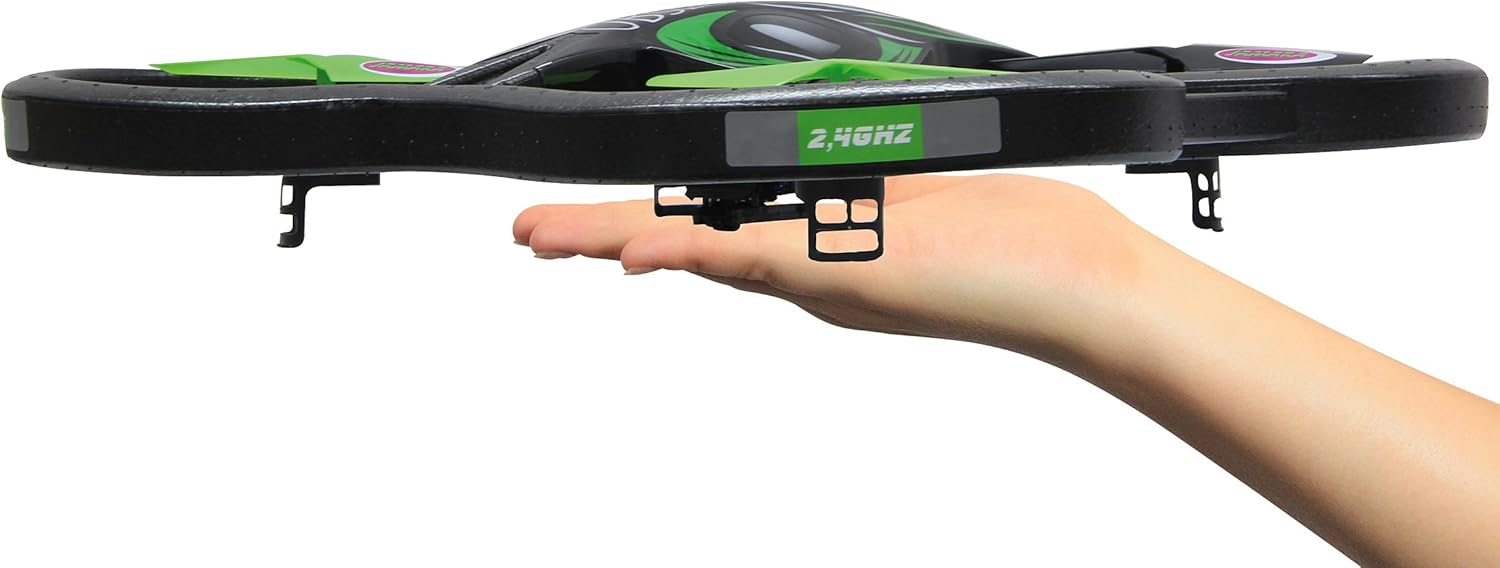
Image 1.2: The Jamara Observer AHP Quadcopter resting in a hand, illustrating its compact size and lightweight design.
Key Features:
- Self-stabilizing attitude control for stable flight.
- 4-channel 2.4 GHz transmitter for precise control.
- 360-degree flip function for aerial stunts.
- Robust and light EPP frame with carbon reinforcement.
- Two selectable flight modes: beginner and expert.
- Integrated LED lighting for visibility.
- Quick-change battery system.
- Integrated camera with video function and removable 1 GB SD-card.
- Manually adjustable camera angle.
- Turbo function for increased speed.
2. Safety Instructions
Read all instructions carefully before operating the quadcopter. Failure to follow these instructions may result in injury or damage to the product.
- Age Restriction: This product is not a toy. Recommended for users aged 14 years and up.
- Liability Insurance: In some countries, a model aircraft liability insurance may be required for operating model planes. Consult local regulations.
- Lithium Battery Safety: The quadcopter includes a lithium battery. Follow all instructions regarding charging, handling, and storage of lithium batteries to prevent fire, injury, or property damage. Do not overcharge, puncture, or expose to extreme temperatures.
- Flight Environment: Operate the quadcopter in open, clear areas, away from people, animals, buildings, and power lines. Avoid flying in strong winds or adverse weather conditions.
- Pre-Flight Check: Always ensure all components are securely attached and functioning correctly before each flight.
- Propeller Safety: Keep hands, face, and loose clothing away from rotating propellers.
- Supervision: Younger users should always be supervised by an adult.
3. Package Contents
Verify that all items listed below are included in your package. If any items are missing or damaged, contact your retailer.

Image 3.1: All components included in the Jamara Observer AHP Quadcopter package, including the quadcopter, transmitter, and various accessories.
- Jamara Observer AHP 2.4 GHz Quadcopter
- 2.4 GHz Transmitter
- Flight Battery Pack (Lion 7.4 V 650 mAh)
- 230 V Charger
- Spare Rotor Blades (set)
- Screwdriver
- 1 GB SD-card
- USB SD Card Reader
- Instruction Manual (this document)
4. Setup
4.1 Charging the Flight Battery
- Connect the flight battery to the 230 V charger.
- Plug the charger into a standard wall outlet.
- Allow the battery to charge fully. Refer to the charger's indicator light for charging status (e.g., red for charging, green for fully charged).
- Once charged, disconnect the battery from the charger and the outlet.
Note: Always supervise the charging process and do not leave batteries charging unattended.
4.2 Installing the Flight Battery
- Locate the battery compartment on the underside of the quadcopter.
- Carefully insert the charged flight battery into the compartment.
- Connect the battery's power connector to the quadcopter's power port. Ensure a secure connection.
- Close the battery compartment cover.
4.3 Installing Transmitter Batteries
- Open the battery cover on the back of the 2.4 GHz transmitter.
- Insert the required number of fresh batteries (e.g., AA batteries, not included) according to the polarity markings.
- Close the battery cover securely.

Image 4.1: The 2.4 GHz transmitter for the Jamara Observer AHP Quadcopter, showing its control sticks and buttons.
4.4 Installing the SD Card
- Locate the SD card slot on the quadcopter's camera module.
- Gently insert the provided 1 GB SD card into the slot until it clicks into place. Ensure correct orientation.
5. Operating Instructions
5.1 Binding the Transmitter to the Quadcopter
- Place the quadcopter on a flat, level surface.
- Turn on the quadcopter's power switch. The LED lights will flash.
- Turn on the transmitter.
- Move the left joystick (throttle) all the way up, then all the way down. The quadcopter's LEDs will stop flashing and remain solid, indicating successful binding.
5.2 Flight Controls
Familiarize yourself with the transmitter controls before attempting flight.

Image 5.1: Visual representation of the quadcopter's control inputs and the execution of a 360-degree flip maneuver.
- Left Joystick (Throttle/Rudder):
- Up/Down: Controls altitude (ascend/descend).
- Left/Right: Controls yaw (rotates the quadcopter left/right).
- Right Joystick (Aileron/Elevator):
- Up/Down: Controls pitch (moves quadcopter forward/backward).
- Left/Right: Controls roll (moves quadcopter left/right sideways).
- Trim Buttons: Used to fine-tune the quadcopter's stability if it drifts in any direction during hover. Adjust small increments until stable.
- Speed Button: Toggles between different flight speeds (e.g., 30%, 60%, 100%) for beginner or expert modes.
- Turbo Function: Activates a temporary boost in power for enhanced maneuverability.
5.3 Performing a 360-Degree Flip
- Fly the quadcopter to a height of at least 3 meters (10 feet).
- Press the 360-degree flip button (refer to transmitter diagram for exact location).
- Immediately push the right joystick in the desired flip direction (forward, backward, left, or right). The quadcopter will perform a flip.
5.4 Camera Operation
- Ensure the SD card is properly inserted.
- To start video recording, press the designated video recording button on the transmitter. The camera's indicator light will change to confirm recording has started.
- To stop recording, press the video recording button again.
- To adjust the camera angle, manually pivot the camera module on the quadcopter before flight.
- After flight, turn off the quadcopter and carefully remove the SD card. Use the provided USB SD card reader to transfer videos to a computer.
6. Maintenance
6.1 Cleaning
- After each flight, gently wipe the quadcopter with a soft, dry cloth to remove dust, dirt, or debris.
- Avoid using water or cleaning solvents, as they may damage electronic components.
6.2 Rotor Blade Replacement
- If a rotor blade is damaged, use the provided screwdriver to carefully remove the retaining screw.
- Replace the damaged blade with a new one from the spare set. Ensure the new blade is oriented correctly (A or B, matching the original).
- Secure the new blade with the screw, but do not overtighten.
6.3 Battery Care and Storage
- Always disconnect the battery from the quadcopter when not in use.
- Store batteries in a cool, dry place, away from direct sunlight and extreme temperatures.
- Do not store fully charged or completely depleted batteries for extended periods. For long-term storage, charge batteries to approximately 50% capacity.
7. Troubleshooting
| Problem | Possible Cause | Solution |
|---|---|---|
| Quadcopter does not respond to transmitter. | Not bound, low battery (quadcopter or transmitter), power switch off. | Ensure both devices are powered on. Re-bind the quadcopter and transmitter. Check and replace/charge batteries. |
| Quadcopter drifts during flight. | Improper trim settings, uneven surface during binding, damaged propeller. | Adjust trim buttons on the transmitter. Ensure quadcopter is on a level surface when binding. Inspect and replace damaged propellers. |
| Short flight time. | Battery not fully charged, old battery, aggressive flying. | Ensure battery is fully charged. Consider replacing old batteries. Fly more conservatively. |
| Camera not recording or poor video quality. | SD card full or not inserted correctly, low light conditions. | Check SD card insertion and free space. Format SD card if necessary. Ensure adequate lighting for recording. |
8. Specifications
| Feature | Detail |
|---|---|
| Model Name | Observer AHP |
| Model Number | 038551 |
| Brand | Jamara |
| Control Type | Remote Control (2.4 GHz Radio Frequency) |
| Quadcopter Dimensions (L x W x H) | Approx. 510 mm x 510 mm x 120 mm (20.08 x 7.32 x 4.72 inches) |
| Rotor Diameter | Approx. 186 mm |
| Item Weight (RTF) | Approx. 288 g (0.63 lbs) |
| Flight Battery | Lion 7.4 V 650 mAh |
| Video Capture Resolution | 1080p |
| Video Capture Format | MP4 |
| Included SD Card | 1 GB |
| Material | EPP Frame, Plastic |
| Recommended Age | 14 years and up |
9. Warranty and Support
Jamara products are manufactured with high-quality materials and undergo strict quality control. For warranty information, technical support, or spare parts, please contact your retailer or visit the official Jamara website.
For further assistance, you may also refer to the manufacturer's product page or support section: