Introduction
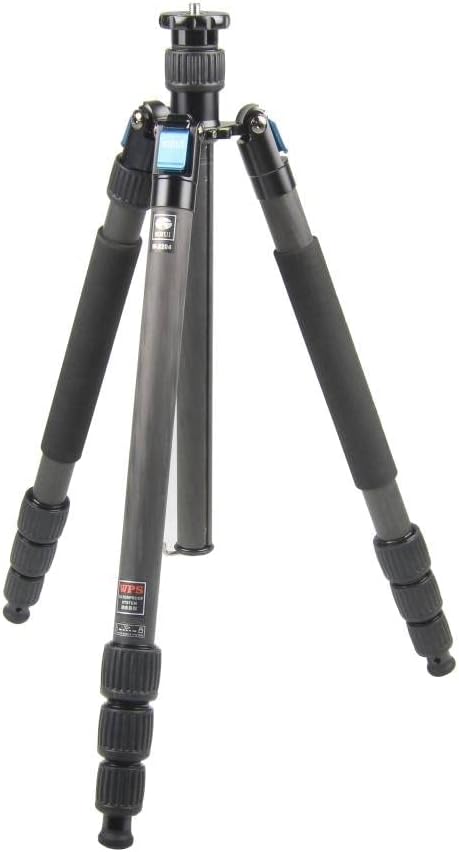
This manual provides comprehensive instructions for the proper setup, operation, and maintenance of your SIRUI W-2204 Carbon Fiber Tripod. The W-2204 is designed for stability and versatility, featuring a waterproof construction, a convertible monopod leg, and an inverted center column for various photographic applications.
Package Contents
Verify that all the following items are included in your package:
- SIRUI W-2204 Carbon Fiber Tripod
- Padded carrying case
- Shoulder strap
- Tool kit
- 3 x Stainless steel spiked feet
- Monopod wrist strap
Setup
1. Tripod Assembly and Basic Setup
To set up the tripod, release the leg locks and extend each leg section to the desired height. Ensure all twist locks are securely tightened to prevent leg collapse. Adjust the leg angles using the ergonomic leg angle locks located at the top of each leg.

2. Monopod Conversion
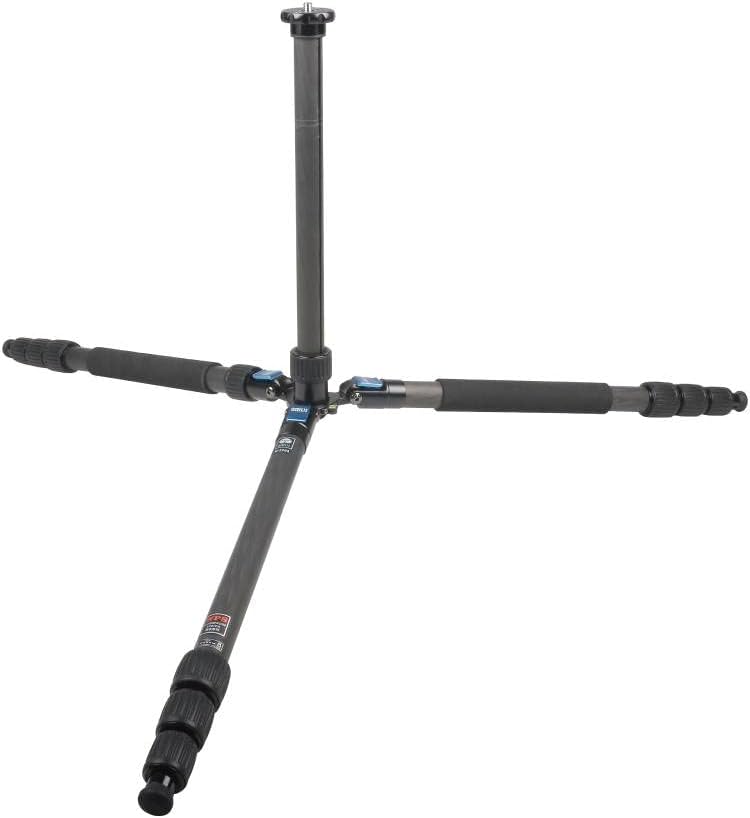
One of the tripod legs is designed to be detachable for conversion into a full-sized monopod. To convert:
- Identify the leg with the foam grip.
- Unscrew this leg from the tripod chassis.
- Remove the center column from the tripod.
- Screw the detached leg onto the base of the center column.
- Attach your camera or ball head to the top of the assembled monopod.

3. Spiked Feet Installation
For enhanced stability on soft or uneven terrain, the standard rubber feet can be replaced with the included stainless steel spikes.
- Unscrew the rubber feet from the bottom of each tripod leg.
- Screw the stainless steel spiked feet into the threaded inserts on the leg ends.
- Ensure they are tightened securely before use.
Operating
1. Leg Angle Adjustment
Each leg features an automatic leg angle lock mechanism. To adjust a leg's angle, pull out the angle lock tab, position the leg to one of the three available angles (standard, medium, or wide spread), and release the tab to lock it in place. This allows for stable positioning on uneven surfaces or for low-angle shooting.
2. Center Column Adjustment
The center column can be extended for additional height or inverted for low-angle and macro photography.
- Extending: Loosen the center column locking knob, raise the column to the desired height, and tighten the knob securely.
- Inverting: Fully extend and remove the center column. Reinsert it from the bottom of the tripod chassis, pushing it upwards until it locks into place. This allows the camera to be positioned below the tripod's apex.
- Split Center Column: The center column can be split into two sections for faster conversion to a short center column, facilitating very low-angle shots.

3. Waterproof Features
The SIRUI W-2204 features a waterproof sealing system designed to prevent water, dust, and other particles from entering the leg tubes. This allows for reliable operation in challenging environmental conditions. After use in wet or dusty environments, it is recommended to clean and dry the tripod thoroughly.
Maintenance
Proper maintenance ensures the longevity and optimal performance of your tripod:
- Cleaning: After each use, especially in wet, sandy, or dusty conditions, wipe down the tripod with a clean, damp cloth. Ensure all leg sections and twist locks are free of debris.
- Drying: If the tripod has been exposed to water, extend all leg sections and allow them to air dry completely before collapsing for storage. This prevents moisture buildup inside the leg tubes.
- Lubrication: Periodically check the smoothness of the leg extension and twist locks. If they become stiff, a small amount of silicone-based lubricant can be applied to the threads of the twist locks. Avoid oil-based lubricants.
- Inspection: Regularly inspect all components, including leg locks, leg angle mechanisms, and the center column, for any signs of wear or damage. Ensure all screws and fasteners are tight.
Troubleshooting
| Issue | Possible Cause | Solution |
|---|---|---|
| Legs do not extend or retract smoothly | Dirt, sand, or debris inside leg sections or twist locks. | Disassemble leg sections (if comfortable), clean thoroughly, and reassemble. Apply a small amount of silicone lubricant to twist lock threads. |
| Tripod wobbles or lacks stability | Leg locks not fully tightened; uneven terrain; excessive load. | Ensure all leg twist locks are securely tightened. Adjust leg angles for stability on uneven ground. Verify camera and lens weight does not exceed the tripod's maximum load capacity. |
| Center column is stiff or difficult to adjust | Dust or debris in the column mechanism; insufficient lubrication. | Clean the center column and its housing. Apply a thin layer of silicone grease to the column. |
| Leg angle locks are difficult to engage/disengage | Debris in the locking mechanism. | Clean the leg angle lock tabs and their pivot points. |
Specifications
| Feature | Detail |
|---|---|
| Model Number | 6435 |
| Material | Carbon Fiber, Rubber, Stainless Steel |
| Maximum Height | 70.9 inches (180 cm) |
| Folded Length | 20.5 inches (52 cm) |
| Item Weight | 4 pounds (1.8 kg) |
| Weight Limit (Load Capacity) | 39.7 pounds (18 kg) |
| Leg Sections | 4 |
| Special Features | Waterproof Leg Design, Monopod Conversion, Inverted Center Column, Split Center Column, Ergonomic Leg Angle Locks |
| Compatible Devices | Camera |
Warranty and Support
SIRUI products are manufactured to high-quality standards. For specific warranty information, please refer to the warranty card included with your product or visit the official SIRUI website. For technical support, spare parts, or service inquiries, please contact SIRUI customer service through their official channels.
Keep your purchase receipt as proof of purchase for any warranty claims.


