
Pentax K-3II
Pentax K-3II DSLR Camera Instruction Manual
Model: K-3II
1. Introduction
Welcome to the instruction manual for your new Pentax K-3II DSLR camera. This camera is designed for top performance, offering high-resolution image reproduction with approximately 24 effective megapixels, a 27-point AF system, and high-speed continuous shooting at approximately 8.3 images per second. It features a newly designed 86,000 pixel RGB light-metering sensor, a large, high-resolution LCD monitor, and an optical viewfinder. The K-3II also includes built-in GPS and a compass with sensor shift for Astro photography, all within a compact form factor.
Key features include the innovative AA simulator to minimize moiré without an optical AA filter, and Pixel Shift Resolution technology for ultra high-definition images with excellent detail and color reproduction. The camera's dustproof and weather-resistant body ensures reliable performance in various environments.
2. Safety Information
Please read all safety instructions carefully before using your Pentax K-3II camera to ensure safe and proper operation. Keep this manual for future reference.
- Battery Safety: Use only the specified D-LI90 Lithium-Ion rechargeable battery. Do not expose batteries to excessive heat, direct sunlight, or fire. Do not short-circuit or disassemble batteries.
- Water and Moisture: Although the camera is weather-resistant, avoid submerging it in water or exposing it to heavy rain for extended periods. Ensure all covers and ports are securely closed when operating in damp conditions.
- Handling: Do not drop the camera or subject it to strong impacts. Avoid pointing the lens directly at the sun or other strong light sources, as this can damage the image sensor.
- Cleaning: Always turn off the camera and remove the battery before cleaning. Use a soft, dry cloth for the camera body. For the lens and sensor, use specialized cleaning tools and solutions.
3. Package Contents
Verify that all items listed below are included in your camera package:
- Pentax K-3II DSLR Camera Body
- D-LI90 Lithium-Ion Rechargeable Battery
- Battery Charger
- AC Plug Cord
- Strap
- Body Mount Cap
- Eyecup
- Software CD-ROM
- Instruction Manual (this document)

Description: This image displays the Pentax K-3II DSLR camera body from a front-angle perspective. The camera is black with a prominent PENTAX logo on the front prism housing. The lens mount is visible, indicating it is a body-only unit. Various control dials and buttons are also visible on the top and front of the camera.
4. Setup
4.1. Battery Installation
- Ensure the camera is turned off.
- Open the battery compartment cover located at the bottom of the camera.
- Insert the D-LI90 battery with the contacts facing inward, ensuring it clicks into place.
- Close the battery compartment cover securely.
4.2. Memory Card Insertion
The K-3II supports Dual SD/SDHC/SDXC memory cards.
- Ensure the camera is turned off.
- Open the memory card slot cover on the side of the camera.
- Insert the SD card(s) into the designated slots (Slot 1 and Slot 2) with the label facing the front of the camera until they click into place.
- Close the memory card slot cover securely.
4.3. Attaching a Lens
The Pentax K-3II uses the Pentax KAF3 and KAF2 lens mounts.
- Remove the body mount cap from the camera body and the rear cap from the lens.
- Align the red mounting index mark on the lens with the red index mark on the camera body.
- Insert the lens into the camera mount and turn it clockwise until it clicks into place.
- To remove the lens, press the lens release button on the camera body and turn the lens counter-clockwise.
5. Operating the Camera
5.1. Powering On/Off
To turn the camera on or off, rotate the power switch located around the shutter button.
5.2. Basic Shooting Modes
The mode dial on the top of the camera allows you to select various shooting modes, including:
- Hyper Program (P): Automatic exposure with manual override.
- Sensitivity Priority (Sv): Adjust ISO while the camera sets aperture and shutter speed.
- Shutter and Aperture Priority (TAv): Set both shutter speed and aperture, camera sets ISO.
- Shutter Priority (Tv): You set shutter speed, camera sets aperture.
- Aperture Priority (Av): You set aperture, camera sets shutter speed.
- Metered Manual (M): Full manual control over exposure.
- Bulb: For long exposures where the shutter remains open as long as the button is pressed.
- User (1, 2, 3): Custom settings for quick recall.

Description: This image shows the back of the Pentax K-3II camera, highlighting the large LCD screen, the optical viewfinder, and various control buttons such as the four-way controller, menu button, info button, and playback button. The mode dial is also partially visible on the top right.
5.3. Autofocus System
The K-3II features the SAFOX 11 autofocus system with 27 autofocus points (25 cross-type). You can select various AF modes including Single AF, Continuous AF, and Face Detection. The camera also supports Live View autofocus.
5.4. Image Stabilization (Sensor-shift)
The camera incorporates a sensor-shift type image stabilization system, which effectively reduces camera shake for sharper images, regardless of the lens used.
5.5. Pixel Shift Resolution
This innovative technology moves the image sensor unit in minute increments to capture four shots. These shots are then merged into a single image to generate an ultra high-definition image with superior detail and color reproduction.
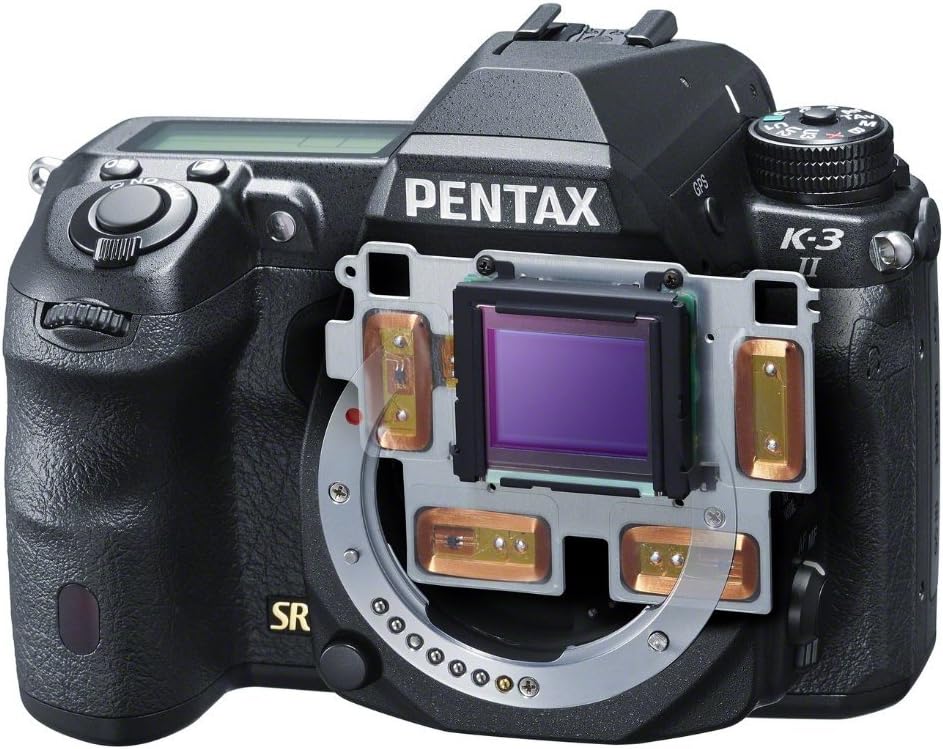
Description: This image provides an internal view of the Pentax K-3II, specifically highlighting the image sensor and the mechanical components responsible for its sensor-shift image stabilization and Pixel Shift Resolution functions. The sensor is centrally located, surrounded by the stabilization frame.
5.6. Built-in GPS and Astro Tracer
The K-3II includes a built-in GPS module and an Astro Tracer function. The Astro Tracer works in conjunction with the camera's sensor-shift mechanism to track celestial bodies, allowing for sharp, un-streaked astrophotography without the need for an equatorial mount.
5.7. Video Recording
The camera supports Full HD (FHD 1080p) video recording in MPEG-4 and H.264 formats. To start recording, press the dedicated video recording button.
5.8. Image Transfer
Images and videos can be transferred from the camera using the dual SD card slots, or by connecting the camera directly to a computer via USB or HDMI.
6. Maintenance
6.1. Cleaning the Camera Body and Lens
- Use a soft, lint-free cloth to wipe the camera body. For stubborn dirt, slightly dampen the cloth with water.
- For the lens, use a lens brush to remove dust, then gently wipe with a lens cleaning cloth and lens cleaning solution.
6.2. Sensor Cleaning
If dust spots appear on your images, the image sensor may need cleaning. Use the camera's built-in sensor cleaning function or consult a professional for manual cleaning.
6.3. Storage
When not in use for extended periods, store the camera in a cool, dry place away from direct sunlight and high humidity. Remove the battery before storage.
7. Troubleshooting
This section provides solutions to common issues you might encounter.
| Problem | Possible Cause | Solution |
|---|---|---|
| Camera does not power on. | Battery is depleted or incorrectly inserted. | Charge the battery fully and ensure it is inserted correctly. |
| Images are blurry. | Camera shake, incorrect focus, or dirty lens. | Use a faster shutter speed, ensure proper focus, or clean the lens. Activate image stabilization. |
| Autofocus is slow or inaccurate. | Low light conditions, low contrast subject, or lens compatibility. | Ensure sufficient light, focus on a high-contrast area, or check lens compatibility. |
| Memory card error. | Card is full, corrupted, or incompatible. | Delete unnecessary files, format the card (this will erase all data), or try a different compatible card. |
8. Specifications
Key technical specifications for the Pentax K-3II DSLR camera:
| Feature | Specification |
|---|---|
| Model Name | Pentax K-3II |
| Image Sensor | 24.3 MP APS-C CMOS |
| ISO Sensitivity | 100-51200 |
| Shutter Speed | 1/8000 to 30 seconds |
| Continuous Shooting | Approx. 8.3 fps |
| Autofocus System | SAFOX 11, 27 points (25 cross-type) |
| Image Stabilization | Sensor-shift type |
| Display | 3.2-inch LCD, 1,037,000 dots |
| Video Resolution | FHD 1080p (MPEG-4, H.264) |
| Storage Media | Dual SD/SDHC/SDXC slots |
| Connectivity | USB, HDMI |
| Battery Type | D-LI90 Lithium-Ion |
| Battery Life (CIPA) | Approx. 720 shots |
| Weight (Body Only) | Approx. 1.76 Pounds (798g) |
| Dimensions (W x H x D) | Approx. 5.16 x 3.94 x 3.03 inches (131.5 x 100 x 77.5 mm) |
9. Warranty and Support
9.1. Warranty Information
The Pentax K-3II DSLR camera typically comes with a 1-year limited warranty from the manufacturer, covering defects in materials and workmanship under normal use. Please retain your proof of purchase for warranty claims. Warranty terms may vary by region and retailer. For detailed warranty information, refer to the warranty card included in your product packaging or visit the official Pentax website.
9.2. Customer Support
For technical assistance, service, or further inquiries, please contact Pentax customer support through their official website or the contact information provided in your product documentation. You can also visit the Pentax Store on Amazon for additional product information and resources.
Related documentsK-3II


Ask a question about this manual
Ask about setup, troubleshooting, compatibility, parts, safety, or missing instructions. Manuals+ will review the question and use this page’s manual context to help answer it.