
Motorola Solutions T460
Motorola Solutions Talkabout T460 Two-Way Radio User Manual
Model: T460
Introduction
The Motorola Solutions Talkabout T460 is a rechargeable two-way radio designed for reliable communication. This manual provides detailed instructions for setting up, operating, and maintaining your T460 radios, ensuring optimal performance and longevity.
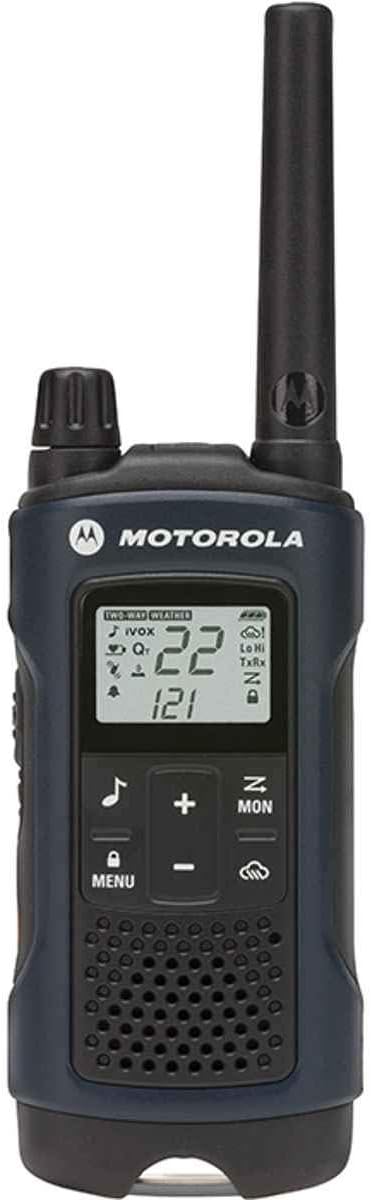
Image: Front view of the Motorola Solutions Talkabout T460 two-way radio, dark blue in color, displaying its screen and control buttons.
What's in the Box
Your Motorola Solutions Talkabout T460 package includes the following items:
- 2 Radios
- 2 Micro-USB Wall Charging Cables
- 2 Rechargeable Battery Packs
- 2 Belt Clips
- User Guide and Accessory Sheet (English and French)
Setup
1. Battery Installation
The T460 radios can operate using either the supplied rechargeable NiMH battery pack or three AA alkaline batteries. For optimal performance, use the rechargeable battery pack.
- Ensure the radio is turned off.
- Locate the battery compartment cover on the back of the radio.
- Press down on the tab and slide the cover off.
- Insert the rechargeable NiMH battery pack with the contacts facing the radio's contacts, or insert three AA alkaline batteries, observing the polarity markings (+/-).
- Replace the battery compartment cover, ensuring it clicks securely into place.
2. Charging the Battery
Charge the rechargeable battery pack before first use to ensure full capacity.
- Connect the micro-USB wall charging cable to the charging port on the side of the radio.
- Plug the other end of the charger into a standard wall outlet.
- The battery indicator on the radio display will show charging status. A full charge typically takes several hours.
- Once fully charged, disconnect the charger.
Note: The radio can be operated while charging, but charging time may be extended.
Operating Instructions
1. Power On/Off
- To turn on: Press and hold the MENU button until the radio powers on.
- To turn off: Press and hold the MENU button until the radio powers off.
2. Adjusting Volume
Use the + and - buttons on the front of the radio to adjust the listening volume.
3. Channel Selection
The T460 has 22 channels. To select a channel:
- Press the MENU button until the channel number flashes.
- Use the + or - buttons to select the desired channel.
- Press the MENU button again or wait a few seconds to confirm the selection.
4. Privacy Codes
The T460 supports 121 privacy codes (38 CTCSS codes and 83 DCS codes) to help reduce interference from other users on the same channel.
- After selecting a channel, press the MENU button twice until the privacy code number flashes.
- Use the + or - buttons to select the desired privacy code.
- Press the MENU button again or wait a few seconds to confirm.
Note: Both radios must be set to the same channel and privacy code to communicate.
5. Push-To-Talk (PTT) and Power Boost
- To transmit: Press and hold the PTT button on the side of the radio and speak clearly into the microphone. Release the button to listen.
- PTT Power Boost: The T460 features a PTT power boost function. A quick double-press of the PTT button will temporarily increase the transmission power, extending range when needed. This also helps conserve battery life when high power is not required.
6. Weather Alerts
Stay informed about real-time weather conditions and alerts.
- Press the Weather button (labeled with a cloud icon) to access weather channels.
- Use the + or - buttons to select a weather channel.
- To activate weather alerts, navigate through the menu to the weather alert setting and enable it. The radio will then alert you to severe weather broadcasts.
7. VOX/iVOX (Hands-Free Operation)
VOX (Voice Operated eXchange) allows hands-free transmission when using a compatible headset. iVOX enables hands-free operation without a headset.
- Press the MENU button until the VOX/iVOX icon appears.
- Use the + or - buttons to select the sensitivity level (1-3, with 3 being most sensitive).
- Press MENU to confirm. When enabled, the radio will transmit when you speak into the microphone.
8. Call Tone
Send an audible alert to other radios in your group.
- Press the Call Tone button (labeled with a musical note icon) to send a distinct alert tone.
9. Keypad Lock
To prevent accidental changes to your settings:
- To lock: Press and hold the Lock button (labeled with a padlock icon) until the lock icon appears on the display.
- To unlock: Press and hold the Lock button again until the lock icon disappears.
10. Scan Feature
The scan feature allows you to monitor all channels for activity.
- To activate scan: Press the Scan button (often combined with the MON button or a dedicated scan function in the menu). The radio will cycle through channels until activity is detected.
- To stop scan: Press the Scan button again.
11. Monitor Feature
The monitor feature allows you to listen to weak signals on the current channel.
- To activate monitor: Press and hold the MON button. Release to stop.
Key Features
The Motorola Solutions Talkabout T460 offers several features to enhance your communication experience:
- Push-To-Talk (PTT) Power Boost: Extends transmission range by increasing transmitter power output, while also conserving battery life when not needed.
- Weather Alerts: Provides real-time weather conditions and alerts, ensuring preparedness for unexpected changes.
- Extensive Channel Combinations: Features 22 channels and 121 privacy codes, offering 2,662 combinations for clear communication.
- Hands-Free Communication: iVOX/VOX functionality allows for voice-activated transmission.
- Water Resistance: Designed to be water-resistant, suitable for outdoor use.
Maintenance
Care and Cleaning
- Wipe the radio with a soft, damp cloth. Do not use abrasive cleaners or solvents.
- Do not immerse the radio in water, despite its water-resistant design.
- Keep the charging port free of dust and debris.
Battery Care
- Store batteries in a cool, dry place when not in use.
- Avoid overcharging or completely draining rechargeable batteries frequently to prolong their lifespan.
- If using AA alkaline batteries, remove them if the radio will not be used for an extended period to prevent leakage.
Troubleshooting
| Problem | Possible Solution |
|---|---|
| Radio does not turn on. |
|
| Cannot communicate with other radios. |
|
| Buttons are unresponsive. |
|
| Poor audio quality or static. |
|
Specifications
| Feature | Detail |
|---|---|
| Model Number | T460 |
| Dimensions (H x W x D) | 7.54 x 2.26 x 1.37 inches (19.15 x 5.74 x 3.48 cm) |
| Item Weight | 6.7 ounces (190 grams) |
| Number of Channels | 22 FRS/GMRS Channels |
| Privacy Codes | 121 (38 CTCSS, 83 DCS) |
| Frequency Range | 300 MHz - 3 GHz (FRS/GMRS) |
| Maximum Talking Range | Up to 35 Miles (Line of Sight) |
| Power Source | Rechargeable NiMH Battery Pack (included) or 3 AA Alkaline Batteries (included) |
| Special Features | Rechargeable, Weather Alerts, PTT Power Boost, iVOX/VOX, Keypad Lock |
| Water Resistance Level | Waterproof (Note: Product description says "Waterproof", but reviews suggest "water-resistant". User should refer to official product documentation for exact IP rating.) |
| Color | Dark Blue |
Warranty and Support
For warranty information, technical support, or service inquiries regarding your Motorola Solutions Talkabout T460 radios, please refer to the warranty card included in your product packaging or visit the official Motorola Solutions website. Contact information for customer service is typically available on their support pages.
Related documentsT460


Ask a question about this manual
Ask about setup, troubleshooting, compatibility, parts, safety, or missing instructions. Manuals+ will review the question and use this page’s manual context to help answer it.