
Introduction
This manual provides essential information for the setup, operation, maintenance, and troubleshooting of your Samsung UN40EH5300 40-Inch 1080p 60Hz LED HDTV. Please read these instructions carefully before using your television to ensure proper and safe operation.
The Samsung UN40EH5300 offers a 40-inch 1080p display with a 60Hz refresh rate, providing clear picture quality. It features Smart Content, a Full Web Browser with built-in Wi-Fi, and AllShare Play for streaming content from other devices.
Setup
Follow these steps to set up your new Samsung LED HDTV.
- Unpacking: Carefully remove the TV and its components from the packaging. Ensure all items listed in the "What's in the Box" section are present.
- Stand Assembly: Attach the included stand to the television. Refer to the quick setup guide for detailed instructions on securing the stand.
- Placement: Place the TV on a stable, level surface or mount it on a wall using a compatible VESA wall mount (sold separately). Ensure adequate ventilation around the TV.
- Power Connection: Connect the power cord to the TV's power input, then plug it into a wall outlet.
- Connecting External Devices:
- HDMI: For high-definition devices like Blu-ray players, game consoles, or cable/satellite boxes, use HDMI cables.
- Antenna/Cable: Connect your antenna or cable TV coaxial cable to the ANT IN port.
- USB: Use the USB ports for connecting USB storage devices.
- Initial Setup: Power on the TV. The initial setup wizard will guide you through language selection, channel scanning, and network connection (Wi-Fi or Ethernet).
Front view of the Samsung UN40EH5300 LED HDTV with its stand.

Side profile of the Samsung UN40EH5300 LED HDTV, showing its slim design and connectivity ports.
Operating Instructions
Learn how to use the various features of your Samsung Smart TV.
- Basic TV Functions: Use the remote control to power on/off, adjust volume, change channels, and select input sources.
- Smart Hub: Access the Smart Hub by pressing the Smart Hub button on your remote. This platform provides access to a variety of apps, streaming services, and a full web browser.
- Built-in Wi-Fi: Your TV features built-in Wi-Fi for easy connection to your home network, enabling access to online content and Smart Hub features.
- AllShare Play: Stream content (photos, videos, music) from compatible devices like smartphones, tablets, or computers directly to your TV using AllShare Play.
- Skype Compatibility: The TV is compatible with Skype for video calls. A separate camera kit is required and sold separately.
- Full Web Browser: Navigate the internet directly from your TV using the integrated web browser.

The Samsung UN40EH5300 displaying content from Amazon Prime Video, demonstrating its smart TV capabilities.

A diagram illustrating the 36.5-inch width of the Samsung UN40EH5300 TV, providing a sense of scale next to a seated person.
Maintenance
Proper care ensures the longevity and performance of your television.
- Cleaning the Screen: Gently wipe the screen with a soft, dry microfiber cloth. For stubborn marks, slightly dampen the cloth with water or a specialized screen cleaner (do not spray directly onto the screen).
- Cleaning the Cabinet: Use a soft, dry cloth to clean the TV's cabinet. Avoid using abrasive cleaners or solvents.
- Software Updates: Periodically check for software updates through the TV's settings menu to ensure optimal performance and access to the latest features.
- Ventilation: Ensure the ventilation openings on the TV are not blocked to prevent overheating.
Troubleshooting
If you encounter issues with your TV, refer to the following common solutions.
- No Power:
- Check if the power cord is securely plugged into both the TV and the wall outlet.
- Ensure the wall outlet is functioning by plugging in another device.
- Try pressing the power button on the TV itself, not just the remote.
- No Picture/Sound:
- Verify the correct input source is selected (e.g., HDMI 1, TV).
- Check all cable connections between the TV and external devices.
- Ensure the volume is not muted or set to zero.
- Network Connection Issues:
- Restart your Wi-Fi router and modem.
- Go to the TV's network settings and re-enter your Wi-Fi password.
- If using a wired connection, ensure the Ethernet cable is securely connected.
- Remote Control Not Working:
- Replace the batteries in the remote control.
- Ensure there are no obstructions between the remote and the TV's IR sensor.
Specifications
Key technical specifications for the Samsung UN40EH5300 LED HDTV.
| Brand | Samsung |
| Model Number | UN40EH5300 |
| Screen Size | 40 Inches |
| Display Technology | LED |
| Resolution | 1080p |
| Refresh Rate | 60 Hz |
| Aspect Ratio | 16:9 |
| Connectivity Technology | WiFi |
| Supported Internet Services | Browser, Skype |
| Product Dimensions | 23.9 x 9.8 x 36.5 inches |
| Item Weight | 24.03 Pounds |
| Color | Black |
| Included Components | Stand, TV |

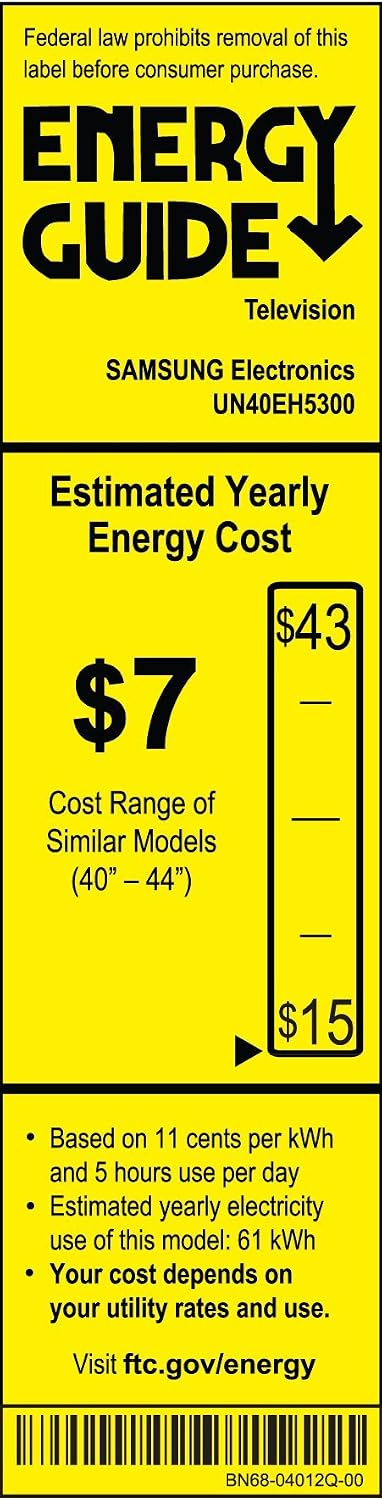
The Energy Guide label for the Samsung UN40EH5300 television, showing an estimated yearly energy cost of $7.
Warranty Information
This product is a Certified Refurbished unit, tested and certified by Samsung to look and work like new. It includes all original accessories and is backed by a 90-day warranty from the date of purchase. Please retain your proof of purchase for warranty claims.
Support
For further assistance, technical support, or warranty service, please contact Samsung Customer Service. You can find contact information on the official Samsung website or through the documentation included with your product.
Samsung Official Website: www.samsung.com


