
Introduction
This manual provides detailed instructions for the setup, operation, maintenance, and troubleshooting of your Sharp HT-SB60 High-Powered Soundbar System. Please read this manual thoroughly before using the product to ensure proper and safe operation.
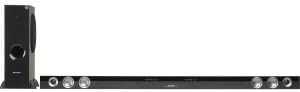
This image displays the Sharp HT-SB60 soundbar and its accompanying wireless subwoofer. The soundbar is a long, slender black unit designed to sit horizontally, featuring speaker grilles and controls on its front. To the left, the tall, black wireless subwoofer stands vertically, indicating its role in providing deep bass.
Setup
Unpacking
Carefully remove all components from the packaging. Ensure all items listed below are present:
- Sharp HT-SB60 Soundbar
- Wireless Subwoofer
- Power Cords (for soundbar and subwoofer)
- Remote Control (with batteries)
- Audio Cables (e.g., Optical, RCA - specific types may vary)
Placement
- Soundbar: Place the soundbar horizontally on a stable surface directly in front of your television, ensuring it does not obstruct the TV's remote sensor.
- Wireless Subwoofer: Position the wireless subwoofer on the floor, preferably in a corner or near a wall, to enhance bass response. Ensure it is within wireless range of the soundbar.
Connections
- Power: Connect the power cords to the soundbar and subwoofer, then plug them into a wall outlet.
- Audio Input: Connect your TV or other audio source to the soundbar using the appropriate audio cable (e.g., Optical, HDMI ARC, RCA). Refer to your TV's manual for compatible audio output ports.
- Subwoofer Pairing: The wireless subwoofer should automatically pair with the soundbar upon power-up. If pairing fails, refer to the troubleshooting section.
Operating Instructions
Basic Operation
- Power On/Off: Press the Power button on the soundbar or remote control.
- Volume Control: Use the Volume Up/Down buttons on the remote or soundbar.
- Input Selection: Press the Input button on the remote or soundbar to cycle through available audio sources (e.g., Optical, Bluetooth, AUX).
Bluetooth Pairing
- Press the Bluetooth button on the remote or soundbar to enter Bluetooth pairing mode. The indicator light will flash.
- On your mobile device, enable Bluetooth and search for available devices.
- Select "Sharp HT-SB60" from the list of devices.
- Once connected, the indicator light will become solid. You can now play audio from your device through the soundbar.
Sound Modes
The HT-SB60 may offer various sound modes to optimize audio for different content types. Refer to your remote control for specific buttons (e.g., Movie, Music, News) to switch between modes.
Maintenance
To ensure the longevity and optimal performance of your soundbar system, follow these maintenance guidelines:
- Cleaning: Use a soft, dry cloth to wipe the surfaces of the soundbar and subwoofer. Do not use liquid cleaners or abrasive materials.
- Ventilation: Ensure adequate ventilation around both units to prevent overheating. Do not block any vents.
- Storage: If storing the unit for an extended period, disconnect it from power and store it in a cool, dry place.
Troubleshooting
If you encounter issues with your Sharp HT-SB60 system, refer to the table below for common problems and solutions.
| Problem | Possible Cause | Solution |
|---|---|---|
| No power | Power cord not connected; outlet not active | Ensure power cords are securely plugged into the soundbar/subwoofer and a working wall outlet. |
| No sound | Incorrect input selected; volume too low; audio cable loose/damaged | Select the correct input source. Increase volume. Check audio cable connections. |
| Subwoofer not pairing | Out of range; interference; pairing issue | Ensure subwoofer is within 10 meters of the soundbar. Power cycle both units. Refer to manual for manual pairing steps if available. |
| Bluetooth connection unstable | Device too far; interference | Move Bluetooth device closer to the soundbar. Avoid obstacles between devices. |
Specifications
- Brand: Sharp
- Model: HT-SB60
- Speaker Type: Soundbar, Subwoofer
- Surround Sound Channel Configuration: 2.1
- Connectivity Technology: Wireless (Bluetooth)
- Power Source: Corded Electric
- Product Dimensions: 8.34 x 18.37 x 57.2 inches
- Item Weight: 29.8 pounds
- Speaker Size (Soundbar): Designed for 60-Inch & Larger TVs
Warranty and Support
Warranty Information
This Sharp HT-SB60 product is Certified Refurbished, tested, and certified by Sharp to look and function like new. It includes all original accessories and is backed by a 90-day warranty from the date of purchase.
Customer Support
For further assistance, technical support, or warranty claims, please contact Sharp customer service. Refer to the official Sharp website or product packaging for the most current contact information.


