
Introduction
This manual provides essential information for setting up, operating, and maintaining your TCL 32-Inch 720p LED TV (2015 Model). Please read it thoroughly before using your television to ensure proper function and safety. The TCL 32D2700 delivers premium picture quality and tremendous value in a sophisticated slim frame design, perfect for bringing entertainment to any space.

Image: Front view of the TCL 32-Inch 720p LED TV, showcasing its slim design and display.
What's in the Box
Upon opening the packaging, verify that all components are present:
- TCL 32-Inch 720p LED TV
- Remote Control
- Power Cord
- 2 AA Batteries (for remote control)
- Detachable TV Stand (2 pieces)
- Screws for Stand Assembly
- Quick Start Guide
- User Manual (this document)
Setup
Follow these steps to set up your new TCL television:
- Unpacking: Carefully remove the TV and all accessories from the packaging. Retain the packaging for future transport or storage.
- Attaching the Stand: Place the TV face down on a soft, clean surface to prevent screen damage. Align the two stand pieces with the corresponding slots on the bottom of the TV. Secure them with the provided screws using a Philips-head screwdriver.
- Placement: Position the TV on a stable, level surface or mount it on a wall using a compatible VESA mount (sold separately). Ensure adequate ventilation around the TV.
- Connecting Power: Connect the detachable power cord to the TV's power input, then plug the other end into a standard electrical outlet.
- Connecting Devices: Your TV features multiple input options. Connect your external devices (e.g., cable box, Blu-ray player, gaming console) to the appropriate ports.
- HDMI: Use HDMI cables for high-definition video and audio. The TV has 2 HDMI inputs.
- USB: Connect USB devices for media playback (1 USB input).
- RF: For antenna or cable connection.
- Composite & Component (shared): For older devices.
- Digital Audio Out (coaxial): For connecting to external audio systems.
- Initial Power On: Insert the included AA batteries into the remote control. Press the Power button on the remote or the TV to turn it on. Follow any on-screen prompts for initial setup.

Image: Diagram illustrating the dimensions of the TCL 32-Inch TV, showing its width (29.0 in / 73 cm) and height (17.0 in).
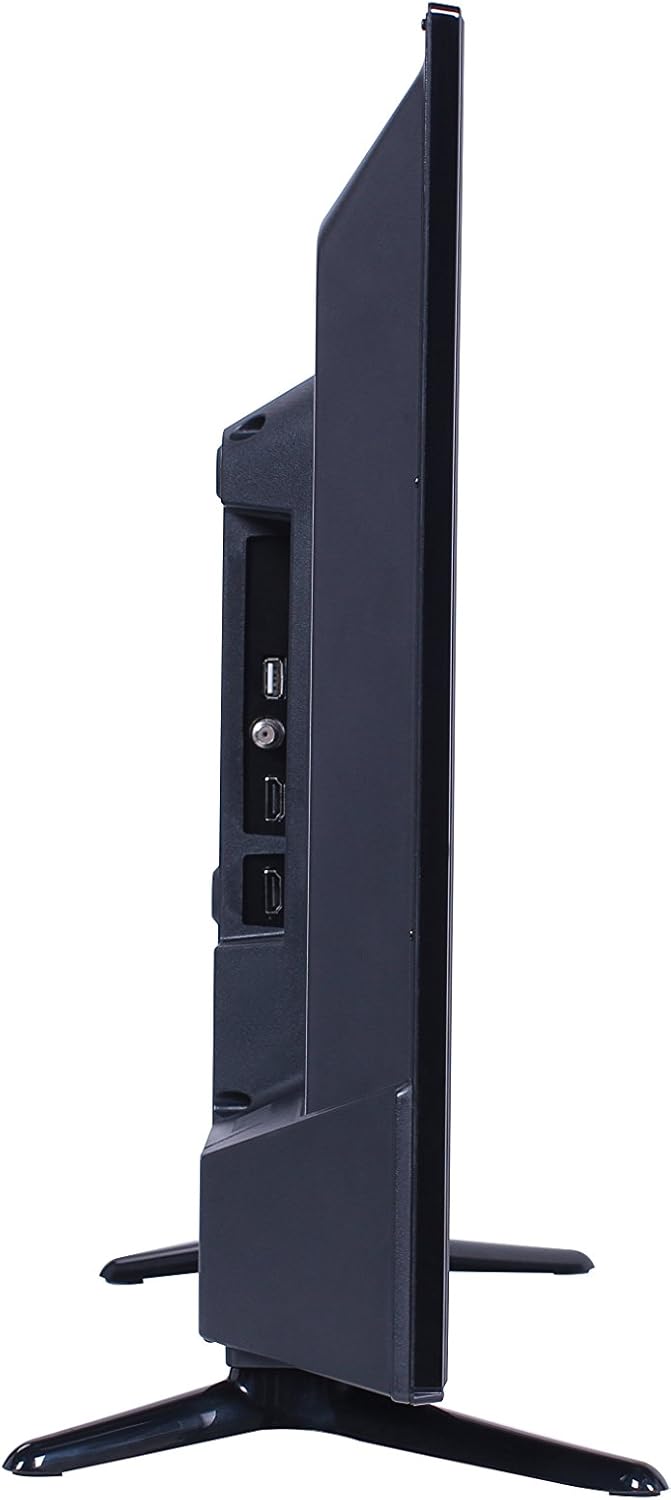
Image: Side view of the TCL 32-Inch TV, highlighting the various input ports available on the back panel.
Operating Your TV
This section covers the basic operation of your TCL TV using the provided remote control.
- Power On/Off: Press the POWER button on the remote to turn the TV on or off.
- Input Selection: Press the INPUT button to cycle through available input sources (HDMI1, HDMI2, USB, AV, etc.).
- Volume Control: Use the VOL +/- buttons to adjust the volume level.
- Channel Selection: Use the CH +/- buttons to change channels when watching broadcast TV.
- Menu Navigation: Use the arrow buttons (UP, DOWN, LEFT, RIGHT) and the OK/ENTER button to navigate through on-screen menus and confirm selections.
- Picture and Sound Settings: Access the TV's menu to customize picture modes (e.g., Standard, Movie, Vivid) and sound settings (e.g., Bass, Treble, Balance).
Maintenance
Proper care and maintenance will extend the life of your television.
- Cleaning the Screen: Gently wipe the screen with a soft, lint-free cloth. For stubborn marks, dampen the cloth with a small amount of screen cleaner specifically designed for electronics. Do not spray cleaner directly onto the screen.
- Cleaning the Cabinet: Use a soft, dry cloth to wipe the TV cabinet. Avoid using abrasive cleaners or solvents.
- Ventilation: Ensure that the ventilation openings on the back of the TV are not blocked. Do not place the TV in an enclosed space without proper airflow.
- Power Cord: Regularly check the power cord for any damage. If damaged, discontinue use and contact customer support.
- Storage: If storing the TV for an extended period, disconnect it from power and store it in a cool, dry place, preferably in its original packaging.
Troubleshooting
If you encounter issues with your TV, refer to the following common problems and solutions before seeking professional service.
| Problem | Possible Cause | Solution |
|---|---|---|
| No Power | Power cord disconnected; Power outlet issue; Remote batteries dead. | Ensure power cord is securely plugged in. Test the outlet with another device. Replace remote batteries. |
| No Picture, But Sound is Present | Incorrect input selected; Device not powered on or connected properly. | Press the INPUT button to select the correct source. Check device power and cable connections. |
| No Sound, But Picture is Present | Volume muted or too low; External audio system issue. | Press the MUTE button or increase volume. Check connections to external audio systems. |
| Poor Picture Quality | Weak signal; Incorrect picture settings; Damaged cable. | Check antenna/cable connection. Adjust picture settings (e.g., brightness, contrast). Try a different cable. |
| Remote Control Not Working | Dead batteries; Obstruction between remote and TV; Incorrect remote mode. | Replace batteries. Remove any obstructions. Ensure remote is pointed at the TV's IR sensor. |
Specifications
Key technical specifications for the TCL 32D2700 32-Inch 720p LED TV:
| Feature | Specification |
|---|---|
| Brand | TCL |
| Model Number | 32D2700 |
| Screen Size | 32 Inches |
| Display Technology | LED (Full Array Backlight) |
| Resolution | 720p |
| Refresh Rate | 60Hz (Native); 120Hz (Effective) |
| Aspect Ratio | 1.77:1 |
| Dimensions (without stand) | 29" x 17" x 3.2" (W x H x D) |
| Dimensions (with stand) | 29" x 18.7" x 7.8" (W x H x D) |
| Item Weight | 10.58 Pounds |
| Inputs | 2 HDMI, 1 USB, RF, Composite & Component (shared), Digital Audio Out (coaxial) |
| Speaker Type | Built-In |
| Wattage | 45 watts |
| Energy Efficiency | Energy Star Certified |
Warranty and Support
For product warranty information, please visit the manufacturer's official website. Free 30 days Tech support is available after delivery.
For further assistance or technical support, please refer to the contact information provided on the TCL official website or your purchase documentation. Always provide your TV's model number (32D2700) and serial number when contacting support.
Legal Disclaimer: *For product warranty please visit manufacturer website. *Free 30 days Tech support after delivery.


