
RADARCAN R-302
RADARCAN® R-302 Anti-Pigeon and Other Birds Pro User Manual
Model: R-302
Product Overview
The RADARCAN® R-302 Anti-Pigeon and Other Birds Pro is designed to effectively deter pigeons and other birds from specific outdoor areas. This device utilizes advanced radar and sound technology to create an unwelcoming environment for birds, helping to keep your balconies, terraces, and other outdoor spaces clean and protected from bird-related issues. It operates by detecting approaching birds and emitting a deterrent sound, similar to shotgun shots, to prevent them from landing or perching.
This product is designed for ease of use, requiring no complex installation or ongoing maintenance. It is a chemical-free solution, ensuring safety for people and domestic animals.
Key Features
- REPERTUM Technology (Radar and Sound): Equipped with radar to detect birds (pigeons and other birds of equal or larger size) in flight as they approach the coverage area. Upon detection, it emits a sound (similar to 3 shots) that immediately prevents birds from approaching and perching, thus keeping the area protected.
- Easy to Use: Requires no installation or maintenance. Simply plug it into a power outlet for constant protection. Features controls to adjust radar sensitivity (detection distance) and deterrent volume.
- Versatile Application: Ideal for use on rooftops, terraces, patios, bell towers, facades, monuments, boats, and similar outdoor locations.
- Safe and Harmless: Completely harmless to people and domestic animals, offering a chemical-free solution for bird deterrence.
- Wide Coverage: Offers a detection range of up to 10 linear meters and a maximum action area of 300 m² outdoors.
Setup and Installation
The RADARCAN® R-302 is designed for simple setup. No complex installation is required.
- Unpack the Device: Carefully remove the RADARCAN® R-302 unit from its packaging.
- Choose a Location: Select an outdoor location where bird deterrence is needed, such as a balcony, terrace, or patio. Ensure the front of the device (where the radar is located) faces the area you wish to protect. The device has a detection angle of 140° from the front.
- Power Connection: Plug the power adapter into the DC 12V power intake jack located on the bottom of the device. Then, plug the adapter into a standard 230V AC power outlet.
- Mounting (Optional): The device can be placed on a flat surface or mounted to a wall. For wall mounting, use a rounded head-screw (Ø5-7mm) with the designated hole on the bottom of the device. Ensure the device is securely fastened and positioned to maximize coverage.

Figure 1: Illustration of power supply connection and optional wall mounting using a screw. The power intake jack is clearly visible on the bottom of the unit.
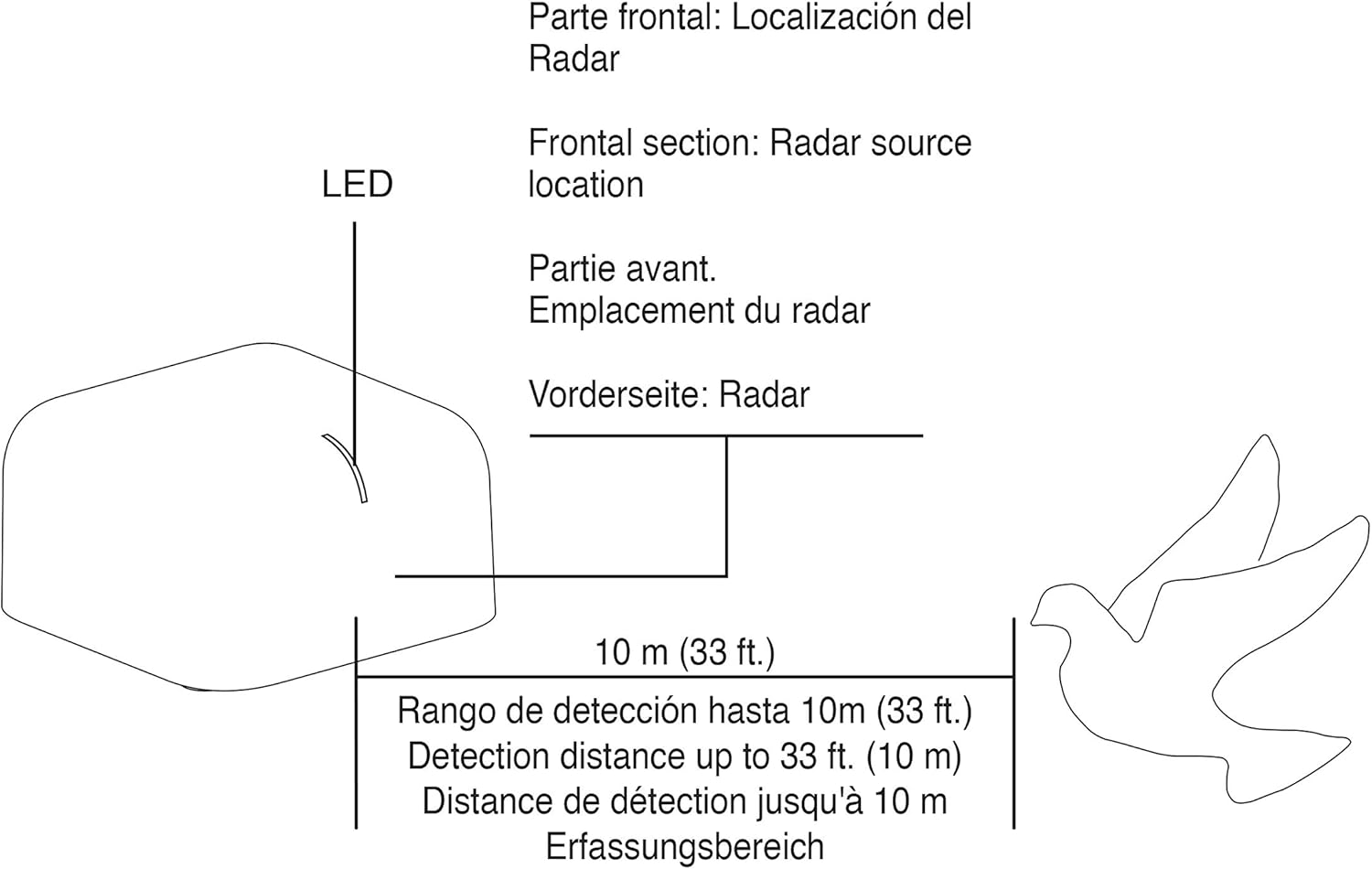
Figure 2: Diagram showing the frontal section of the device where the radar is located, and its detection range of up to 10 meters (33 ft). The LED indicator is also shown.
Operating Instructions
Once the device is powered on, it will begin operating automatically. The RADARCAN® R-302 features two adjustable controls on its bottom surface:

Figure 3: Detailed view of the bottom panel, highlighting the 'DETECT' and 'VOL' regulators, the power intake jack, and the central speaker.
- DETECT Regulator (Sensitivity): This control adjusts the sensitivity of the radar, which in turn controls the detection distance for approaching birds.
- Turn the knob towards '+' for greater detection distance.
- Turn the knob towards '-' for shorter detection distance.
- VOL Regulator (Volume): This control adjusts the volume of the deterrent sound (the "shot" sound).
- Turn the knob towards '+' for a louder sound.
- Turn the knob towards '-' for a quieter sound.
The device will automatically activate its repellency system when birds are detected within the set range, emitting the deterrent sound to keep them away.
Maintenance
The RADARCAN® R-302 is designed for minimal maintenance. According to the manufacturer, it requires no specific maintenance or refills. Keep the device clean by wiping it with a dry cloth if necessary. Ensure the speaker and radar areas are free from obstructions like dirt or debris to maintain optimal performance.
Troubleshooting
If you experience issues with your RADARCAN® R-302, consider the following:
- Device Not Emitting Sound:
- Check if the device is properly plugged into a working power outlet.
- Ensure the 'VOL' regulator is not set to its minimum position.
- Verify that the 'DETECT' regulator is set appropriately for the desired detection range. The device only emits sound when birds are detected.
- Birds Still Present:
- Adjust the 'DETECT' regulator to increase sensitivity and detection range.
- Adjust the 'VOL' regulator to increase the deterrent sound volume.
- Ensure the device's front (radar area) is facing the primary direction from which birds approach and is not obstructed.
- Consider the coverage area (300 m² max outdoor) and detection range (10m linear). For larger areas, multiple units might be required.
- Note that while highly effective, some persistent birds may require a period of adaptation to the deterrent.
- Sound is Too Loud/Disturbing:
- Decrease the volume using the 'VOL' regulator.
- Adjust the 'DETECT' sensitivity if the sound is triggering too frequently due to non-bird movements.
For further assistance, please refer to the Warranty and Support section.
Specifications
| Feature | Detail |
|---|---|
| Model Number | R-302 |
| Technology | REPERTUM (Radar and Sound) |
| Detection Range | Up to 10 linear meters (33 ft) |
| Detection Angle | 140° from the front |
| Maximum Coverage Area | 300 m² (Outdoor) |
| Power Supply | 230V AC |
| Power Consumption | 7 W |
| Dimensions (L x W x H) | 120 x 120 x 65 mm |
| Weight | 527 g |
| Chemicals | None |
| Refills | Not required |
| Manufacturer | Radarcan |
| Country of Design & Manufacture | Spain |
Warranty and Support
The RADARCAN® R-302 comes with up to a 5-year warranty. RADARCAN provides dedicated customer service and support 24 hours a day, 365 days a year.
For any inquiries, technical support, or warranty claims, please contact RADARCAN customer service directly. Refer to the official RADARCAN website or product packaging for the most current contact information.
You can also visit the RADARCAN Store on Amazon for more information and product details.
Ask a question about this manual
Ask about setup, troubleshooting, compatibility, parts, safety, or missing instructions. Manuals+ will review the question and use this page’s manual context to help answer it.