
Introduction
Thank you for choosing the FILA FILACTIVE 38-099-001 Digital Quartz Watch. This manual provides detailed instructions for the proper setup, operation, and maintenance of your new timepiece. Please read this manual thoroughly to ensure optimal performance and longevity of your watch.
Product Overview
The FILA FILACTIVE 38-099-001 is a versatile digital quartz watch designed for everyday use. It features a durable plastic case and strap, a clear digital display, and several useful functions including a chronograph and backlight.
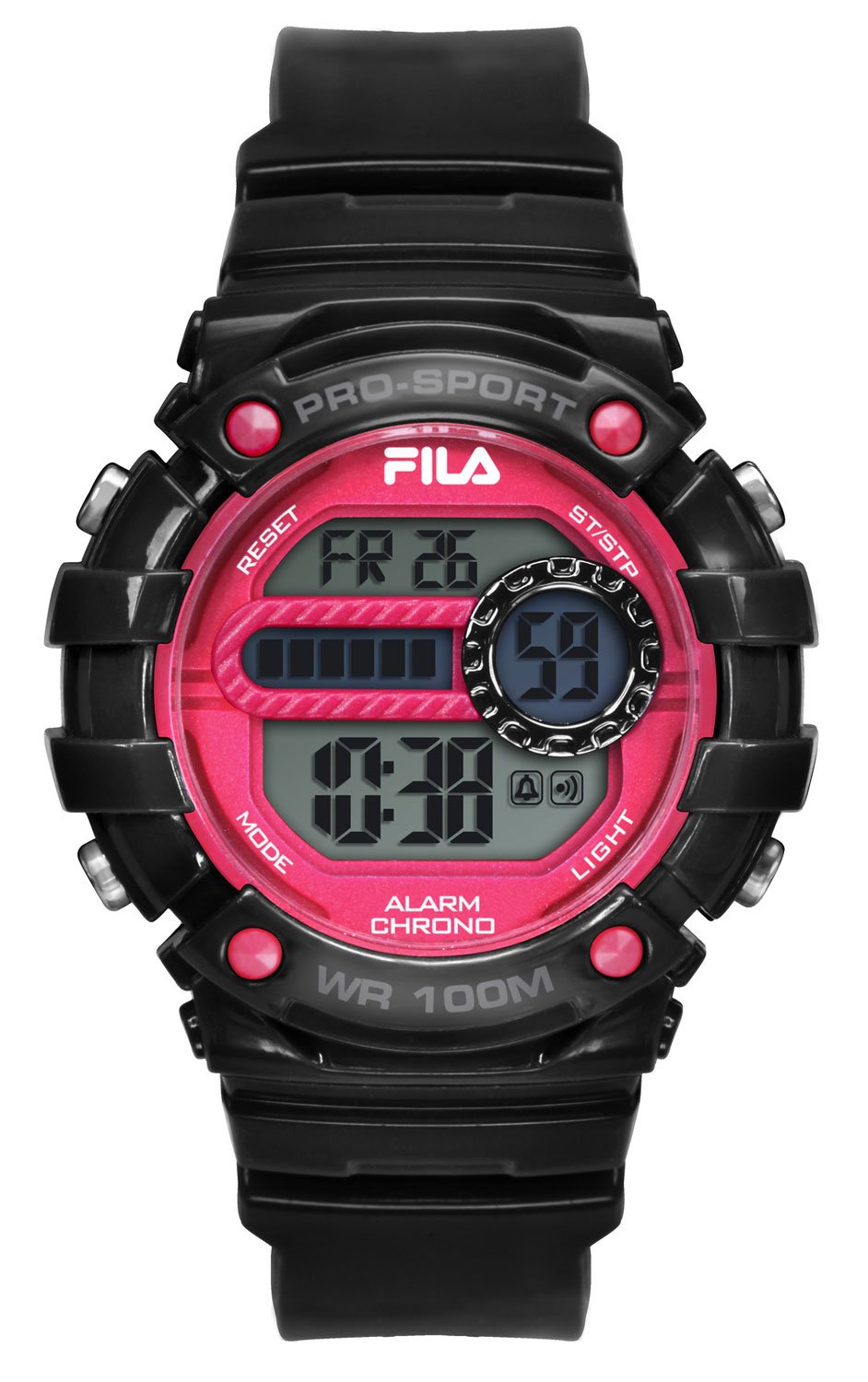
Image of the FILA FILACTIVE 38-099-001 digital quartz watch, showing its black and red design with a digital display.
Key Components:
- Digital Display: Shows time, date, and other functions.
- Function Buttons: Typically located on the sides of the watch for setting and operating various modes. (Specific button functions will be detailed in the 'Operating Instructions' section).
- Plastic Case: Durable and lightweight housing for the watch movement.
- Plastic Strap: Comfortable and adjustable for secure wear, with a pin buckle clasp.
Setup
Initial Activation:
- Upon receiving your watch, check for any protective films on the display or case back. Carefully remove them.
- The watch may be in a power-saving mode or require initial time setting.
Setting the Time and Date:
While specific button labels may vary, the general procedure for setting digital watches is as follows:
- Locate the "MODE" or "SET" button (usually on the left side). Press it repeatedly until the time setting mode is activated (digits will flash).
- Use the "ADJUST" or "START" button (usually on the right side) to increase or decrease the flashing digits (hours, minutes, seconds).
- Press the "MODE" or "SET" button again to cycle through hours, minutes, date, month, and day settings.
- Once all settings are correct, press the "MODE" or "SET" button one last time to exit the setting mode.
Operating Instructions
Time Display:
- In normal timekeeping mode, the watch displays hours, minutes, and seconds. It may also show the day of the week and date.
Chronograph (Stopwatch) Function:
- Press the "MODE" button until the chronograph mode is displayed (often indicated by "ST" or "CHRO").
- Press the "START" button to begin timing.
- Press the "STOP" button to pause the timing. Press "START" again to resume.
- Press the "RESET" button (often the same as "STOP" or a dedicated button) to clear the chronograph to zero.
Backlight:
- To illuminate the display in low-light conditions, press the "LIGHT" button (usually located on the top left or right side). The backlight will typically stay on for a few seconds.
Water Resistance (100 Meters):
- Your watch is water-resistant up to 100 meters (10 ATM). This means it is suitable for swimming, snorkeling, and showering.
- Important: Do not operate any buttons while the watch is submerged in water or wet, as this can compromise the water resistance seal.
- Avoid exposing the watch to hot water or steam, as this can also affect the seals.
Features
- Sporty and Elegant Design: Combines athletic aesthetics with a refined look.
- Chronograph: Allows for precise timing of events.
- Stopwatch Function: Measures elapsed time with accuracy.
- Digital Display: Clear and easy-to-read time and function display.
- Backlight: Provides illumination for visibility in dark environments.
- Quartz Movement: Ensures accurate timekeeping.
- 100 Meter Water Resistance: Suitable for various water activities.
Maintenance
Cleaning:
- Wipe the watch case and strap regularly with a soft, dry cloth.
- For stubborn dirt, use a slightly damp cloth with mild soap, then wipe dry immediately.
- Avoid using harsh chemicals, solvents, or abrasive cleaners, as these can damage the watch's finish.
Battery Replacement:
- The watch is powered by a quartz movement, which requires a battery.
- When the display becomes dim or the watch stops functioning, the battery may need replacement.
- It is recommended to have the battery replaced by a qualified watch technician to ensure the water resistance seal is properly maintained.
Storage:
- Store your watch in a cool, dry place away from direct sunlight and extreme temperatures.
- Avoid exposing the watch to strong magnetic fields, which can affect timekeeping accuracy.
Troubleshooting
| Problem | Possible Cause | Solution |
|---|---|---|
| Display is blank or dim. | Low or dead battery. | Replace the battery (recommended by a professional). |
| Time is incorrect. | Time not set correctly or accidental button press. | Refer to the "Setting the Time and Date" section to reset the time. |
| Buttons are unresponsive. | Watch may be in a specific mode, or internal issue. | Try pressing the "MODE" button repeatedly to cycle through modes. If issue persists, consult a technician. |
| Condensation inside the display. | Water resistance compromised. | Stop using the watch immediately and take it to a watch repair specialist. |
Specifications
| Model Number: | 38-099-001 |
| Brand: | FILA |
| Display Type: | Digital |
| Movement Type: | Quartz |
| Case Material: | Plastic |
| Band Material: | Plastic |
| Dial Window Material: | Acrylic |
| Case Diameter: | 40 mm |
| Case Thickness: | 14 mm |
| Water Resistance Depth: | 100 Meters (10 ATM) |
| Clasp Type: | Pin Buckle |
| Special Features: | Chronograph, Backlight |
| Color (Band/Dial): | Black / Black |
Warranty and Support
For warranty information and customer support, please refer to the documentation provided at the time of purchase or contact your retailer. Specific warranty terms and conditions may vary by region and retailer.
For further assistance or technical inquiries, please visit the official FILA website or contact their customer service department.