
Brecknell 816965007479
Brecknell ElectroSamson Digital Hand-Held Scale User Manual
Model: 816965007479
1. Introduction
The Brecknell ElectroSamson Digital Hand-Held Scale is designed for accurate and convenient weighing in various applications. This modern digital scale combines the functionality of a traditional hanging balance with the precision of digital technology. It is suitable for tasks such as sports fishing, poultry weighing, seed and animal feed preparation, and other general weighing needs up to 22 lb (10 kg).
2. Safety Information
- Do not overload the scale beyond its maximum capacity of 22 lb (10 kg).
- Avoid dropping the scale or subjecting it to severe impacts.
- Keep the scale away from water and extreme temperatures.
- Ensure the item being weighed is securely attached to the hook to prevent accidents.
- Use only the specified 9V alkaline battery.
- Do not attempt to disassemble or repair the scale yourself. Contact qualified personnel for service.
3. Package Contents
Verify that all the following items are included in your package:
- Brecknell ElectroSamson Digital Hand-Held Scale
- S hook
- Metal bar
- Padded carrying pouch with belt clip
- 9V alkaline battery

Figure 1: The Brecknell ElectroSamson Digital Hand-Held Scale, showing the main unit with its S-hook and weighing hook.
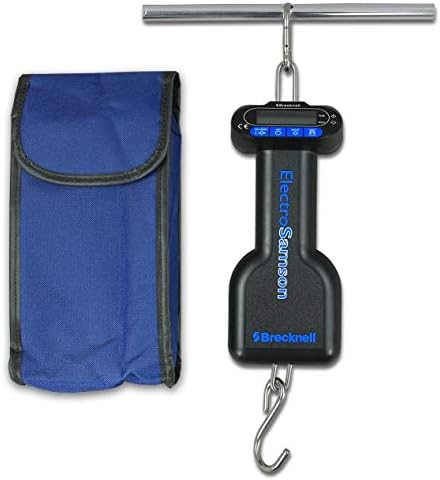
Figure 2: The Brecknell ElectroSamson Digital Hand-Held Scale alongside its protective padded carrying pouch.
4. Setup
4.1 Battery Installation
- Locate the battery compartment cover on the back of the scale.
- Open the cover.
- Insert the included 9V alkaline battery, ensuring correct polarity (+/-).
- Close the battery compartment cover securely.
4.2 Assembly
Attach the S hook to the top loop of the scale. The metal bar can be used in conjunction with the S hook for certain applications or as an alternative hanging point.
5. Operating Instructions
5.1 Power On/Off
- To power on the scale, press the ON/OFF button. The LCD display will illuminate.
- To power off the scale, press and hold the ON/OFF button until the display turns off. The scale also features an auto-off function to conserve battery power.
5.2 Unit Conversion
The scale supports weighing in pounds (lb) and kilograms (kg).
- With the scale powered on, press the UNIT button to cycle between "lb" and "kg". The selected unit will be displayed on the LCD.
5.3 Tare Function
The tare function allows you to subtract the weight of a container or attachment, so only the net weight of the item is measured. The scale also features a memory tare function that retains the tare value even after power off.
- Hang the empty container or attachment onto the weighing hook.
- Wait for the display to stabilize.
- Press the TARE button. The display will reset to zero.
- Place the item to be weighed into the container. The display will show the net weight of the item.
- To clear the tare, remove all items from the hook and press the TARE button again.
5.4 Hold Feature
The "Hold" feature is useful for weighing heavier or unstable loads, allowing a single person to operate the scale and record the reading.
- Hang the item to be weighed onto the hook.
- Once the weight stabilizes, the scale will automatically "hold" the reading on the display. A "HOLD" indicator may appear.
- You can then remove the item, and the weight will remain displayed until cleared or the scale powers off.
5.5 Weighing Procedure
- Ensure the scale is powered on and set to the desired unit (lb or kg).
- If using a container, perform the tare function as described above.
- Securely attach the item to be weighed to the bottom hook of the scale.
- Lift the scale by its top S hook or handle, ensuring the item hangs freely and is not touching any surfaces.
- Wait for the display to stabilize and show the weight. The hold function will typically activate.
- Record the measurement.
6. Maintenance
- Cleaning: Wipe the scale with a soft, damp cloth. Do not use abrasive cleaners or immerse the scale in water.
- Storage: When not in use, store the scale in its padded carrying pouch to protect it from dust and damage. Store in a dry place at room temperature.
- Battery Replacement: Replace the 9V battery when the low battery indicator appears on the display or if the scale fails to power on. Dispose of used batteries responsibly.
7. Troubleshooting
| Problem | Possible Cause | Solution |
|---|---|---|
| Scale does not power on. | Dead or incorrectly installed battery. | Check battery polarity. Replace with a new 9V alkaline battery. |
| Inaccurate readings. | Overload, unstable surface, or item not hanging freely. | Ensure weight is within capacity. Use on a stable surface. Confirm item is not touching anything. |
| Display shows "Err" or similar error. | Overload or internal error. | Remove excess weight. Power off and restart the scale. If error persists, contact support. |
8. Specifications
- Model: 816965007479
- Brand: Brecknell
- Capacity: 22 lb x 0.02 lb (10 kg x 0.01 kg)
- Units: lb, kg
- Readout Accuracy: 0.02 lb, 0.01 kg
- Display Type: LCD (Backlit Display)
- Power: 9V alkaline battery (included)
- Construction: Tough ABS case, Metal components
- Form Factor: Handheld
- Product Dimensions: 13 x 3.75 x 2.25 inches
- Item Weight: 2 pounds
9. Warranty and Support
For warranty information or technical support regarding your Brecknell ElectroSamson Digital Hand-Held Scale, please refer to the documentation provided with your purchase or visit the official Brecknell website. Contact details for customer service are typically available on the manufacturer's website.
Related documents816965007479

Ask a question about this manual
Ask about setup, troubleshooting, compatibility, parts, safety, or missing instructions. Manuals+ will review the question and use this page’s manual context to help answer it.