
1. Introduction
The WAGO 281-482 INS Comb Jump BAR is an essential accessory designed to establish common potential connections between adjacent terminal blocks. This component ensures reliable and efficient electrical bridging in various industrial and scientific applications, simplifying wiring and enhancing system integrity.
2. Safety Information
Adherence to safety guidelines is crucial during installation and operation. Failure to follow these instructions may result in injury or damage to equipment.
- Always disconnect all power sources from the electrical system before attempting any installation, maintenance, or inspection.
- Installation and wiring should only be performed by qualified and authorized personnel in accordance with local and national electrical codes.
- Ensure proper insulation and take precautions to prevent short circuits.
- Use appropriate tools for installation and avoid applying excessive force.
- Do not modify the product in any way. Use only as intended by the manufacturer.
3. Product Overview
The WAGO 281-482 is an insulated comb-style jumper bar featuring multiple pins. It is specifically engineered for quick and secure potential distribution across compatible WAGO terminal blocks, providing a robust and space-saving solution for electrical connections.
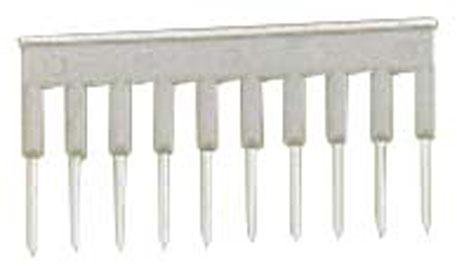
This image displays the WAGO 281-482 INS Comb Jump BAR, a multi-pin jumper used for electrical connections. It features a grey insulated body with ten metallic pins designed to insert into compatible terminal blocks.
4. Setup and Installation
Follow these steps to correctly install the WAGO 281-482 INS Comb Jump BAR:
- Power Disconnection: Before beginning, ensure that all power to the terminal block system is completely disconnected and locked out.
- Identify Connection Points: Determine the specific terminal blocks where potential distribution is required. The comb jump bar is designed to bridge adjacent terminals.
- Align the Jumper: Carefully align the metallic pins of the WAGO 281-482 INS Comb Jump BAR with the designated jumper slots on the terminal blocks.
- Insert Firmly: Apply even pressure to firmly insert the comb jump bar into the slots until it is fully seated. Ensure that all pins are properly engaged within their respective terminal block openings.
- Verify Connection: Visually inspect the installed jump bar to confirm a secure and proper connection. Once verified, power can be re-applied to the system.
5. Operating Instructions
Once correctly installed, the WAGO 281-482 INS Comb Jump BAR provides a continuous and reliable electrical connection between the bridged terminal blocks. No further operational steps are typically required beyond ensuring proper initial installation. The jump bar functions passively to distribute potential as intended by the circuit design.
6. Maintenance
Regular maintenance helps ensure the longevity and reliable performance of the comb jump bar.
- Inspection: Periodically inspect the comb jump bar for any visible signs of damage, such as cracks in the insulation, bent pins, or corrosion.
- Connection Check: Ensure the jump bar remains securely seated in the terminal blocks.
- Cleaning: If necessary, gently clean the surface of the jump bar with a dry, lint-free cloth. Do not use abrasive cleaners, solvents, or liquids that could compromise the insulation or electrical contacts.
7. Troubleshooting
If you encounter issues with electrical continuity or connection, consider the following troubleshooting steps:
- No Electrical Continuity: If there is no electrical continuity between the bridged terminals, first ensure that the comb jump bar is fully and correctly seated in the terminal block slots.
- Damaged Pins: Inspect the metallic pins of the jump bar for any signs of bending, corrosion, or damage that might prevent proper contact. Replace the jump bar if pins are damaged.
- Terminal Block Issue: Verify that the terminal blocks themselves are functioning correctly and that their internal contacts are not damaged.
- Power Supply: Confirm that power is correctly applied to the system and that the circuit is complete.
8. Specifications
| Attribute | Detail |
|---|---|
| Brand | WAGO |
| Model Number | 281-482 |
| Manufacturer | Wago |
| Product Type | INS Comb Jump BAR |
| Compatible Connector Type | Screw (for compatible terminal blocks) |
9. Warranty Information
Specific warranty information for the WAGO 281-482 INS Comb Jump BAR is not provided within this document. For detailed warranty terms and conditions, please refer to the official WAGO website or contact WAGO customer support directly. Keep your purchase receipt as proof of purchase.
10. Customer Support
For technical assistance, product inquiries, or any other support needs regarding the WAGO 281-482 INS Comb Jump BAR, please contact WAGO customer support. Contact details, including phone numbers and email addresses, can typically be found on the official WAGO website.


