
1. Important Safety Information
- This device is designed for indoor use only. Do not expose to moisture, rain, or extreme temperatures.
- Ensure the timer is connected to a properly grounded electrical outlet. Note: This timer is designed for Type F (Schuko) sockets which include an earth pin. It may not be compatible with Type E sockets (common in France, Belgium, Poland, Czech Republic, Slovakia) which require a protruding earth pin on the socket itself. Verify your socket type before use.
- Do not exceed the maximum load of 3680W (16A/230V). Overloading can cause damage to the device and pose a fire hazard.
- This product features child protection shutters on the socket to prevent accidental insertion of objects.
- Do not disassemble or attempt to repair the device. Refer all servicing to qualified personnel.
- Keep out of reach of children.
2. Product Overview
The Garza Analog Indoor Timer is a simple and reliable device for automating electrical appliances. It allows you to set daily ON/OFF cycles with 15-minute intervals.
2.1 Package Contents
- Garza Analog Indoor Timer (x2 units)
- Instruction Manual
2.2 Key Features
- 24-hour daily programming
- 15-minute switching intervals
- Manual ON/Automatic switch
- Child protection shutters
- Maximum load: 3680W, 16A/230V/50Hz

Image 1: Two Garza Analog Indoor Timers. These timers feature a 24-hour dial for setting schedules and a standard Type F (Schuko) socket.

Image 2: Visual representation of the timer's key features: suitable for indoor use, equipped with a safety shutter, and offering 24-hour programming capabilities.
3. Setup
3.1 Setting the Current Time
- Rotate the 24-hour dial clockwise until the current time aligns with the arrow indicator on the timer's face. The dial is marked from 1 to 24, representing hours.
3.2 Programming ON/OFF Cycles
- The dial is surrounded by small segments (pins). Each segment represents 15 minutes.
- To set a period when the connected appliance should be ON, push the corresponding segments downwards.
- To set a period when the connected appliance should be OFF, leave the corresponding segments in the upwards position.
- You can program multiple ON/OFF cycles throughout the 24-hour period.

Image 3: Close-up of the timer's front, highlighting the 24-hour dial and the programmable segments (pins) used for setting ON/OFF times.

Image 4: The timer being plugged into a power strip, demonstrating its compact design and ease of connection.
4. Operating Instructions
4.1 Using the ON/AUTO Switch
On the side of the timer, there is a switch with two positions:
- ON (I): In this position, the timer bypasses the programmed settings, and the connected appliance will remain continuously ON.
- AUTO (Clock Icon): In this position, the timer will operate according to your programmed ON/OFF cycles. The appliance will turn ON and OFF as per the pushed-down segments on the dial.
After programming, ensure the switch is set to the AUTO position for the timer to function as scheduled.
5. Maintenance
- To clean the timer, unplug it from the power outlet.
- Wipe the exterior with a soft, dry cloth. Do not use liquid cleaners or abrasive materials.
- Ensure the timer is completely dry before plugging it back in.
6. Troubleshooting
6.1 Timer Not Functioning
- Check Power Supply: Ensure the timer is securely plugged into a live electrical outlet.
- Check ON/AUTO Switch: Verify that the side switch is set to the AUTO (Clock Icon) position. If it's on 'ON', the timer will not follow the schedule.
- Check Programming: Ensure the segments for the desired ON period are pushed down.
- Appliance Functionality: Test the appliance directly in the wall socket to ensure it is working correctly.
6.2 Plug Compatibility Issues
- As noted in the safety section, this timer uses a Type F (Schuko) plug. If your wall socket is a Type E (e.g., in France or Belgium), it requires a protruding earth pin in the socket itself. The timer's plug does not have a hole for this pin, making it incompatible for safe grounding.
- If you encounter this issue, do not force the plug. Using an ungrounded appliance can be dangerous. Consider returning the product or obtaining a compatible adapter that ensures proper grounding, if available and certified for safety.
6.3 Unusual Noise
- Analog timers often produce a faint humming or ticking sound due to their mechanical nature. This is generally normal.
- If the noise is excessively loud or accompanied by other issues (e.g., burning smell, sparking), immediately unplug the device and discontinue use.
7. Specifications
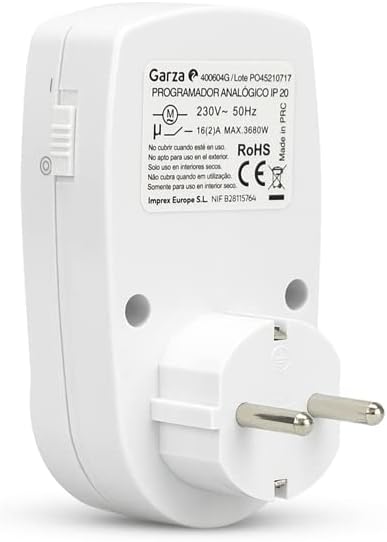
Image 5: The rear of the timer, displaying technical labels including voltage, current, and maximum power.
| Specification | Value |
|---|---|
| Model Number | 400604 |
| Brand | Garza |
| Type | Analog Indoor Timer |
| Voltage | 230V |
| Frequency | 50Hz |
| Maximum Current | 16A |
| Maximum Power | 3680W |
| Programming Cycle | 24 Hours |
| Minimum Setting Unit | 15 Minutes |
| Dimensions (L x W x H) | 5.5 x 6.5 x 10.5 cm (approx.) |
| Weight | 105 grams (approx.) |
| Material | Plastic |
| Color | White |
| Protection | Child Protection Shutters |
| Usage Environment | Indoor Only |
8. Warranty and Support
Garza products are manufactured to high-quality standards. For specific warranty details, please refer to the warranty card included with your purchase or contact your retailer.
For technical support or inquiries, please contact Garza customer service through their official website or the contact information provided by your point of purchase.
