
Greenlee DVM-80UVM
HD Electric DVM-80UVM Universal Digital Voltmeter
Instruction Manual
1. Introduction
Thank you for choosing the HD Electric DVM-80UVM Universal Digital Voltmeter. This manual provides essential information for the safe and effective operation, maintenance, and troubleshooting of your device. The DVM-80UVM is a high-accuracy dual stick voltmeter and phasing set, designed for professional use in electrical systems.
It is capable of measuring voltage from 5V up to 40kV, and up to 80kV with optional add-on resistors. Its two-stick design is versatile for both overhead and underground applications, featuring Phase Accurate Technology for reliable readings.
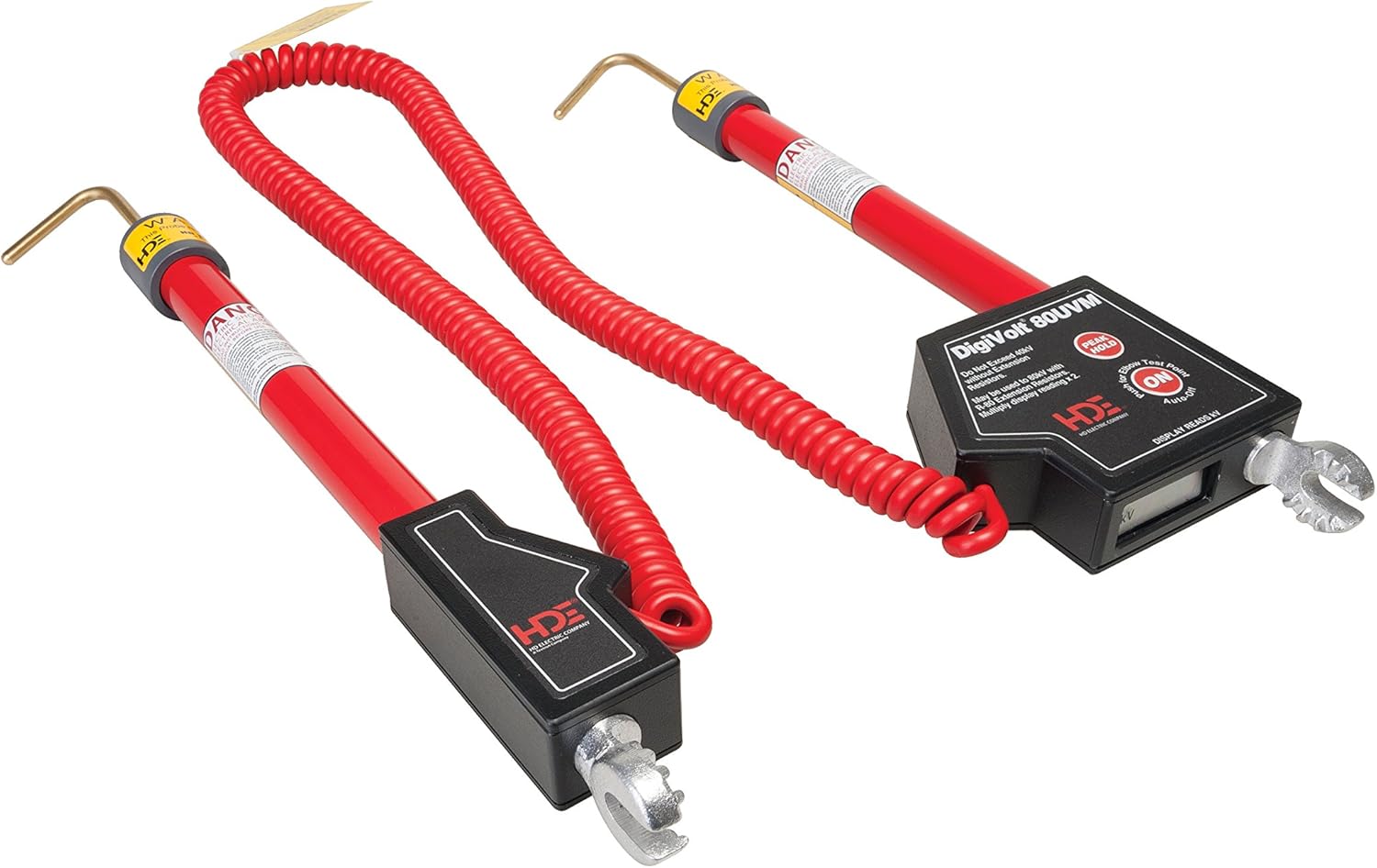
Image 1.1: The HD Electric DVM-80UVM Universal Digital Voltmeter, showing its dual stick design and coiled connecting cord.
2. Safety Information
WARNING: Always follow local safety regulations and company procedures when working with electrical equipment. Failure to do so may result in serious injury or death.
- Only qualified personnel should operate this device.
- Always inspect the device for damage before use. Do not use if damaged.
- Ensure proper personal protective equipment (PPE) is worn.
- Verify the voltage range of the DVM-80UVM is appropriate for the system being tested.
- Do not attempt to open or repair the device. Refer to qualified service personnel.
- Keep hands and other body parts clear of live conductors.
3. Components and Features
The DVM-80UVM includes the following key components and features:
- Digital Meter: Reads in kilovolts (kV) with 3.5 digits and a decimal point.
- Auto-Ranging: Eliminates the need for a range selector switch.
- Backlit Display: For easy reading in various lighting conditions.
- Peak Hold Mode: Displays the peak voltage reading.
- Coiled Connecting Cord: Extends from 3.5 feet retracted to 12 feet extended.
- Battery Compartment: Easy access for 9V alkaline battery replacement (no tools required).
- Phase Accurate Technology: Ensures accurate and repeatable voltage readings.
4. Setup
4.1 Battery Installation
- Locate the battery compartment on the DVM-80UVM unit.
- Open the battery compartment cover. No tools are required.
- Insert one standard 9V alkaline battery, observing correct polarity.
- Close the battery compartment cover securely.
The device is powered by a single 9V alkaline battery. An auto-shutoff feature helps prevent battery drain.
5. Operating Instructions
5.1 General Voltage Measurement
- Ensure the DVM-80UVM is clean and free from damage.
- Turn on the device. The backlit display should illuminate.
- Carefully apply the probes to the conductors to be measured. The device will auto-range.
- Read the voltage displayed in kilovolts (kV).
- To use Peak Hold Mode, activate the function (refer to device specific button/switch if available). The display will hold the highest voltage detected.
5.2 Phasing Measurements
The DVM-80UVM can determine if multiple conductors are in-phase or out-of-phase. Consult specific phasing procedures for your application.
5.3 Capacitive Test Point Mode
This mode allows for measurements and phasing on elbow test points. The meter will display the system voltage when used in this mode.
5.4 De-energized Verification
Before grounding, use the DVM-80UVM to verify that a conductor is de-energized. A reading of 0V indicates a de-energized state.

Image 5.1: A technician performing electrical measurements, demonstrating typical use of Greenlee test equipment.
6. Maintenance
6.1 Cleaning
Wipe the exterior of the DVM-80UVM with a clean, damp cloth. Do not use abrasive cleaners or solvents. Ensure the device is dry before storage or next use.
6.2 Battery Replacement
Replace the 9V alkaline battery when the low battery indicator appears on the display, or if the device fails to power on. Refer to Section 4.1 for installation instructions.
6.3 Storage
Store the DVM-80UVM in a cool, dry place, away from direct sunlight and extreme temperatures. If storing for extended periods, remove the battery to prevent leakage.
7. Troubleshooting
| Problem | Possible Cause | Solution |
|---|---|---|
| Device does not power on. | Dead or improperly installed battery. | Replace battery, ensuring correct polarity. |
| Inaccurate readings. | Probes not making good contact; device malfunction. | Ensure firm contact with conductors. If problem persists, contact customer support. |
| Display is dim or flickering. | Low battery. | Replace the 9V battery. |
| Auto-shutoff activates too quickly. | Normal operation (battery saving feature); very low battery. | This is a feature to save battery life. If it's unusually quick, replace the battery. |
8. Specifications
| Attribute | Detail |
|---|---|
| Model Number | DVM-80UVM |
| Brand | Greenlee |
| Measurement Type | Voltmeter |
| Voltage Range | 5V - 40kV (up to 80kV with optional add-on resistors) |
| Accuracy | Within 1% of reading +/- 3 counts (line-to-ground and line-to-line measurements); Within 2% of reading +/- 3 counts (line-to-ground & line-to-line measurements) with add-on resistors |
| Meter Resolution | 0.005 - 1.999 range with 1 Volt resolution; 2.00 - 19.00 range with 10 Volt resolution; 19.0 - 40.0 range with 100 Volt resolution |
| Frequency Range | Measures AC and DC voltages through 1000Hz RMS |
| Power Source | 1 x 9V alkaline battery |
| Item Weight (w/o probes) | 2.25 lbs (1.02 kg) |
| Product Dimensions | 20 x 14 x 11 inches |
| Operating Temperature | Up to 140°F (60°C) |
| Connecting Cord Length | 3.5-Foot retracted, 12-Foot extended |
| Manufactured In | USA |
9. Warranty and Support
For warranty information and technical support, please refer to the official Greenlee website or contact Greenlee customer service directly. Keep your purchase receipt as proof of purchase.
Greenlee is committed to providing high-quality tools and support for professionals. For further assistance, visit the Greenlee Store on Amazon or their official corporate website.
Related documentsDVM-80UVM


Ask a question about this manual
Ask about setup, troubleshooting, compatibility, parts, safety, or missing instructions. Manuals+ will review the question and use this page’s manual context to help answer it.