
Introduction
This manual provides essential information for the safe and effective use of Rayovac Fusion C Alkaline Batteries. These batteries are designed to deliver long-lasting power for a variety of devices, including those with high power demands. Each pack contains four C cell batteries, engineered for reliability and performance.
Key features include a 10-year power guarantee in storage and a design to prevent damaging leaks, ensuring your devices are protected and ready when needed. Rayovac Fusion C batteries are manufactured in the USA with both US and global parts.
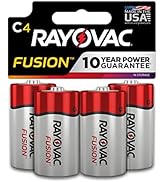
Image: Rayovac Fusion C Batteries, 4-pack. This image displays the product packaging for the Rayovac Fusion C Alkaline Batteries, showing four C-sized batteries.
Setup and Installation
To install Rayovac Fusion C batteries into your device, follow these steps:
- Identify Battery Compartment: Locate the battery compartment on your electronic device. This is often found on the back or bottom of the device.
- Open Compartment: Open the battery compartment cover. This may involve sliding a latch, unscrewing a screw, or pressing a release button.
- Observe Polarity: Inside the compartment, you will see markings indicating the correct orientation for the batteries (+ and - symbols). Match the positive (+) and negative (-) ends of the Rayovac Fusion C batteries to these markings.
- Insert Batteries: Insert each C battery firmly into its designated slot, ensuring correct polarity. Incorrect installation can prevent the device from functioning and may cause battery leakage or damage.
- Close Compartment: Securely close the battery compartment cover.
Always replace all batteries in a device at the same time to ensure optimal performance and prevent issues.

Image: Rayovac Fusion C Batteries in packaging. This image shows the front of the Rayovac Fusion C Batteries 4-pack, illustrating the product as it would appear before opening for installation.
Operating Instructions
Rayovac Fusion C Alkaline Batteries are designed for single-use applications and are suitable for a wide range of electronic devices, particularly those requiring consistent, high-drain power. These include, but are not limited to, high-powered toys, flashlights, portable stereos, and other household electronics.
Once installed correctly, your device should power on as expected. If the device does not operate, refer to the Troubleshooting section of this manual.

Image: Graphic indicating suitability for power-hungry devices. This image visually communicates that Rayovac Fusion C batteries are ideal for devices that consume significant power, such as boomboxes, drones, and lanterns.
Maintenance and Storage
Proper handling and storage can extend the life and ensure the safety of your Rayovac Fusion C batteries.
- Storage: Store unused batteries in their original packaging in a cool, dry place at room temperature. Avoid extreme temperatures, direct sunlight, and high humidity.
- Shelf Life: These batteries are designed to hold power for up to 10 years in storage.
- Disposal: Dispose of used batteries according to local regulations. Do not dispose of batteries in fire, as they may explode or leak.
- Safety: Do not install batteries backwards, charge them, or mix them with used or other battery types. This can cause explosion, fire, or injury.

Image: Graphic highlighting leak prevention. This image illustrates the battery's design feature that helps prevent damaging leaks, emphasizing product safety.
Troubleshooting
If your device is not functioning after installing new Rayovac Fusion C batteries, consider the following:
- Check Polarity: Ensure that the batteries are inserted with the correct positive (+) and negative (-) orientation as indicated in the device's battery compartment.
- Verify Contact: Make sure the battery terminals are making proper contact with the device's connectors. Gently adjust if necessary.
- Device Functionality: Test the device with another set of known-good batteries if available, or test the batteries in another compatible device to rule out a device malfunction.
- Battery Condition: Although unlikely with new batteries, inspect for any visible damage or signs of leakage. Do not use damaged batteries.
If the issue persists, consult your device's instruction manual or contact the device manufacturer for further assistance.
Specifications
| Feature | Specification |
|---|---|
| Brand | Rayovac |
| Model Number | 814-4TFUSK |
| Battery Cell Type | Alkaline |
| Voltage (per cell) | 1.5 Volts |
| Unit Count | 4.0 Count |
| Reusability | Single Use |
| Product Dimensions | 1.7 x 4 x 5 inches (packaging) |
| Item Weight | 9.59 ounces (packaging) |
| Battery Weight (per cell) | 64.5 Grams |
| Global Trade Identification Number (GTIN) | 00012800522934 |

Image: Back of Rayovac Fusion C Batteries packaging. This image shows the rear of the battery packaging, displaying warnings, model number, and UPC information.
Warranty and Support
Rayovac Fusion C Batteries come with a 10-year power guarantee in storage, ensuring their readiness for use over an extended period. For specific warranty claims or product support, please refer to the official Rayovac website or contact their customer service directly. Details regarding the manufacturer's warranty and support options can typically be found on the product packaging or the brand's official online resources.
For additional information or to explore other Rayovac products, visit the official Rayovac website: www.rayovac.com
