
Introduction
This manual provides essential information for the proper installation, operation, and maintenance of the FAAC 455D Electronic Control Unit (Model 790917). This control board is designed for use with 230V automatic swing leaf gates, compatible with both electro-mechanical and hydraulic operators, including various FAAC models (e.g., 412, 415, 402, 422, 400, 750) and other brands.
Please read this manual thoroughly before proceeding with installation or operation to ensure safety and optimal performance.
Safety Information
WARNING:
- Installation and maintenance must be performed by qualified personnel only.
- Disconnect power before performing any work on the control unit.
- Ensure all electrical connections comply with local regulations and standards.
- For continued protection against fire, replace fuses only with the same type and rating as specified (e.g., F1-5A, F2-0.BAS).
- Do not expose the control unit to moisture or extreme temperatures.
Product Overview
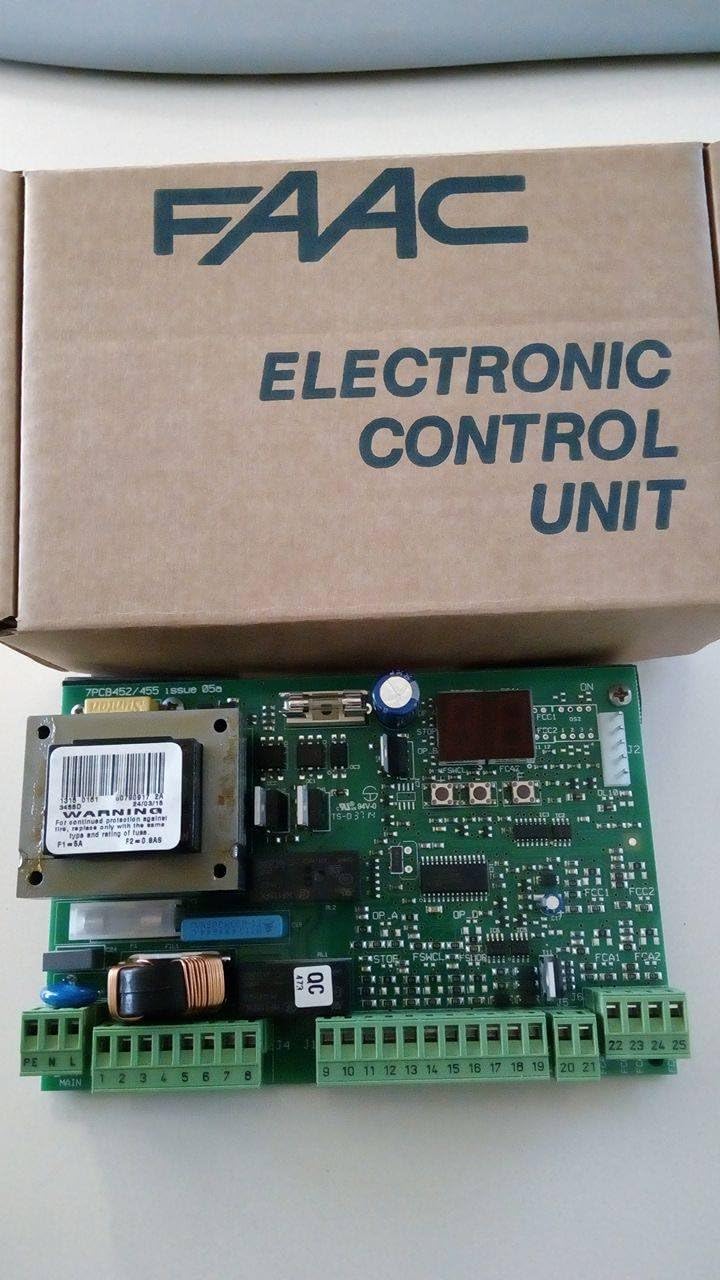
Figure 1: The FAAC 455D Electronic Control Unit (Model 790917) shown with its brown cardboard packaging. The packaging clearly displays "FAAC ELECTRONIC CONTROL UNIT". The green circuit board features various electronic components, including a transformer with a warning label about fuse replacement (F1-5A, F2-0.BAS) and multiple green terminal blocks for electrical connections.
The FAAC 455D (Model 790917) is a robust electronic control board designed for managing automated gate systems. It features clearly labeled terminal blocks for power input, motor connections, and accessory inputs.
Key Components:
- Main Power Input Terminals: L, N, PE (Earth).
- Motor Connection Terminals: Numbered terminals for connecting gate operator motors.
- Accessory Terminals: Inputs for safety devices, command devices, and other accessories.
- Fuses: Protective fuses (e.g., F1-5A, F2-0.BAS) for circuit protection.
- Transformer: For power supply to the control board's internal circuits.
Setup and Installation
Before beginning installation, ensure the gate structure is sound and operates smoothly manually. All wiring must be performed with the main power supply disconnected.
Electrical Connections:
- Power Supply: Connect the 220V/230V AC main power supply to the terminals labeled PE (Earth), N (Neutral), and L (Live) in the MAIN section.
- Motor Connections: Connect the gate operator motors to the appropriately numbered terminals (e.g., 1-8, 9-21) as per your specific gate operator's wiring diagram. Refer to the gate operator's manual for detailed motor wiring instructions.
- Safety Devices: Connect photocells, safety edges, and other safety devices to their designated terminals. Ensure proper polarity and functionality.
- Command Devices: Connect push buttons, key switches, remote control receivers, and other command devices to the relevant input terminals (e.g., 22-25).
Note: A detailed wiring diagram specific to your gate operator model should be consulted for precise terminal assignments and configuration.
Operating Instructions
Once installed and wired correctly, the FAAC 455D control unit manages the gate's operation. The specific operating modes and programming options are typically configured via dip switches or potentiometers on the board, or through an external programmer.
Basic Operation:
- Power On: After connecting the main power, the control unit will power up. Indicators (LEDs) on the board may illuminate to show status.
- Gate Cycle: Activate the gate using a connected command device (e.g., remote control, push button). The gate will open or close according to its programmed cycle.
- Safety Stop: If a safety device (e.g., photocell) is triggered during operation, the gate will stop or reverse its movement to prevent obstruction.
For advanced programming and specific operating modes (e.g., automatic closing, pedestrian opening), refer to the detailed programming section, which is typically provided in a separate programming guide or integrated into the gate operator's manual.
Maintenance
Regular maintenance ensures the longevity and reliable operation of your FAAC 455D control unit and the entire gate system.
Recommended Maintenance Schedule:
- Monthly:
- Visually inspect the control unit for any signs of damage, loose connections, or corrosion.
- Test all safety devices (photocells, safety edges) to ensure they are functioning correctly.
- Annually (by qualified technician):
- Check all electrical connections for tightness.
- Verify fuse integrity and replace if necessary with the correct type and rating.
- Inspect the gate operator's mechanical components for wear and lubrication.
- Perform a full functional test of the gate system, including all operating modes and safety features.
CAUTION:
Always disconnect the main power supply to the control unit before performing any maintenance or inspection.
Troubleshooting
This section provides guidance for common issues you might encounter with the FAAC 455D control unit. For complex problems, contact qualified technical support.
| Problem | Possible Cause | Solution |
|---|---|---|
| Gate does not move. | No power to control unit. Blown fuse. Safety device activated. Motor fault. | Check main power supply. Inspect and replace fuses (F1-5A, F2-0.BAS) if blown. Check photocells/safety edges for obstructions or misalignment. Consult gate operator manual or technician. |
| Gate opens but does not close. | Safety device continuously activated. Programming error. | Check safety devices for continuous obstruction or fault. Review programming settings (e.g., automatic closing timer). |
| Gate operates erratically. | Loose wiring connections. Interference. Faulty component. | Check all terminal connections for tightness. Identify and eliminate sources of electrical interference. Contact technical support. |
Specifications
| Feature | Detail |
|---|---|
| Model Number | 790917 |
| Input Voltage | 220V/230V AC |
| Compatibility | FAAC 230V swing leaf gate operators (e.g., 412, 415, 402, 422, 400, 750) and other compatible 230V electro-mechanical or hydraulic operators. |
| Fuses | F1-5A, F2-0.BAS (as per unit labeling) |
| Package Dimensions | 7.87 x 5.12 x 2.76 inches |
| Item Weight | 1.36 pounds |
| Manufacturer | FAAC SA |
Warranty and Support
The FAAC 455D control unit typically comes with a manufacturer's warranty. Please refer to your purchase documentation or contact your supplier for specific warranty terms and conditions.
For technical support, installation assistance, or troubleshooting beyond the scope of this manual, please contact your authorized FAAC dealer or a qualified gate automation technician.
Manufacturer: FAAC SA
For further information, you may visit the official FAAC website or contact their customer service. (Specific contact details or website links are not provided in the source data, so a generic statement is used.)