
1. Introduction
The Steinel L 910 S LED outdoor wall light is designed to provide elegant and intelligent ambient lighting for your home's exterior. Featuring a reliable 180° infrared motion sensor, this luminaire offers both up and down lighting effects, enhancing the ambiance of facades, gardens, and terraces. Its energy-efficient and maintenance-free LEDs ensure long-lasting performance. When networked, multiple L 910 S units can synchronize their on/off cycles for a cohesive lighting experience.

Image 1.1: The Steinel L 910 S LED outdoor wall light in silver, providing up and down illumination on an exterior wall at dusk.
2. Safety Instructions
- Electrical Installation: Installation must be carried out by a qualified electrician in accordance with national wiring regulations and local electrical codes.
- Power Disconnection: Always disconnect the power supply before performing any installation, maintenance, or repair work.
- Voltage: Ensure the power supply voltage matches the product's specifications (230 Volts).
- IP Rating: The luminaire has an IP44 rating, meaning it is protected against solid objects larger than 1mm and splashing water from any direction. Do not submerge or expose to high-pressure water jets.
- LEDs: The integrated LEDs are not replaceable. Do not attempt to open the LED module.
- Mounting: Mount the fixture securely on a stable surface.
3. Package Contents
Please check that all components are present and undamaged:
- Steinel L 910 S LED Outdoor Wall Light
- Mounting Material (screws, wall plugs)
- Instruction Manual
4. Installation
Follow these general steps for installation. Refer to the detailed wiring diagram and mounting instructions included in the package for specific guidance.
- Prepare the Mounting Location: Choose a suitable outdoor location, ensuring the surface is flat and stable. Consider the desired detection range and angle for the motion sensor.
- Disconnect Power: Turn off the main power supply at the circuit breaker before starting any electrical work.
- Mount the Base Plate: Use the provided mounting material to securely attach the luminaire's base plate to the wall. Ensure proper alignment.
- Electrical Connection: Connect the electrical wires (Live, Neutral, Earth) to the corresponding terminals on the luminaire. Ensure all connections are secure and insulated.
- Attach the Luminaire Body: Carefully attach the main body of the luminaire to the base plate, ensuring it clicks into place or is secured with screws as per the specific model's design.
- Restore Power: Once installation is complete and all connections are secure, restore power at the circuit breaker.
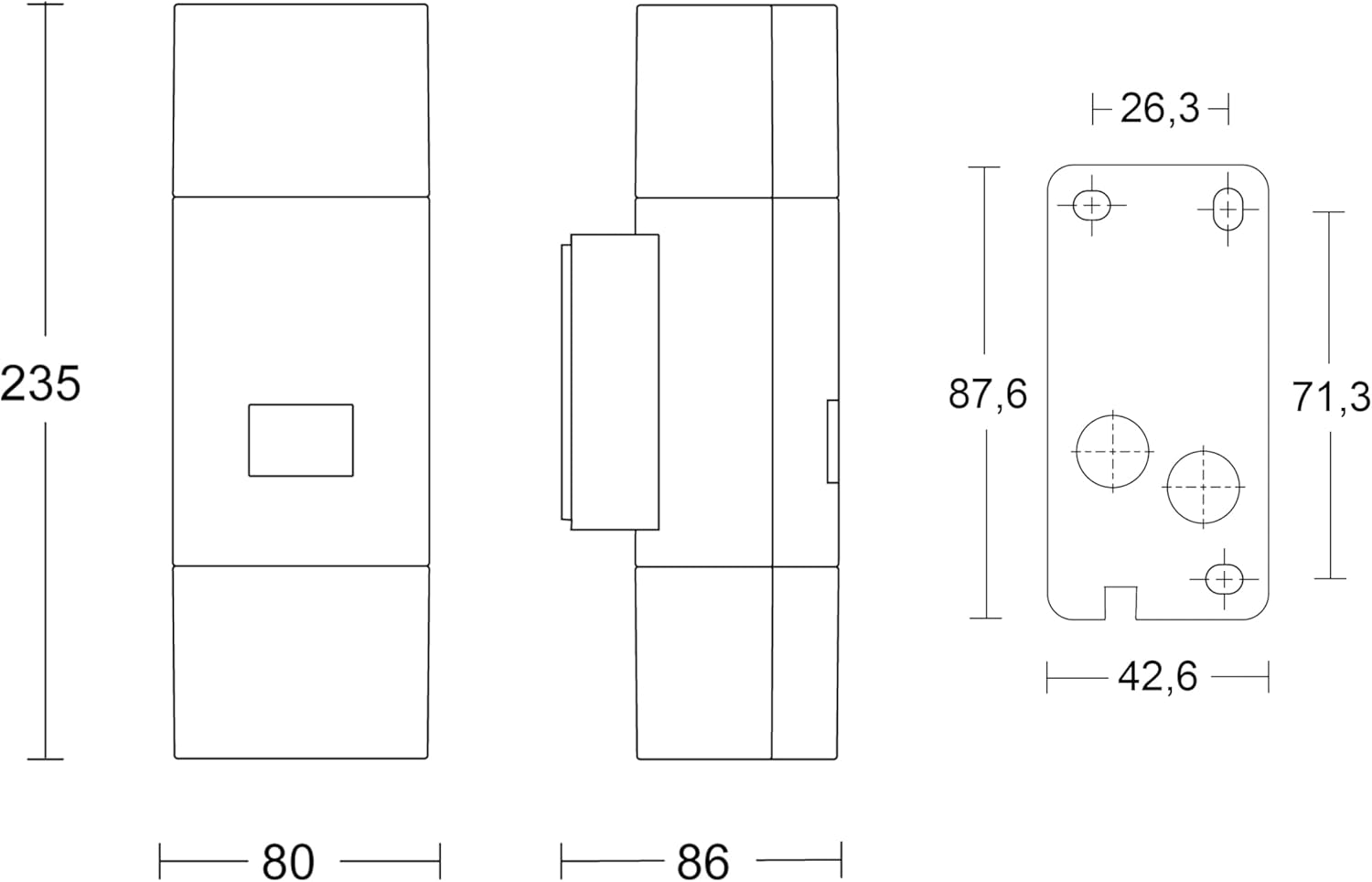
Image 4.1: Dimensions of the Steinel L 910 S wall light (235mm height, 80mm width, 86mm depth).
5. Operation
The Steinel L 910 S features an integrated 180° infrared motion sensor and various lighting functions:
- Motion Detection: The 180° sensor reliably detects movement within a configurable range of 5 or 12 meters.
- Soft Light Start: The LED light gradually brightens upon activation, providing a pleasant and eye-friendly illumination.
- Basic Light Function: A continuous low-level light can be activated during darkness, providing subtle ambient lighting. Upon motion detection, the light switches to full brightness.
- Twilight Setting: The sensor can be configured to activate only when ambient light falls below a certain threshold (e.g., 2 lux or 20 lux).
- Time Setting: The duration for which the light remains at full brightness after detection can be adjusted.

Image 5.1: Key features of the L 910 S, including LED lifespan, sensor range, and light settings. You can view the product in your space using the AR QR code.
6. Settings (DIP Switches)
The L 910 S features internal DIP switches for precise configuration of its functions. Access these switches by carefully opening the luminaire's housing as instructed in the full manual.

Image 6.1: Internal DIP switches for configuring the luminaire's settings.
| Switch No. | Function | Settings | Description |
|---|---|---|---|
| 1 | Basic Light Activation | OFF / ON | Enables or disables the continuous basic light function during darkness. |
| 2 | Basic Light Brightness | 1/2 / ON | Sets the brightness of the basic light to half or full intensity. |
| 3 | Twilight Setting | OFF / 20 lux / 2 lux | Determines the ambient light level at which the sensor becomes active. 'OFF' means it's always active regardless of light. |
| 4 | Time Setting | 2 min / 15 min | Sets the duration the light stays on at full brightness after motion detection. |
| 5 | Continuous Light / Test Mode | TEST / OFF / ON | 'TEST' for quick setup, 'ON' for continuous full light (e.g., 4 hours), 'OFF' for normal sensor operation. |
| 6 | Detection Range | 5m / 12m | Adjusts the maximum detection range of the motion sensor. |
7. Maintenance
The Steinel L 910 S LED outdoor wall light is designed for minimal maintenance.
- Cleaning: Clean the luminaire regularly with a soft, damp cloth. Do not use abrasive cleaners or solvents, as these can damage the surface.
- LED Lifespan: The integrated LEDs have an average lifespan of 50,000 hours and do not require replacement.
- Inspection: Periodically check the luminaire for any signs of damage or loose connections.
8. Troubleshooting
If you encounter issues with your L 910 S luminaire, refer to the following table:
| Problem | Possible Cause | Solution |
|---|---|---|
| Light does not turn on. | No power supply. Incorrect twilight setting. Sensor obstructed. | Check circuit breaker and wiring. Adjust DIP switch 3 (Twilight Setting). Ensure sensor is clear of obstructions. |
| Light stays on continuously. | Continuous light function activated. Constant motion in detection area. | Check DIP switch 5 (Continuous Light / Test Mode). Reduce detection range (DIP switch 6) or reposition the luminaire. |
| Light turns on too frequently. | Detection range too wide. Sensor too sensitive. | Adjust DIP switch 6 (Detection Range) to 5m. Ensure sensor is not picking up unwanted movement (e.g., trees, small animals). |
| Light turns off too quickly/slowly. | Incorrect time setting. | Adjust DIP switch 4 (Time Setting) to desired duration. |
9. Specifications
| Feature | Detail |
|---|---|
| Brand | Steinel |
| Model Number | 576219 |
| Product Dimensions (L x W x H) | 23.5 x 8 x 8.5 cm |
| Item Weight | 730 grams |
| Material | Aluminum, Plastic |
| Color | Silver |
| IP Rating | IP44 |
| Power Source | Corded Electric |
| Voltage | 230 Volts |
| Bulb Type | LED (Integrated) |
| Luminous Flux | 797 Lumens |
| Power Consumption | 9.8 Watts |
| Color Temperature | 3000 Kelvin (Warm White) |
| Color Rendering Index (CRI) | 80 |
| Average Lifespan | 50,000 Hours |
| Special Features | Infrared Motion Sensor (180° detection) |
| Installation Type | Wall Mount |
| Indoor/Outdoor Use | Outdoor |
10. Warranty and Support
Steinel products are manufactured to high quality standards. This product comes with a manufacturer's warranty. Please refer to the warranty card included in your package or visit the official Steinel website for detailed warranty terms and conditions.
For technical support, spare parts availability, or any questions regarding your Steinel L 910 S luminaire, please contact Steinel customer service. Contact information can typically be found on the official Steinel website or in the product packaging.


