
1. Introduction
The HealthmateForever T12AB2 is a touch screen electrotherapy device designed to provide temporary relief of pain associated with sore and aching muscles in the shoulder, waist, back, neck, upper extremities (arm), and lower extremities (leg) due to strain from exercise or normal household work activities. This device utilizes Transcutaneous Electrical Nerve Stimulation (TENS) and Electrical Muscle Stimulation (EMS) technologies to deliver therapeutic electrical impulses.
Please read this manual thoroughly before operating the device to ensure safe and effective use. Keep this manual for future reference.
2. Important Safety Information
WARNING: Do not use this device if you have a pacemaker, implanted defibrillator, or other implanted metallic or electronic device. Consult your physician before using this device if you have any medical conditions.
- Do not use on open wounds or broken skin.
- Do not use if you are pregnant.
- Do not use near your heart, on your head, face, or throat.
- Keep out of reach of children.
- Discontinue use if you experience any adverse reactions and consult your physician.
- Statements regarding this device have not been evaluated by the FDA and are not intended to diagnose, treat, cure, or prevent any disease or health condition.
3. Package Contents
Carefully unpack the box and ensure all items are present:
- HealthmateForever T12AB2 Electrotherapy Device
- Electrode Wires (4-in-1)
- Self-adhesive Electrode Pads (multiple pairs)
- USB Cable
- AC Adapter (Wall Charger)
- Pad Holder
- Stylus Pen
- User Manual (this document)
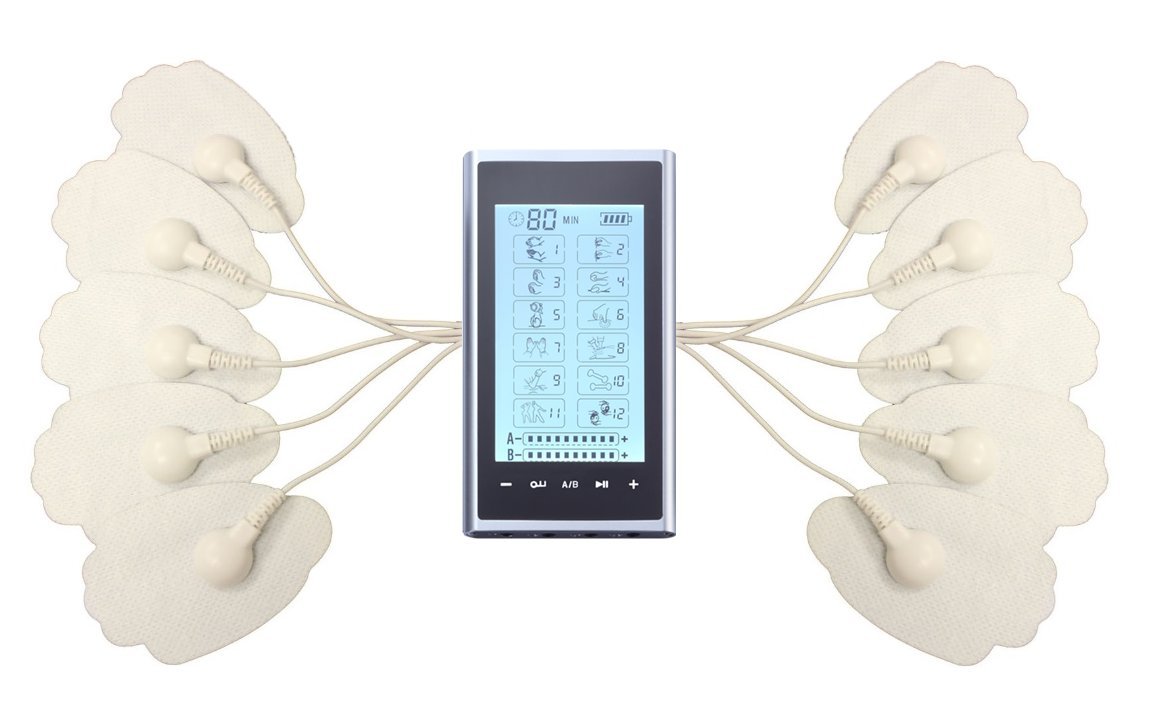
Image: Contents of the HealthmateForever T12AB2 package.
4. Device Features
- Touch Screen Interface: Easy navigation and selection of modes and settings.
- 12 Pre-programmed Modes: Offers a variety of massage sensations for different needs.
- Dual Channel Output: Allows for simultaneous treatment of two different body areas or use with multiple pads.
- Adjustable Intensity and Timer: Customize your therapy session.
- Rechargeable Lithium Battery: Convenient and portable.
5. Setup
- Charge the Device: Before first use, fully charge the device. Refer to Section 7 for charging instructions.
- Connect Electrode Wires: Insert the pin connectors of the electrode wires into the output ports (A and B) on the top of the device.
- Attach Electrode Pads: Snap the self-adhesive electrode pads onto the ends of the electrode wires. Ensure a secure connection.
- Prepare Skin: Clean and dry the skin area where the pads will be applied. Remove any lotions, oils, or sweat.
- Apply Pads: Remove the protective film from the pads and firmly place them on the desired treatment area. Ensure the entire surface of the pad is in contact with the skin.
6. Operating Instructions
6.1 Power On/Off
- To turn on, press and hold the Power button (usually located at the bottom of the device) until the screen illuminates.
- To turn off, press and hold the Power button again until the screen turns off.
6.2 Selecting a Mode
The device features 12 pre-programmed modes, each offering a unique sensation. Use the touch screen or stylus to select your desired mode.

Image: Device screen showing mode selection (1-12).
The 12 modes simulate various massage techniques:

Image: Visual representation of the 12 electrotherapy modes.
- Tuina: Traditional Chinese massage technique.
- Acupuncture: Simulates acupuncture sensations.
- Tapping: Rhythmic tapping sensation.
- Guasha: Simulates scraping massage.
- Cupping: Simulates cupping therapy.
- Shiatsu: Japanese finger pressure massage.
- Pressure: Constant pressure sensation.
- Back Pain: Mode specifically designed for back discomfort.
- Deep Tissue Massage: Simulates deep muscle manipulation.
- Body Building: Muscle toning and strengthening.
- Body Building 2: Alternative muscle toning program.
- Combination: A mix of different sensations.
6.3 Adjusting Intensity
After selecting a mode, use the + and - buttons on the device or the touch screen controls to adjust the intensity level for each channel (A and B) independently. Start with the lowest intensity and gradually increase it until you feel a comfortable, yet effective, sensation. Avoid setting the intensity too high, which may cause discomfort.
6.4 Setting the Timer
The device typically has a default treatment time. You can adjust the session duration using the timer controls on the touch screen. Common session durations range from 10 to 80 minutes. The device will automatically shut off once the timer expires.
6.5 Pad Placement
Proper pad placement is crucial for effective therapy. Refer to the diagram below for recommended placement points for various body areas. Ensure pads are placed on clean, dry skin and are not overlapping.

Image: Recommended electrode pad placement points.
- For localized pain, place pads directly on or around the painful area.
- For larger areas, use multiple pads or larger pads to cover the region.
- Avoid placing pads directly over joints or bony prominences.
7. Charging the Device
When the battery indicator on the screen shows low power, it's time to recharge the device.
- Connect the small end of the USB cable to the charging port on the device.
- Connect the larger end of the USB cable to the AC adapter (wall charger).
- Plug the AC adapter into a standard electrical outlet.
- The battery icon on the screen will indicate charging status. A full charge typically takes a few hours.
- Once fully charged, disconnect the charger.

Image: HealthmateForever T12AB2 device connected to its wall charger.
8. Maintenance and Care
- Cleaning the Device: Wipe the device with a soft, damp cloth. Do not use abrasive cleaners or immerse the device in water.
- Electrode Pads: After each use, place the pads back on the protective film and store them on the pad holder. If pads lose their adhesiveness, clean them gently with a damp cloth or replace them.
- Storage: Store the device and accessories in a cool, dry place, away from direct sunlight and extreme temperatures.
- Battery Care: To prolong battery life, avoid fully discharging the device frequently. Charge it regularly, even if not in use for extended periods.
9. Troubleshooting
| Problem | Possible Cause | Solution |
|---|---|---|
| Device does not turn on. | Low battery or device not charged. | Charge the device fully. Ensure power button is pressed and held. |
| No sensation or weak sensation. | Pads not properly applied, pads lost adhesiveness, wires loose, intensity too low. | Ensure pads are firmly on skin. Clean or replace pads. Check wire connections. Increase intensity gradually. |
| Pads do not stick. | Skin is oily/dirty, pads are worn out. | Clean skin thoroughly. Gently clean pads with a damp cloth or replace with new ones. |
| Screen is unresponsive. | Device frozen or stylus not used correctly. | Restart the device. Use the provided stylus for precise touch input. |
10. Specifications
- Model: T12AB2
- Channels: Dual (A & B)
- Modes: 12 pre-programmed massage modes
- Intensity Levels: Adjustable
- Timer: Adjustable session duration
- Power Source: Rechargeable Lithium Battery
- Output: TENS/EMS
11. Warranty and Support
HealthmateForever products are designed for durability and performance. For specific warranty details, please refer to the warranty card included with your product or visit the official HealthmateForever website. If you encounter any issues or have questions regarding your T12AB2 device, please contact HealthmateForever customer support for assistance.
Manufacturer: Healthmate International, LLC
