
Timex T5K802
Timex Marathon Digital Sport Watch Instruction Manual
Model: T5K802
Introduction
This manual provides comprehensive instructions for the setup, operation, and maintenance of your Timex Marathon Digital Sport Watch, model T5K802. Please read this manual carefully to ensure proper use and to maximize the lifespan of your watch.
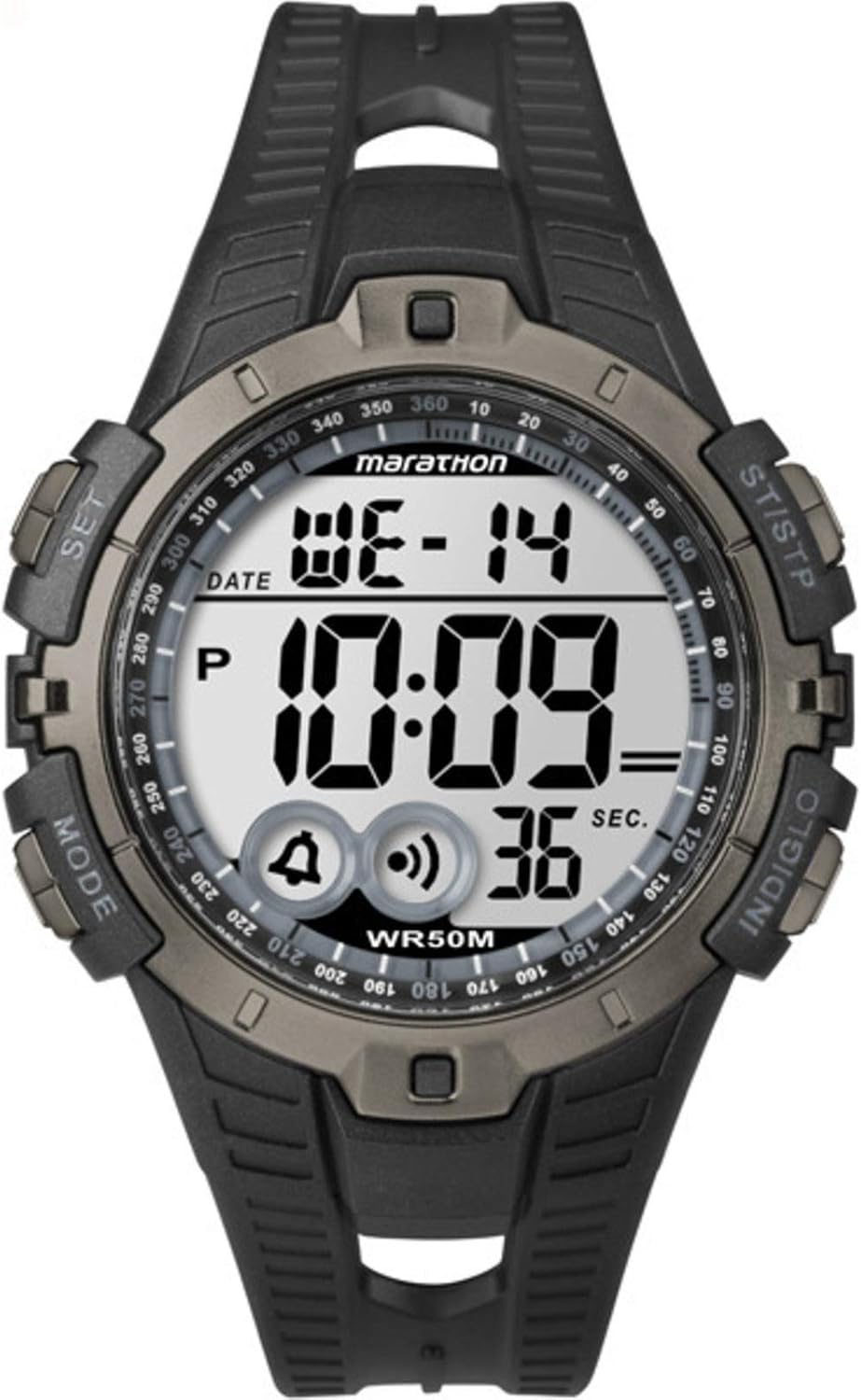
Figure 1: Timex Marathon Digital Sport Watch. The watch features a digital display showing the day (WE), date (14), and time (10:09). Below the time, icons for alarm and chime are visible, along with a seconds counter (36 SEC). Buttons are labeled 'MODE' (left bottom), 'SET' (left top), 'ST/STP' (right top), and 'INDIGLO' (right bottom). The watch face also indicates 'marathon' and 'WR50M' for water resistance.
Setup
Initial Time and Date Setting
- Press and hold the SET button (top left) until the display flashes, indicating time setting mode.
- Press the MODE button (bottom left) to cycle through the setting options: seconds, hours, minutes, year, month, date.
- Use the ST/STP button (top right) to adjust the flashing value. Holding the button will advance the value quickly.
- Once all settings are correct, press the SET button again to exit the setting mode.
Battery Information
The watch is powered by one Lithium Metal battery, which is included. The battery is designed for long-lasting performance. When the display becomes dim or functions become erratic, it may be time to replace the battery.
Operating Instructions
Button Functions Overview
- MODE: Cycles through different modes (Time, Chronograph, Alarm, Timer).
- SET: Enters and exits setting modes; confirms selections.
- ST/STP: Starts/stops chronograph; adjusts values in setting mode.
- INDIGLO: Activates the INDIGLO night-light.
Time Mode
The default display shows the current time, day of the week, and date. Press the INDIGLO button to illuminate the display in low-light conditions.
Chronograph (Stopwatch) Mode
- From Time Mode, press MODE until "CHRONO" or a stopwatch icon appears.
- Press ST/STP to start the chronograph.
- Press ST/STP again to pause the chronograph.
- To reset, while paused, press and hold ST/STP until the display shows zero.
Alarm Mode
- From Time Mode, press MODE until "ALARM" or an alarm icon appears.
- Press SET to enter alarm setting mode. The hour will flash.
- Use ST/STP to adjust the hour. Press MODE to move to minutes.
- Use ST/STP to adjust the minutes.
- Press SET to confirm and exit.
- To turn the alarm on/off, in Alarm Mode, press ST/STP. An alarm icon will appear/disappear on the main display.
Maintenance
Cleaning Your Watch
To clean your watch, use a soft, damp cloth. Do not use harsh chemicals or abrasive cleaners, as these can damage the watch's finish or seals. For the strap, mild soap and water can be used, then rinse thoroughly and dry.
Water Resistance
This watch is water resistant to 50 meters (WR50M). This means it is suitable for recreational swimming in shallow water. It is not suitable for diving or snorkeling. Do not operate buttons underwater. Avoid exposing the watch to extreme temperature changes, which can affect the water-resistant seals.
Battery Replacement
Battery replacement should ideally be performed by a qualified watch technician to ensure the water resistance is maintained. If replacing the battery yourself, ensure the gasket is properly seated and the case back is securely fastened.
Troubleshooting
| Problem | Possible Cause / Solution |
|---|---|
| Display is blank or dim. | Low battery. Replace the battery. |
| Buttons are unresponsive. | The watch may be in a locked mode or require a soft reset. Try removing and reinserting the battery (if comfortable) or consult a service center. |
| Time is inaccurate. | Ensure the time and date are set correctly as per the "Initial Time and Date Setting" section. Extreme temperatures or strong magnetic fields can affect accuracy. |
| Water inside the watch. | Water resistance may have been compromised. Avoid further water exposure and seek professional repair immediately to prevent internal damage. |
Specifications
- Model Number: T5K802
- Dimensions: 8.89 x 6.6 x 7.62 cm (Product Size)
- Weight: 91 g
- Battery: 1 Lithium Metal battery (included)
- Water Resistance: 50 meters (WR50M)
- Display Type: Digital
Warranty Information
Timex watches are manufactured to high quality standards and are warranted against manufacturing defects for a period specified by your region's warranty policy. This warranty does not cover normal wear and tear, battery life, accidental damage, or damage caused by improper use or unauthorized repairs. Please retain your proof of purchase for warranty claims.
Customer Support
For further assistance, technical support, or service inquiries, please visit the official Timex website or contact their customer service department. Refer to the packaging or the official Timex website for specific contact details in your region.
You can find more information on the Timex Store on Amazon.
Ask a question about this manual
Ask about setup, troubleshooting, compatibility, parts, safety, or missing instructions. Manuals+ will review the question and use this page’s manual context to help answer it.