
Introduction
This manual provides essential information for the safe and efficient operation of your Pioneer DV-K301C 3-Disc DVD Player. Please read it thoroughly before using the product and keep it for future reference.
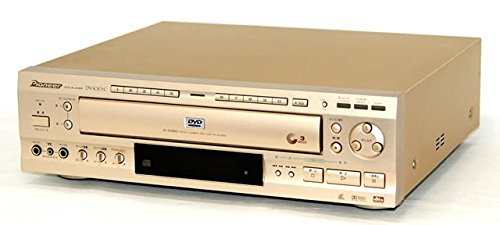
Image: Front view of the Pioneer DV-K301C 3-Disc DVD Player. The player features a gold finish with a central disc tray and control buttons.
Safety Information
Always follow these basic safety precautions to reduce the risk of fire, electric shock, and injury:
- Do not expose this appliance to rain or moisture.
- Do not remove the cover. Refer servicing to qualified personnel only.
- Ensure proper ventilation. Do not block ventilation openings.
- Use only the power supply specified for this unit (AC100V 50/60Hz).
- Avoid placing the unit in direct sunlight or near heat sources.
- Do not insert foreign objects into the disc tray or ventilation slots.
Package Contents
Verify that all items are present in the package:
- Pioneer DV-K301C 3-Disc DVD Player
- Remote Control
- Power Cord
- Audio/Video Cables (RCA type)
- User Manual (this document)
Setup
1. Placement
Place the DVD player on a stable, level surface with adequate ventilation. Avoid placing it near heat sources or in enclosed spaces.
2. Connecting to a TV
Use the provided audio/video cables to connect the DVD player to your television.
- Video Connection: Connect the yellow video output jack on the DVD player to the yellow video input jack on your TV. For higher quality, use the S-Video output if your TV supports it.
- Audio Connection: Connect the red (right) and white (left) audio output jacks on the DVD player to the corresponding audio input jacks on your TV or audio receiver.
- Digital Audio Connection (Optional): For surround sound, connect the optical digital output or coaxial digital output from the DVD player to a compatible audio receiver.
3. Power Connection
Plug the power cord into the AC IN socket on the rear of the DVD player, then plug the other end into a standard AC100V 50/60Hz wall outlet.
4. Microphone Connection (for Karaoke)
The unit supports connecting two microphones for karaoke functionality. Each microphone input has independent volume control.
- Locate the microphone input jacks on the front panel of the player.
- Insert your microphones into these jacks.
- Adjust the microphone volume using the dedicated controls.
Operating Instructions
1. Power On/Off
Press the POWER button on the front panel or remote control to turn the unit on or off. The unit enters a low-power standby mode when turned off.
2. Loading Discs
The DV-K301C features a convenient 3-disc changer. You can load up to three discs (DVD, Video CD, or CD).
- Press the OPEN/CLOSE button to open the disc tray.
- Place a disc onto one of the three disc slots, label side up.
- To load additional discs, press the DISC SKIP button to rotate the tray to an empty slot.
- Press OPEN/CLOSE again to close the tray.
Note: Discs can be exchanged in empty slots even while another disc is playing.
3. Playback
After loading discs, the player will typically start playing the first loaded disc automatically. You can select a specific disc using the DISC 1, DISC 2, or DISC 3 buttons on the remote control.
- Play/Pause: Press the PLAY/PAUSE button to start or pause playback.
- Stop: Press the STOP button to stop playback.
- Skip: Use the SKIP buttons (|< / >|) to skip tracks or chapters.
- Fast Forward/Rewind: Use the FF/REW buttons to fast forward or rewind.
4. On-Screen Menu (GUI)
The DV-K301C features a Graphical User Interface (GUI) for easy navigation and control. Press the MENU button on the remote control to access the on-screen menu. This allows you to adjust settings, select tracks, or access special features even if the disc does not have its own menu.
Functions accessible via GUI include:
- Multi-audio selection
- Multi-language subtitle selection
- Multi-aspect ratio adjustment
- Multi-angle viewing
- Parental level control
- Key control (for karaoke)
- Digital echo adjustment (for karaoke)
5. Karaoke Function
With two microphone inputs and key/echo control, the DV-K301C is ideal for karaoke. Adjust microphone volume and apply digital echo effects as desired through the on-screen menu.
Maintenance
Cleaning the Unit
Wipe the exterior of the unit with a soft, dry cloth. Do not use abrasive cleaners, waxes, or solvents. For stubborn stains, use a slightly damp cloth and then dry thoroughly.
Cleaning Discs
Wipe discs from the center outwards with a soft, lint-free cloth. Do not use solvents or abrasive cleaners. Avoid touching the playback surface of the disc.
Ventilation
Ensure that the ventilation openings on the unit are not blocked to prevent overheating. Periodically check for dust accumulation and gently clean if necessary.
Troubleshooting
| Problem | Possible Cause | Solution |
|---|---|---|
| No power | Power cord not connected securely. | Check power cord connection to the unit and wall outlet. |
| No picture | Video cables not connected correctly. TV input not selected. | Ensure video cables are securely connected. Select the correct video input on your TV. |
| No sound | Audio cables not connected correctly. TV/receiver volume too low or muted. | Ensure audio cables are securely connected. Adjust volume on TV/receiver. Check mute function. |
| Disc does not play | Disc is dirty, scratched, or inserted incorrectly. Incorrect disc type. | Clean the disc. Ensure disc is inserted label side up. Verify disc is compatible (DVD, Video CD, CD). |
| Remote control not working | Batteries are dead or inserted incorrectly. Obstruction between remote and unit. | Replace batteries. Ensure correct polarity. Remove any obstructions. Point remote directly at the unit's sensor. |
Specifications
| Model | DV-K301C |
| Brand | Pioneer |
| Supported Media Types | DVD, Video CD, Compact Disc (CD) |
| Color | Gold |
| Video Output Resolution | 1080p (upscaled) |
| Video Output (S-Video) | Y: 1Vp-p (75Ω), C: 286mVp-p (75Ω) |
| Video Output (Composite) | 1Vp-p (75Ω) |
| Audio Output (Analog) | 200mVrms (1kHz, -20dB), 2 channels |
| Digital Audio Outputs | Optical, Coaxial |
| Supported Digital Audio Formats | Dolby Digital, DTS, MPEG, Linear PCM |
| Frequency Response (DVD, 96kHz/24bit) | 4Hz - 44kHz |
| Signal-to-Noise Ratio (S/N) | 115dB |
| Dynamic Range | 103dB |
| Total Harmonic Distortion | 0.002% |
| Wow & Flutter | Below measurement limit (±0.001% W.PEAK) |
| Power Supply | AC100V, 50/60Hz |
| Power Consumption | 14W |
| Standby Power Consumption | 1.5W |
| Dimensions (W x D x H) | 420.0 mm x 375.0 mm x 128.0 mm |
| Weight | 4.5 kg |
Warranty and Support
For warranty information and customer support, please refer to the warranty card included with your product or visit the official Pioneer website. Keep your purchase receipt as proof of purchase.
Note: Specific warranty terms may vary by region. Contact your local Pioneer service center for detailed information.