
1. Introduction
The Turnigy 870E is a compact and reliable digital multimeter designed for measuring AC/DC voltage, DC current, resistance, diode, and continuity. Featuring a backlit display, it provides clear readings in various lighting conditions, making it an invaluable tool for hobbyists and professionals alike. This manual provides essential information for the safe and effective use of your multimeter.
2. Safety Information
Please read and understand all safety information before operating this multimeter. Failure to follow these instructions may result in electric shock, fire, or damage to the meter or the equipment under test.
- Always ensure the test leads are in good condition and properly connected to the correct input jacks for the measurement being performed.
- Never apply voltage to the meter when the function switch is set to resistance, diode, or continuity.
- Always disconnect the circuit power and discharge all high-voltage capacitors before measuring resistance or continuity.
- Do not use the meter if it appears damaged or if the battery cover is not fully closed.
- Observe all local and national safety codes.
- Keep fingers behind the finger guards on the test probes during measurements.
3. Product Overview
Familiarize yourself with the components of your Turnigy 870E Digital Multimeter.
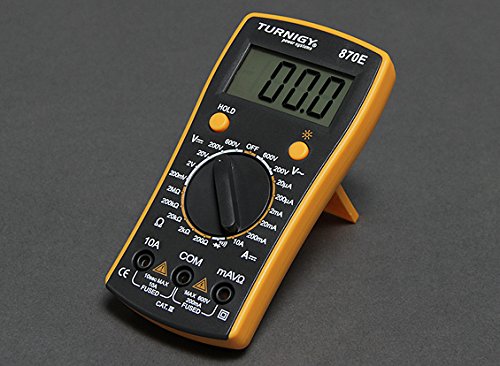
Figure 1: Front view of the Turnigy 870E Digital Multimeter. This image displays the main components including the backlit LCD screen, the rotary function switch, and the input jacks for test leads.
Key Components:
- LCD Display: Shows measurement readings, units, and various indicators. Features a backlight for improved visibility.
- Function Switch: Rotary dial used to select the desired measurement function (e.g., V~, V-, A-, Ω, Diode, Continuity).
- Input Jacks: Sockets for connecting the test leads. Typically include COM (common), VΩmA (voltage, resistance, small current), and 10A (high current).
- Data Hold Button: Freezes the current reading on the display.
- Backlight Button: Activates or deactivates the display backlight.
4. Setup
4.1 Battery Installation
- Ensure the multimeter is turned off.
- Locate the battery compartment on the back of the unit.
- Unscrew the retaining screw(s) and remove the battery cover.
- Insert a new 9V battery, observing the correct polarity (+ and -).
- Replace the battery cover and secure it with the screw(s).
4.2 Connecting Test Leads
- Insert the black test lead into the COM (common) jack.
- For most measurements (voltage, resistance, diode, continuity, small current), insert the red test lead into the VΩmA jack.
- For high current measurements (up to 10A), insert the red test lead into the 10A jack.
5. Operating Instructions
Before taking any measurement, ensure the test leads are correctly connected and the function switch is set to the appropriate range.
5.1 Measuring DC Voltage (V-)
- Set the function switch to the desired DC Voltage (V-) range. If the voltage is unknown, start with the highest range and decrease as necessary.
- Connect the red test lead to the positive (+) side of the circuit and the black test lead to the negative (-) side.
- Read the voltage value on the LCD display.
5.2 Measuring AC Voltage (V~)
- Set the function switch to the desired AC Voltage (V~) range.
- Connect the test leads across the AC voltage source.
- Read the voltage value on the LCD display.
5.3 Measuring DC Current (A-)
- Important: Ensure the red test lead is in the correct current input jack (VΩmA for small currents, 10A for large currents).
- Set the function switch to the desired DC Current (A-) range.
- Turn off the power to the circuit.
- Break the circuit and connect the multimeter in series with the load. The current must flow through the multimeter.
- Restore power to the circuit and read the current value on the LCD display.
5.4 Measuring Resistance (Ω)
- Set the function switch to the desired Resistance (Ω) range.
- Ensure the circuit is de-energized and all capacitors are discharged.
- Connect the test leads across the component to be measured.
- Read the resistance value on the LCD display.
5.5 Continuity Test
- Set the function switch to the Continuity (Ω with sound wave symbol) position.
- Ensure the circuit is de-energized.
- Connect the test leads across the component or wire.
- If continuity exists (low resistance), the meter will emit an audible beep. The display will show the resistance value.
5.6 Diode Test
- Set the function switch to the Diode (diode symbol) position.
- Ensure the circuit is de-energized.
- Connect the red test lead to the anode (+) and the black test lead to the cathode (-) of the diode.
- The display will show the forward voltage drop. Reverse the leads; the display should show 'OL' (open loop) for a good diode.
6. Maintenance
6.1 Battery Replacement
When the battery symbol appears on the display, the battery needs to be replaced. Refer to Section 4.1 for battery installation instructions.
6.2 Cleaning
Wipe the case with a damp cloth and mild detergent. Do not use abrasives or solvents. Ensure the meter is completely dry before use.
6.3 Storage
If the meter is not to be used for an extended period, remove the battery to prevent leakage and store it in a cool, dry place.
7. Troubleshooting
- No display or faint display: Check battery installation. Replace battery if necessary.
- 'OL' or '1' on display: Indicates over-range or open circuit. Ensure test leads are properly connected and the function switch is set to the correct range.
- Incorrect readings: Verify test lead connections, function switch setting, and battery condition. Ensure the circuit under test is de-energized for resistance/continuity measurements.
- No continuity beep: Check if the component has high resistance or if the circuit is open.
8. Specifications
| Feature | Specification |
|---|---|
| Brand | Hobby King |
| Manufacturer | Turnigy |
| Model Number | 9395000001 |
| Power Source | Battery Powered (9V) |
| Display | Digital LCD with Backlight |
| Functions | AC/DC Voltage, DC Current, Resistance, Diode, Continuity |