
1. Introduction
The Nissin Commander Air 1 is a 2.4GHz radio transmission wireless flash commander designed for Nikon cameras. It enables wireless control of compatible Nissin Air System flash units, offering enhanced flexibility and reliability compared to optical systems. This manual provides detailed instructions for setup, operation, and maintenance of your Commander Air 1.
2. Safety Information
- Do not expose the unit to water or excessive humidity.
- Avoid direct exposure to strong sunlight or high temperatures.
- Do not attempt to disassemble or repair the unit yourself. Refer to qualified service personnel.
- Keep out of reach of children.
- Use only specified batteries (AAA).
3. Package Contents
Verify that all items are present in the package:
- Nissin Commander Air 1
- 2.5mm remote shutter release cable for Nikon cameras with 10-pin connector ports
- 2.5mm remote shutter release cable for Nikon cameras with DC-2 connector ports
- Leather storage case
4. Setup
4.1 Battery Installation
- Locate the battery compartment on the underside of the Commander Air 1.
- Open the battery compartment cover.
- Insert 2 AAA batteries, ensuring correct polarity (+/-).
- Close the battery compartment cover securely.
4.2 Mounting to Camera
- Slide the Commander Air 1 onto your Nikon camera's hot shoe.
- Secure the unit by tightening the locking mechanism (if present) or pushing the "Unlock" lever forward until it clicks into place.

Image: The Nissin Commander Air 1, showing its hot shoe mount and control panel. This image illustrates the device ready for attachment to a camera.
5. Operating Instructions
5.1 Power On/Off
Press and hold the power button (usually marked with a circle and a vertical line) to turn the Commander Air 1 on or off.

Image: A clear top-down view of the Nissin Commander Air 1, highlighting the display, control dial, and power button for easy identification.
5.2 Wireless Flash Control Overview
The Commander Air 1 utilizes a 2.4GHz radio transmission system to control up to 21 compatible Nissin Di700A flash units across 3 groups (A, B, C). This system offers a reliable communication range of up to 30 meters (approximately 98 feet) and does not require a direct line of sight between the commander and the flash units.
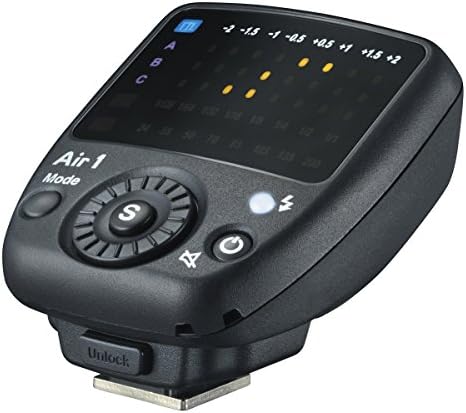
Image: A diagram illustrating the Commander Air 1 wirelessly controlling three separate flash groups (A, B, C), demonstrating its multi-group control capability.

Image: A visual representation of the 30-meter wireless communication range between the Commander Air 1 and a remote flash unit, highlighting its extended operational distance.
5.3 Group Control (A, B, C)
Use the select dial and mode button to assign and adjust settings for individual flash groups. The Commander Air 1 allows independent control over each group's output and mode.
5.4 TTL Compensation
Adjust TTL (Through-The-Lens) flash exposure compensation from -2EV to +2EV in increments. This allows fine-tuning of flash output based on your scene's lighting conditions.
5.5 Manual Output
For precise control, set the flash output manually in 8 steps, typically ranging from full power (1/1) down to 1/128 power.
5.6 Zoom Coverage
Control the zoom position of compatible remote flash units from 24mm to 200mm to match your lens's focal length and optimize light spread.

Image: A diagram illustrating how the Commander Air 1 can control the zoom angle of a remote flash, allowing adjustment of the light beam's spread.
5.7 Synchronization Modes
- High-Speed Synchronization (HSS): Supports shutter speeds up to 1/8000 second, allowing for wider apertures in bright conditions or freezing fast motion.
- First Curtain Synchronization: Flash fires immediately after the shutter opens.
- Second Curtain Synchronization: Flash fires just before the shutter closes, creating motion trails behind moving subjects.
5.8 AF Assist Light
The built-in AF assist light helps the camera achieve focus in low-light conditions.
5.9 Channel Selection
The Commander Air 1 offers 8 channels. Select a channel to prevent interference with other wireless flash systems in the vicinity. Ensure your remote flash units are set to the same channel.

Image: A diagram illustrating how multiple Commander Air 1 units can operate in proximity without interference, thanks to their unique radio transmission IDs.
6. Maintenance
- Cleaning: Use a soft, dry cloth to clean the exterior of the unit. Do not use liquid cleaners or solvents.
- Storage: When not in use for extended periods, remove the batteries to prevent leakage. Store the unit in a cool, dry place, away from direct sunlight and extreme temperatures.
- Battery Life: The Commander Air 1 can provide approximately 3,000 flashes on a fresh set of AAA batteries. Replace batteries when the low battery indicator appears or performance degrades.
7. Troubleshooting
| Problem | Possible Cause | Solution |
|---|---|---|
| Unit does not power on. | Dead or incorrectly inserted batteries. | Replace batteries with fresh AAA batteries, ensuring correct polarity. |
| Remote flash units do not fire. | Incorrect channel selection; remote flash not powered on; out of range; interference. | Ensure Commander Air 1 and remote flashes are on the same channel. Verify remote flashes are powered on and within 30m range. Change channels to avoid interference. |
| Flash output is inconsistent. | Low batteries in remote flash or commander; environmental interference. | Replace batteries in both commander and remote flashes. Try changing channels. |
8. Specifications
| Model Number | NI-ZCOA01N |
| Dimensions (L x W x H) | 2.56 x 2.36 x 2.17 inches |
| Item Weight | 1.76 ounces |
| Batteries Required | 2 x AAA batteries |
| Wireless System | 2.4GHz Radio Transmission |
| Wireless Range | Up to 30 meters (approx. 98 feet) |
| Control Groups | 3 groups (A, B, C) |
| Channels | 8 Channels |
| TTL Compensation | +/- 2EV |
| Manual Output | 8 steps |
| Zoom Coverage | 24 - 200mm |
| High-Speed Sync | Up to 1/8000 sec |
| Compatible Mountings | Nikon hot shoe (e.g., compatible with Nikon SB 700 system) |
| Manufacturer | Nissin |
| Date First Available | March 18, 2015 |
9. Warranty and Support
Nissin products are manufactured to high quality standards. For information regarding warranty coverage, service, or technical support, please refer to the warranty card included with your product or visit the official Nissin website. Keep your proof of purchase for warranty claims.