
Introduction
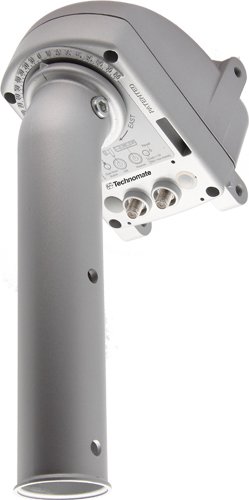
The Technomate TM-2300 M2 DiSEqC HH Motor is designed for precise satellite dish positioning, enabling your satellite receiver to track multiple satellites across the arc. This motor offers enhanced speed and quiet operation compared to previous models. It is compatible with DiSEqC 1.2 and 1.3 (GoTo X) protocols, allowing seamless integration with most compatible satellite receivers on the market. The robust construction ensures durability and reliable performance for dishes up to 1.2 meters.
Setup and Installation
Careful installation is crucial for optimal performance of your TM-2300 M2 motor. Ensure all connections are secure and the motor is correctly aligned.
- Mounting the Motor: Securely attach the TM-2300 M2 motor to your satellite dish pole. Ensure it is level and firmly fixed to prevent movement during operation. The motor is designed to support dishes up to 1.2 meters in diameter.
- Connecting the Coaxial Cable: Connect the coaxial cable from your satellite receiver to the designated input on the motor. Ensure the connection is tight to prevent signal loss.
- Adjusting Hardware Limits: The motor features adjustable hardware limits for East/West boundaries. These limits prevent the dish from moving beyond its safe operational range. Refer to your satellite receiver's manual for specific instructions on setting these limits via DiSEqC commands.
- Initial Alignment: Perform an initial alignment of your satellite dish to a known satellite. This can be done using the manual move buttons on the motor or through your satellite receiver's DiSEqC setup menu.
- Signal Loss Null Play: The motor includes a 'Null Play' feature to compensate for minor signal loss, ensuring consistent performance.
Operating Instructions
The TM-2300 M2 motor is controlled via DiSEqC commands sent from your compatible satellite receiver.
- DiSEqC 1.2 Operation: Use your satellite receiver's menu to select the desired satellite. The receiver will send DiSEqC 1.2 commands to the motor, which will then move the dish to the pre-programmed position for that satellite.
- DiSEqC 1.3 (GoTo X) / USALS Operation: If your receiver supports DiSEqC 1.3 (also known as USALS), input your precise geographical coordinates into the receiver. The receiver will then automatically calculate and command the motor to move the dish to the correct position for any selected satellite.
- Status LED: The motor is equipped with an LED indicator for status checks. Consult your receiver's manual or the motor's specific documentation for LED behavior interpretation (e.g., solid light for power, blinking for movement).
- Manual Move Button: For fine-tuning or initial setup without a receiver, the motor includes a manual move button. Pressing this button will incrementally move the dish.
Maintenance
The Technomate TM-2300 M2 motor is designed for durability with high-quality components, including metal gears. Regular maintenance is minimal but recommended to ensure long-term performance.
- Regular Inspection: Periodically check the motor and dish mounting for any signs of loosening, corrosion, or damage. Ensure all cables are securely connected and free from wear.
- Cleaning: Keep the motor free from excessive dirt, dust, and debris. A soft, damp cloth can be used to gently clean the exterior. Avoid using harsh chemicals or abrasive materials.
- Environmental Protection: While designed for outdoor use, extreme weather conditions can impact performance. Ensure the motor is installed in a location that minimizes exposure to direct heavy rain or snow if possible, without obstructing satellite signals.
Troubleshooting
If you encounter issues with your TM-2300 M2 motor, consider the following troubleshooting steps:
- No Movement:
- Check all cable connections between the receiver and the motor. Ensure they are secure and undamaged.
- Verify that your satellite receiver is powered on and sending DiSEqC commands.
- Observe the motor's status LED. If it is off, check power supply from the receiver.
- Try using the manual move button on the motor to see if it responds.
- Poor Signal/Signal Loss:
- Ensure the dish is correctly aligned to the desired satellite. Fine-tune the position using your receiver's signal strength meter.
- Check for any obstructions in the line of sight to the satellite.
- Inspect the coaxial cable for damage or loose connections.
- Verify that the 'Null Play' feature is functioning as intended to compensate for minor signal fluctuations.
- Incorrect Satellite Position:
- Recalibrate the motor's East/West hardware limits if the dish is overshooting or undershooting positions.
- If using USALS, double-check the geographical coordinates entered into your satellite receiver.
- Ensure the motor's initial alignment to the reference satellite is accurate.
Specifications
| Feature | Specification |
|---|---|
| Brand | Technomate |
| Model | TM-2300 |
| Compatibility | DiSEqC 1.2, DiSEqC 1.3 (GoTo X / USALS) |
| Dish Size Support | Up to 1.2 meters |
| Material | Metal (gears and components) |
| Dimensions (Package) | 33.8 x 17.8 x 10.6 cm |
| Weight (Item) | 3.06 Kilograms |
| Features | Adjustable hardware limits, Null play for signal loss, LED for status check, Manual move button |
Warranty and Support
For warranty information and technical support, please refer to the documentation provided at the time of purchase or contact your retailer. You may also visit the official Technomate website for the latest support resources and contact details.