
GAME 4710-BB
GAME SandPRO 50D Series Pool Sand Filter Unit Instruction Manual
Model: 4710-BB
Introduction
This manual provides essential information for the safe and efficient operation and maintenance of your GAME SandPRO 50D Series Pool Sand Filter Unit. This high-performance filtration system is designed for above-ground pools, offering energy-efficient water circulation and superior filtration. Please read this manual thoroughly before installation and operation to ensure proper use and longevity of your unit.
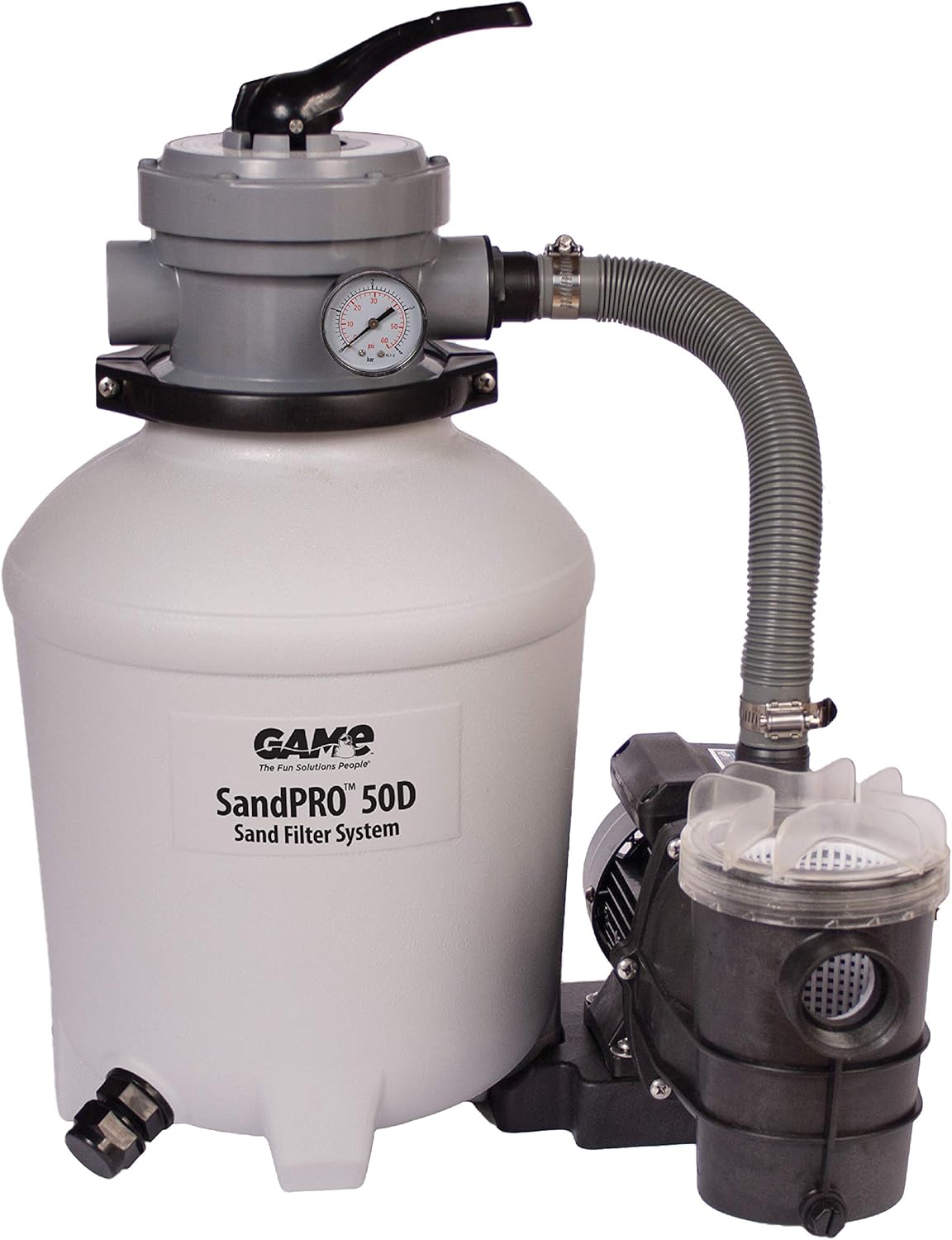
Image: The GAME SandPRO 50D Series Pool Sand Filter Unit, showcasing its compact design and main components including the sand tank, pump, and multi-port valve.
Safety Information
WARNING: This product contains chemicals known to the State of California to cause cancer and birth defects or other reproductive harm. For more information, go to www.P65Warnings.ca.gov.
Always follow basic safety precautions when installing and operating this electrical equipment. Refer to the official Safety Information PDF document for comprehensive safety guidelines.
- Ensure the unit is installed on a solid, level surface.
- Do not operate the pump if the ground is wet or if you are standing in water.
- Always disconnect power before performing any maintenance or service.
- Keep children and unauthorized persons away from the unit during operation.
- Ensure all electrical connections are properly grounded and protected by a Ground-Fault Circuit Interrupter (GFCI).
Setup and Installation
Proper setup is crucial for the optimal performance of your SandPRO 50D filter unit. Follow these steps carefully:
- Placement: Position the filter unit on a stable, level surface near your above-ground pool. Ensure adequate drainage and protection from direct weather exposure if possible.
- Sand Filling: The SandPRO 50D requires 50 pounds of medium-grade pool filtering sand, also known as #20 silica sand. Do not use regular sand or other filtering media unless specified by the manufacturer. Carefully pour the sand into the filter tank, ensuring the standpipe is centered.
- Multi-Port Valve Installation: Securely attach the multi-port valve to the top of the sand tank. Ensure the O-ring is properly seated and the clamp is tightened evenly.
- Hose Connections: Connect the hoses from your pool to the appropriate ports on the multi-port valve and pump. The unit includes adapters for Intex pools (32 mm, 40 mm, 1-1/4-in, & 1-1/2-in hose fittings). Ensure all hose clamps are tightened securely to prevent leaks, but avoid over-tightening which can damage fittings.
- Electrical Connection: Connect the pump to a properly grounded electrical outlet protected by a GFCI.

Image: A person adding 50 pounds of #20 silica sand into the filter tank, illustrating the sand filling process.

Image: The SandPRO 50D filter unit connected to an above-ground pool, demonstrating the typical setup with hoses.
For detailed diagrams and step-by-step instructions, please refer to the comprehensive User Guide (PDF) provided by the manufacturer.
Operating Instructions
The SandPRO 50D features an easy-to-operate 4-position rotary valve for various functions:

Image: A detailed view of the multi-port valve with its 4-way handle, the integrated pressure gauge, and the transparent lid of the strainer basket.
- FILTER: This is the standard operating mode for daily filtration. Water is pumped through the sand bed, trapping debris, and returned to the pool.
- BACKWASH: Used to clean the sand filter. Water flow is reversed, flushing trapped debris out through the waste port. Perform backwash when the pressure gauge reading increases by 5-10 PSI above its clean operating pressure.
- RINSE: After backwashing, this mode settles the sand bed and flushes any remaining dirty water to waste before returning to FILTER mode.
- WINTERIZE: Prepares the filter for off-season storage. Consult the user guide for specific winterization procedures.
The integrated pressure gauge allows you to monitor the filter's performance. A rising pressure indicates that the filter media is becoming clogged and requires backwashing.
Maintenance
Regular maintenance ensures the longevity and efficiency of your SandPRO 50D filter unit:
- Strainer Basket: Periodically check and clean the large-capacity easy-to-clean hair & debris strainer basket. The see-through lid allows for easy inspection. Turn off the pump before opening the basket.
- Backwashing & Rinsing: Perform backwashing and rinsing as needed, typically when the pressure gauge indicates a 5-10 PSI increase from its clean operating pressure.
- Sand Replacement: The #20 silica sand typically needs replacement every 3-5 years, depending on usage and water quality. Refer to the user guide for instructions on replacing the sand.
Troubleshooting
If you encounter issues with your SandPRO 50D, consider the following common troubleshooting tips:
| Problem | Possible Cause | Solution |
|---|---|---|
| Low Water Flow / Poor Filtration | Clogged strainer basket; Dirty sand filter; Air in the system. | Clean strainer basket; Perform backwash and rinse; Bleed air from the system. |
| Water Leaks | Loose hose clamps; Damaged O-rings; Cracked fittings. | Tighten clamps (do not overtighten); Inspect and replace O-rings; Inspect and replace damaged fittings. |
| Pump Not Starting | No power; GFCI tripped; Motor issue. | Check power supply and GFCI; Consult a qualified electrician or contact customer support. |
For more complex issues or if troubleshooting steps do not resolve the problem, refer to the detailed troubleshooting section in the official User Guide (PDF).
Specifications
- Model: 4710-BB
- Pump Horsepower: 0.5 HP
- Maximum Pool Capacity: Up to 10,000 gallons
- Flow Rate: 40 GPM (Gallons Per Minute)
- Sand Requirement: 50 lbs of #20 Silica Sand (not included)
- Product Dimensions: 17.64 x 17.77 x 24.82 inches
- Item Weight: 21 pounds
- Manufacturer: GAME
Warranty and Support
For warranty information, technical support, or to inquire about replacement parts, please contact GAME customer service. Replacement parts for SandPRO filters are exclusively available through GAME.
You can also refer to the official User Guide (PDF) for additional information: User Guide (PDF)
Related documents4710-BB


Ask a question about this manual
Ask about setup, troubleshooting, compatibility, parts, safety, or missing instructions. Manuals+ will review the question and use this page’s manual context to help answer it.