
Introduction
This manual provides essential information for the safe and correct installation, function, and maintenance of the GE WB24T10081 Wall Oven High Limit Switch. This component is designed to ensure the safe operation of your wall oven by preventing overheating. Please read all instructions carefully before proceeding with installation or any service.
Safety Warning:
- Always disconnect power to the appliance before servicing to prevent electric shock.
- Wear appropriate personal protective equipment, including gloves and eye protection.
- If you are unsure about any step, consult a qualified appliance technician.
- This part should only be installed by individuals with experience in appliance repair.
Product Overview
The GE WB24T10081 is a high limit switch specifically designed for GE wall ovens. Its primary function is to monitor the temperature within the oven cavity or specific components. If the temperature exceeds a predetermined safe limit, the switch will automatically interrupt power to the heating elements, preventing potential damage to the appliance or a fire hazard. This is a critical safety component.
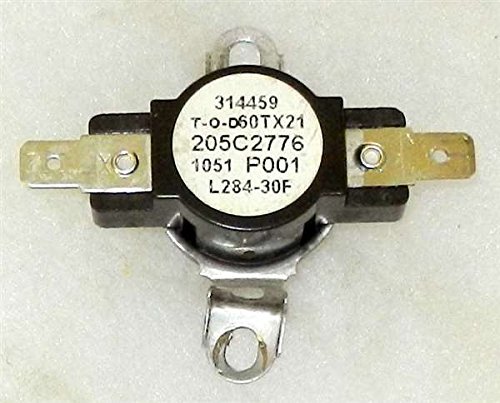
Figure 1: GE WB24T10081 Wall Oven High Limit Switch. This image displays the physical appearance of the high limit switch, a critical safety component for wall ovens.
Installation
Follow these general steps for replacing the high limit switch. Specific steps may vary depending on your oven model. Always refer to your specific oven's service manual if available.
- Disconnect Power: Locate the circuit breaker for your wall oven and turn off the power. Verify power is off by attempting to turn on the oven.
- Access the Switch: Depending on your oven model, you may need to remove the oven from its cabinet, or access the rear or top panel. Carefully remove any screws or fasteners securing the panels.
- Locate the Old Switch: Identify the existing high limit switch. It is typically a small, disc-shaped component with two or more wires connected to it. Note the wiring configuration before disconnecting.
- Disconnect Wires: Carefully disconnect the wires from the old switch. It is recommended to take a photo of the wiring before removal for reference.
- Remove Old Switch: Unscrew or unclip the old high limit switch from its mounting bracket.
- Install New Switch: Mount the new GE WB24T10081 high limit switch in the same location and orientation as the old one. Secure it with the original screws or clips.
- Connect Wires: Reconnect the wires to the new switch, ensuring they match the original configuration. Double-check all connections for security.
- Reassemble Oven: Replace all panels and secure them with their original fasteners.
- Restore Power: Turn the circuit breaker back on.
- Test Functionality: Operate the oven to ensure it functions correctly and heats as expected. Monitor for any unusual behavior.
Operating Principle
The high limit switch is an automatic safety device and does not require manual operation. It continuously monitors the temperature in its vicinity. If the temperature rises above its factory-set threshold, the internal contacts of the switch will open, interrupting the electrical circuit to the heating elements. This action prevents the oven from overheating. Once the temperature drops to a safe level, the switch may automatically reset (auto-reset type) or require manual resetting (manual-reset type). The GE WB24T10081 is typically an auto-reset type, meaning it will close the circuit again once the temperature falls, allowing the oven to resume normal operation if the underlying issue is resolved.
Maintenance
The GE WB24T10081 High Limit Switch is a sealed component and does not require routine maintenance or lubrication. Its function is to operate reliably as a safety device. However, it is important to:
- Ensure the area around the switch is free from debris or obstructions that could affect its temperature sensing.
- Periodically inspect wiring connections to the switch for any signs of corrosion or looseness, especially if the oven has experienced overheating events.
- If the switch repeatedly trips, it indicates an underlying issue with the oven's temperature regulation system, which should be diagnosed and repaired by a qualified technician. Replacing the high limit switch without addressing the root cause will not resolve the problem.
Troubleshooting
If your wall oven is experiencing issues related to overheating or not heating, the high limit switch may be involved. Here are common symptoms and troubleshooting steps:
| Symptom | Possible Cause | Action |
|---|---|---|
| Oven not heating at all. | Tripped high limit switch, faulty heating element, or other electrical issue. |
|
| Oven heats intermittently or shuts off during use. | High limit switch tripping due to overheating, faulty thermostat, or control board issue. |
|
| Oven is excessively hot. | Faulty thermostat, control board, or a high limit switch that has failed to trip. |
|
Note: Testing a high limit switch typically requires a multimeter and knowledge of electrical circuits. If you are not comfortable performing these tests, it is best to contact a professional.
Specifications
| Attribute | Detail |
|---|---|
| Brand | GE |
| Part Number | WB24T10081 |
| Item Model Number | WB24T10081 |
| Item Weight | 0.8 ounces |
| Product Dimensions | 10 x 10 x 10 inches (Packaging dimensions, actual part is smaller) |
| Manufacturer | GE |
Note: Specifications are subject to change without notice. Always verify compatibility with your specific appliance model before purchase and installation.
Warranty and Support
Warranty information for the GE WB24T10081 High Limit Switch is typically provided by the seller or the manufacturer at the time of purchase. Please retain your proof of purchase for any warranty claims.
For technical support or further assistance, please contact the retailer from whom you purchased this part or refer to the official GE Appliances support website. When contacting support, have your oven's full model number and serial number ready, along with details of the issue you are experiencing.
GE Appliances Support: www.geappliances.com/ge/service-and-support/


