
Miller 267422
Miller 267422 Replacement Face Guard User Manual
For Miller Weld-Mask Auto-Darkening Goggles
General Information
This manual provides essential information for the proper use and maintenance of the Miller 267422 Replacement Face Guard. Please read thoroughly before installation or use.
Product Name: Miller 267422 Replacement Face Guard for Weld-Mask
Brand: Miller
Model Number: 267422
Description: Genuine Miller Weld-Mask replacement Face Guard. For use with Miller Weld-Mask auto-darkening goggles ONLY. Package of 1.
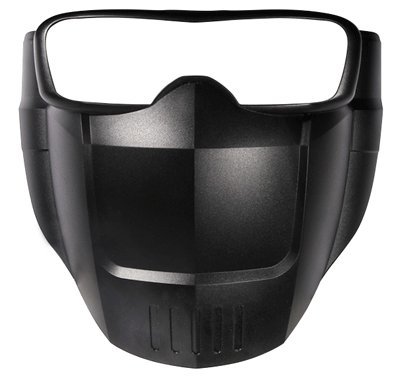
Setup and Installation
The Miller 267422 Face Guard is designed for quick and secure attachment to the Miller Weld-Mask auto-darkening goggles.
Required Items:
- Miller Weld-Mask Auto-Darkening Goggles (sold separately)
Installation Steps:
- Ensure your Miller Weld-Mask auto-darkening goggles are clean and free of debris.
- Align the attachment points on the 267422 Replacement Face Guard with the corresponding slots or clips on the Weld-Mask goggles.
- Gently press the face guard into place until it securely clicks or locks into position. Verify that all attachment points are firmly engaged.
- Once installed, lightly tug on the face guard to confirm it is securely fastened and will not detach during use.
Operating Instructions
The 267422 Replacement Face Guard functions as a protective barrier when attached to the Miller Weld-Mask auto-darkening goggles. It is a passive component and does not require active operation.
Proper Use:
- Always ensure the face guard is properly installed before beginning any welding or cutting operations.
- The face guard provides additional protection for the lower face and neck area from sparks, spatter, and radiant heat.
- Do not use the face guard if it is cracked, damaged, or shows signs of wear that could compromise its protective capabilities.
Maintenance and Care
Regular maintenance ensures the longevity and effectiveness of your Miller 267422 Replacement Face Guard.
Cleaning:
- Clean the face guard with a soft cloth and mild soap and water.
- Avoid abrasive cleaners or solvents, as these can damage the material.
- Rinse thoroughly with clean water and allow to air dry completely before re-attaching to the goggles or storing.
Storage:
- Store the face guard in a clean, dry environment, away from direct sunlight and extreme temperatures.
- Protect it from physical damage when not in use.
Inspection:
- Before each use, inspect the face guard for any signs of cracks, chips, deep scratches, or other damage.
- If any damage is observed, replace the face guard immediately to ensure continued protection.
Troubleshooting
This section addresses common issues related to the Miller 267422 Replacement Face Guard.
| Problem | Possible Cause | Solution |
|---|---|---|
| Face guard does not attach securely. | Incorrect alignment or debris in attachment points. | Ensure proper alignment with Weld-Mask goggles. Clean attachment points on both the face guard and goggles. |
| Face guard appears loose after installation. | Attachment clips not fully engaged or damaged clips. | Press firmly until clips click into place. If clips are damaged, the face guard needs replacement. |
| Visible damage (cracks, chips) on face guard. | Impact or wear and tear. | Immediately replace the face guard. Do not use a damaged face guard. |
Specifications
- Model Number: 267422
- Product Dimensions: 10 x 8 x 3 inches
- Item Weight: 2.82 ounces
- Compatibility: Exclusively for Miller Weld-Mask auto-darkening goggles
- Material: Durable molded plastic
Warranty and Support
For information regarding product warranty, please refer to the documentation provided with your original Miller Weld-Mask auto-darkening goggles or visit the official Miller Electric website.
For technical support or replacement parts, please contact Miller Electric customer service or an authorized Miller dealer.
Manufacturer: Miller Electric
Website: www.millerwelds.com
Contact: Refer to manufacturer's website for current contact information.
Related documents267422


Ask a question about this manual
Ask about setup, troubleshooting, compatibility, parts, safety, or missing instructions. Manuals+ will review the question and use this page’s manual context to help answer it.