
Hughes HRMC-8
Hughes HRMC-8 DirecTV 5-Device Learning Remote Control User Manual
Introduction
This manual provides comprehensive instructions for the setup, operation, and maintenance of your Hughes HRMC-8 DirecTV 5-Device Learning Remote Control. Please read this manual thoroughly before using the device to ensure proper functionality and to prevent damage.
Safety Information
- Do not expose the remote control to extreme temperatures, direct sunlight, or high humidity.
- Avoid dropping the remote control or subjecting it to strong impacts.
- Do not attempt to disassemble or modify the remote control. This will void the warranty.
- Keep batteries out of reach of children. If swallowed, seek immediate medical attention.
- Dispose of used batteries according to local regulations.
Setup
1. Battery Installation
The Hughes HRMC-8 remote control requires two (2) AA batteries (not included). Follow these steps to install the batteries:
- Locate the battery compartment cover on the back of the remote control.
- Press down on the tab and slide the cover downwards to remove it.
- Insert two new AA batteries, ensuring the positive (+) and negative (-) terminals align with the markings inside the compartment.
- Replace the battery compartment cover by sliding it back into place until it clicks securely.
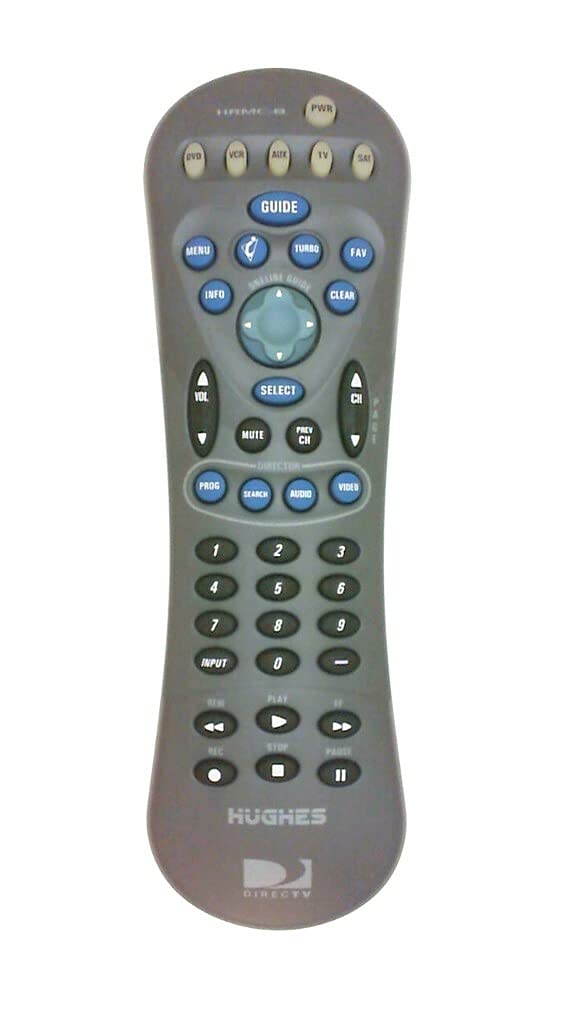
Figure 1: Back view of the HRMC-8 remote control, indicating the battery compartment location.

Figure 2: Close-up of the battery compartment with AA batteries correctly installed, showing polarity markings.
2. Programming the Remote Control
The HRMC-8 is a learning remote designed to control up to 5 devices, including DirecTV receivers. Refer to your DirecTV receiver's manual or the specific device's manual for detailed programming codes and instructions. Generally, the process involves:
- Turning on the device you wish to program (e.g., TV, DVD player, DirecTV receiver).
- Pressing and holding the appropriate device button on the HRMC-8 remote (e.g., TV, VCR, SAT) until the indicator light illuminates.
- Entering the 4-digit programming code for your device.
- Testing the remote's functions. If the device does not respond, try alternative codes or the learning function.
3. Using the Learning Function
If a direct code is not available, the HRMC-8 can learn commands from your original remote control. This feature allows you to customize button functions.
- Place the HRMC-8 remote and your original remote control head-to-head on a flat surface, approximately 1-2 inches apart.
- Press and hold the "LEARN" button (if available, or a combination as per specific instructions) on the HRMC-8 until the indicator light blinks.
- Press the button on the HRMC-8 you wish to program.
- Press the corresponding button on your original remote control.
- The HRMC-8 indicator light will confirm successful learning. Repeat for all desired buttons.
Operating the Remote Control
Once programmed, the HRMC-8 remote control operates similarly to your original device remotes. Use the device selection buttons (e.g., TV, VCR, SAT) to switch control between your connected equipment.
- Power Button: Turns the selected device on or off.
- Channel Up/Down: Changes channels on your DirecTV receiver or TV.
- Volume Up/Down: Adjusts the volume of the selected audio device (typically TV or audio receiver).
- Number Pad: For direct channel entry or menu navigation.
- Menu/Guide: Accesses the menu or program guide of your DirecTV receiver.
- Directional Pad (Arrows) & Select: Navigates through on-screen menus.
Maintenance
Cleaning
To clean the remote control, use a soft, dry cloth. Do not use abrasive cleaners, solvents, or wet cloths, as these can damage the surface or internal components.
Battery Replacement
When the remote control's performance degrades or the indicator light fails to illuminate, it is time to replace the batteries. Follow the battery installation steps outlined in the "Setup" section.
Troubleshooting
| Problem | Possible Cause | Solution |
|---|---|---|
| Remote control does not respond. | Dead or incorrectly installed batteries. | Replace batteries, ensuring correct polarity. |
| Remote control does not operate a specific device. | Incorrect programming code or device not selected. | Ensure the correct device button is selected. Re-program the device using the correct code or the learning function. |
| Buttons are unresponsive or sticky. | Dirt or debris under buttons. | Clean the remote control as described in the Maintenance section. |
| Remote's range is reduced. | Low battery power or obstruction between remote and device. | Replace batteries. Ensure a clear line of sight to the device's IR receiver. |
Specifications
- Model: HRMC-8
- Brand: Hughes
- Connectivity Technology: Infrared
- Controller Type: Button Control
- Number of Devices: 5
- Power Source: 2 x AA Batteries (not included)
- Product Dimensions: 8.25 x 2.5 x 1.35 inches (20.96 x 6.35 x 3.43 cm)
- Item Weight: 3.87 ounces (109.7 grams)
- Color: Gray
- Material: Plastic, Metal
- Special Feature: Learning Function, Ergonomic Design
Related documentsHRMC-8


Ask a question about this manual
Ask about setup, troubleshooting, compatibility, parts, safety, or missing instructions. Manuals+ will review the question and use this page’s manual context to help answer it.