
Introduction
This manual provides essential instructions for the proper installation, operation, and maintenance of your Ozone OES-BAS-20 Core Series Safe. Please read this manual thoroughly before using the safe to ensure optimal performance and security. Keep this manual for future reference.
Important Safety Information
- Do not store the emergency override keys inside the safe. Keep them in a secure, separate location.
- Ensure the safe is securely mounted to prevent unauthorized removal.
- Replace batteries promptly when the low battery indicator activates to avoid lockout.
- Avoid exposing the safe to extreme temperatures or humidity.
- This safe is not water-resistant. Protect it from water exposure.
Package Contents
- Ozone OES-BAS-20 Core Series Safe
- User Guide / Manual
- Emergency Override Keys (2)
- Mounting Hardware (bolts)
Product Overview
The Ozone OES-BAS-20 Core Series Safe is designed to provide secure storage for your valuables. It features a robust alloy steel construction and an electronic keypad for keyless access. The safe incorporates several security features, including an auto-secure mode and a low battery indicator.
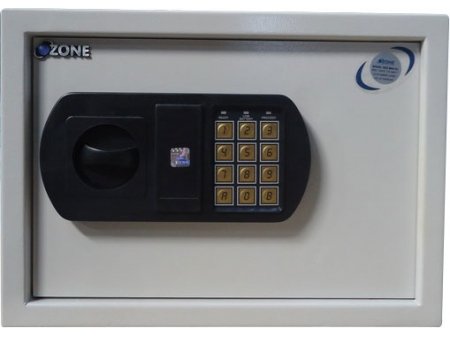
Image: Front view of the Ozone OES-BAS-20 Core Series Safe, showing the grey exterior and the black electronic keypad with a rotary handle.
Key Features
- No Keys No Fuss: User-programmable code eliminates the risk of key loss or duplication.
- Auto Secure Mode: Three consecutive incorrect code inputs activate a 3-minute lockout period.
- Low Energy Consumption: Operates on 4 x AA/1.5 volt batteries, lasting approximately one year with typical use.
- Low Battery Indicator: Provides an audio-visual alert when batteries need replacement.
- Strong Construction: Heavy-duty alloy steel body for enhanced protection against break-in attempts.
Setup Guide
1. Unpacking
Carefully remove the safe from its packaging. Inspect the safe for any signs of damage. Retain the packaging materials for potential future transport or service.
2. Battery Installation
- Locate the battery compartment, typically on the inside of the safe door.
- Open the battery cover.
- Insert 4 x AA/1.5 volt alkaline batteries, ensuring correct polarity (+/-).
- Close the battery cover securely.
- The safe should emit a beep, indicating successful battery installation.
3. Mounting the Safe (Wall Mount)
For enhanced security, it is recommended to securely mount the safe. This model is designed for wall mounting.
- Choose a suitable location for mounting, ensuring it is a solid surface capable of supporting the safe's weight.
- Using the pre-drilled holes on the back of the safe as a template, mark the drilling points on the wall.
- Drill pilot holes into the wall at the marked locations.
- Align the safe with the drilled holes and secure it using the provided mounting bolts. Tighten all bolts firmly.
Operating Your Safe
1. Initial Opening
Upon first use, the safe can be opened using the emergency override keys. Insert the key into the keyhole (often concealed behind a cover on the keypad), turn it, and simultaneously turn the handle to open the door.
2. Setting Your User Code
It is crucial to set your personal user code immediately after initial opening.
- With the safe door open, locate the red or green reset button on the inside of the door (usually near the hinge).
- Press the reset button. The safe will beep, and an indicator light on the keypad will illuminate.
- Within 5 seconds, enter your desired 3-8 digit code on the keypad.
- Press the '#' or 'B' button to confirm. The safe will beep again, indicating the code has been successfully set.
- Test the new code with the door open before closing it.
3. Opening with User Code
- Enter your personal 3-8 digit user code on the keypad.
- Press the '#' or 'B' button.
- If the code is correct, the green indicator light will illuminate, and you will hear a beep.
- Within 5 seconds, turn the handle clockwise (or as indicated) to open the safe door.
4. Auto Secure Mode
For enhanced security, if three incorrect codes are entered consecutively, the safe will enter an 'Auto Secure Mode'. During this period, the keypad will be inactive for 3 minutes, preventing further attempts. Wait for the lockout period to expire before attempting to enter the code again.
5. Low Battery Indicator
The safe is equipped with an audio-visual alarm to indicate low battery power. When the batteries are low, the safe will emit a series of beeps and/or a specific light pattern during operation. Replace the batteries promptly to ensure continuous functionality and avoid being locked out.
Maintenance
Battery Replacement
When the low battery indicator activates, replace all four AA/1.5 volt batteries with new ones. Follow the battery installation steps outlined in the 'Setup Guide'. Do not mix old and new batteries or different battery types.
Cleaning
Clean the exterior of the safe with a soft, damp cloth. Avoid using abrasive cleaners or solvents, as these can damage the finish or electronic components. Ensure no moisture enters the keypad or lock mechanism.
Troubleshooting
| Problem | Possible Cause | Solution |
|---|---|---|
| Safe does not open with code. | Incorrect code entered; batteries low; keypad locked. | Verify code and re-enter. Replace batteries. Wait for Auto Secure Mode to expire. Use emergency override key. |
| Keypad is unresponsive. | Dead batteries; Auto Secure Mode active. | Replace batteries. Wait for Auto Secure Mode to expire. |
| Low battery indicator is on. | Batteries are low. | Replace all four AA batteries immediately. |
| Safe door does not close properly. | Obstruction; locking bolts misaligned. | Check for any items blocking the door. Ensure the handle is in the correct position before closing. |
Product Specifications
| Feature | Specification |
|---|---|
| Brand | Ozone |
| Model Number | OES-BAS-20 |
| Lock Type | Electronic Keypad (with Key override) |
| Colour | Grey |
| Material | Alloy Steel |
| Mounting Type | Wall Mount |
| Item Weight | 10.51 kg (10 kg 500 g) |
| Alarm | Audible (for low battery, incorrect code) |
| Water Resistance Level | Not Water Resistant |
| Power Source | 4 x AA/1.5 Volt Batteries |
| Package Dimensions | 48.49 x 39.29 x 30.1 cm |
Warranty and Support
For warranty information or technical support, please refer to the warranty card included with your product or contact Ozone customer service. Keep your purchase receipt as proof of purchase for warranty claims.