
1. Introduction
This manual provides essential information for the safe and effective use of your XTERRA Fitness TR600 Folding Treadmill. Please read this manual thoroughly before assembly or operation and retain it for future reference.
The XTERRA TR600 Treadmill is designed to combine quality, performance, and aesthetic appeal with the practical flexibility of a machine that can be easily folded and stored, making it suitable for home environments.

Figure 1.1: The XTERRA Fitness TR600 Folding Treadmill in its operational state.
2. Important Safety Information
WARNING: To reduce the risk of serious injury, read all important precautions and instructions in this manual before using the treadmill.
- Always attach the safety tether clip to your clothing before beginning a workout. The treadmill will stop if the clip is pulled off the console.
- Keep children and pets away from the treadmill at all times. The treadmill is not intended for use by children.
- Place the treadmill on a level surface with at least 6 feet of clear space behind it and 2 feet on each side.
- Do not operate the treadmill if it has a damaged power cord or plug, or if it is not working properly.
- Wear appropriate exercise clothing and athletic shoes. Do not wear loose clothing that could get caught in the treadmill.
- Consult a physician before beginning any exercise program.
- The maximum user weight recommendation for this treadmill is 325 pounds.
3. Setup and Assembly
The XTERRA TR600 Treadmill requires assembly. It is designed for straightforward setup, typically involving the installation of approximately 16 bolts. It is recommended to have assistance during assembly due to the product's weight (approximately 218.3 pounds).
3.1 Unpacking and Placement
- Carefully remove all components from the packaging. Retain packaging materials until assembly is complete.
- Place the treadmill in a suitable location, ensuring adequate clearance around the unit for safe operation and maintenance.
3.2 Assembly Steps
Follow the detailed assembly instructions provided in the separate assembly guide. Key steps include:
- Attach the uprights to the base frame.
- Connect the console assembly to the uprights, ensuring all electrical connections are secure.
- Secure all remaining components as per the assembly guide.
3.3 Folding and Transport
The TR600 features a lift-assist folding design, making it easier to raise and lower the running deck. When folded, the treadmill can be transported using its integrated 4-wheel carriage system.

Figure 3.1: The TR600 Treadmill in its folded, space-saving configuration.
4. Operating Instructions
The XTERRA TR600 Treadmill offers a range of features for an effective workout. Familiarize yourself with the console and controls before starting your exercise routine.
4.1 Console Overview
The large 6.5-inch blue backlit LCD display provides clear readings of program profile, time, speed, pace, distance, calories, incline, and pulse. Quick access buttons allow for easy adjustment of speed and incline.
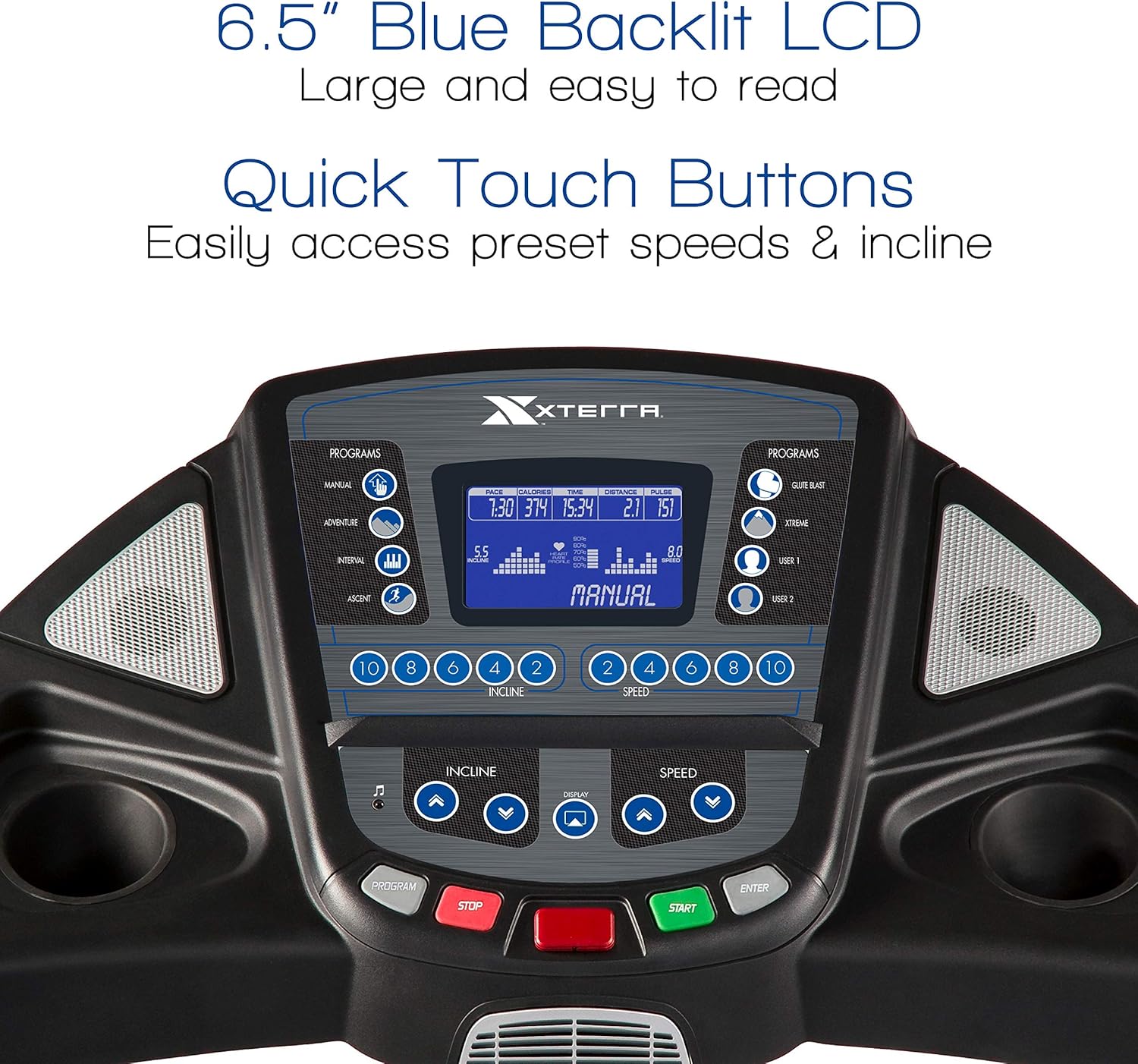
Figure 4.1: Detailed view of the TR600 console, showing the LCD display and quick touch buttons for speed and incline.
4.2 Starting a Workout
- Ensure the safety tether clip is properly attached to the console and your clothing.
- Step onto the treadmill belt.
- Press the START button to begin. The treadmill will typically start at a low speed.
- Adjust speed using the speed control buttons on the console or the handlebar-mounted controls. The treadmill supports speeds up to 12 mph.
- Adjust incline using the incline control buttons on the console or the handlebar-mounted controls. The incline range is 0-12%.

Figure 4.2: Handlebar-mounted controls for convenient speed and incline adjustments during your workout.
4.3 Workout Programs
The TR600 includes 6 pre-set programs, 2 user-defined programs, and a manual mode. Refer to the console guide for detailed instructions on selecting and customizing programs.
4.4 Key Features
- Running Surface: The treadmill features a large 20" x 60" belt, providing ample space for comfortable strides.

Figure 4.3: The spacious 20" x 60" running deck accommodates various stride lengths.
- Motor: Powered by a smooth and quiet 2.75 HP motor.
- Heart Rate Monitoring: Heart rate pulse grips are conveniently located on the handlebars to monitor your pulse during exercise.
- Audio Connectivity: An audio jack with built-in speakers allows you to connect your MP3 player or smartphone for entertainment during your workout.

Figure 4.4: Connect your device to the integrated audio jack for music playback.
- XTRAsoft Cushioned Deck: This technology provides multiple points of cushioning for maximum impact absorption, enhancing comfort and reducing strain.

Figure 4.5: The XTRAsoft Cushioned Deck system for enhanced comfort.

Figure 4.6: The TR600 treadmill in use, demonstrating its ergonomic design for running.
5. Maintenance
Regular maintenance ensures the longevity and optimal performance of your XTERRA TR600 Treadmill. Always unplug the treadmill before performing any maintenance.
5.1 Cleaning
- Wipe down the console and other surfaces with a damp cloth after each use to remove sweat and dust. Avoid abrasive cleaners.
- Periodically vacuum underneath the treadmill to prevent dust and debris from accumulating.
5.2 Belt Lubrication
The running belt requires periodic lubrication to reduce friction and extend the life of the motor and belt. Refer to your separate lubrication guide or contact customer support for recommended lubrication intervals and procedures.
5.3 Belt Tension and Alignment
Check the running belt tension and alignment regularly. If the belt slips or drifts to one side, adjust it according to the instructions in the assembly guide or contact customer support.
6. Troubleshooting
This section addresses common issues you might encounter with your TR600 Treadmill. For problems not listed here, or if solutions do not resolve the issue, please contact XTERRA Fitness customer support.
| Problem | Possible Cause | Solution |
|---|---|---|
| Treadmill does not power on. | Power cord not fully plugged in; circuit breaker tripped; safety key not inserted. | Ensure power cord is secure. Check household circuit breaker. Insert safety key fully into console. |
| Running belt slows down or stops unexpectedly. | Overload (user weight exceeds limit); motor issue; belt lubrication needed; calibration issue. | Ensure user weight is within 325 lbs limit. Check for proper belt lubrication. If "slow speed" error persists or belt does not respond to controls, contact customer support as internal components (e.g., harness, electrical board) may require inspection. |
| Belt slips or is off-center. | Belt tension or alignment issue. | Adjust belt tension and alignment according to the assembly guide. |
| Unusual noises during operation. | Loose components; motor or roller issue; belt wear. | Inspect for loose bolts. If noise persists, contact customer support. |
7. Product Specifications
| Brand | XTERRA |
| Model Name | TR600 (FBA_160083) |
| Item Weight | 218.3 Pounds |
| Material | Alloy Steel (Frame), Plastic |
| Special Feature | Foldable |
| Recommended Uses | Cardiovascular Exercise |
| Maximum Horsepower | 2.75 HP |
| Assembly Required | Yes |
| Display Type | LCD (6.5-inch blue backlit) |
| Maximum Weight Recommendation | 325 Pounds |
| Deck Length | 60 Inches |
| Deck Width | 20 Inches |
| Assembled Dimensions (LxWxH) | 78.7 x 35 x 54.1 inches |
| Folded Dimensions (LxWxH) | 53.7 x 35 x 67.1 inches |
| UPC | 795447160836 |
8. Warranty and Support
8.1 Warranty Information
The XTERRA Fitness TR600 Treadmill comes with a manufacturer-provided warranty. This typically includes:
- Lifetime: Frame and Motor
- 3 Years: Deck
- 1 Year: Parts and In-Home Labor
Please retain your proof of purchase for warranty claims. Warranty terms may vary; refer to the official warranty document included with your product or contact XTERRA Fitness directly for the most current information.
8.2 Customer Support
For technical assistance, parts, or warranty inquiries, please contact XTERRA Fitness customer support. Visit the official XTERRA website or refer to your product packaging for contact details.
You can also visit the XTERRA Store on Amazon for additional product information and support resources.
