
1. Introduction
The RØDE RodeLink FM Digital Wireless Filmmaker System provides a complete solution for wireless audio capture, designed for filmmakers and videographers. This system includes a receiver (RX-CAM), a transmitter (TX-BELT), and a broadcast-grade lavalier microphone (RØDELink LAV), offering reliable and high-quality audio transmission.
Key features include:
- Digital Series II 2.4GHz transmission with 128-bit encryption.
- Constant monitoring and hopping between frequencies for optimal signal strength up to 100 meters (328 feet).
- OLED display on the receiver for essential information.
- Flexible mounting options for both receiver and transmitter.
- Includes an omnidirectional lavalier microphone for clear audio reproduction.
2. System Components
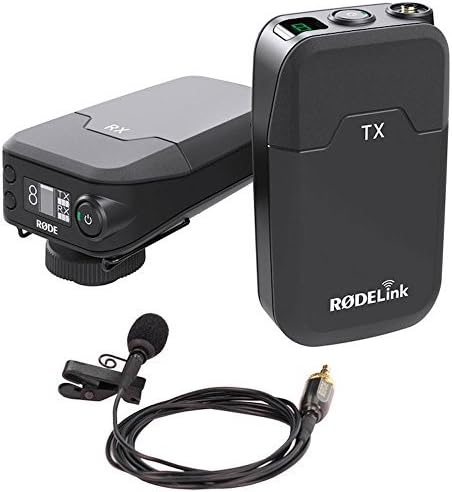
Image 2.1: The RodeLink FM system includes the RX-CAM receiver, TX-BELT transmitter, and RØDELink LAV lavalier microphone.
The RodeLink FM system consists of three primary components:
- RX-CAM Receiver: The camera-mounted receiver unit.
- TX-BELT Transmitter: The belt-pack transmitter unit.
- RØDELink LAV: An omnidirectional lavalier microphone.

Image 2.2: The RX-CAM receiver (left) and TX-BELT transmitter (right) units.
3. Setup
3.1 Powering the Units
- Receiver (RX-CAM): Insert two AA batteries into the battery compartment. Alternatively, power via micro USB.
- Transmitter (TX-BELT): Insert two AA batteries into the battery compartment. Alternatively, power via micro USB.
3.2 Connecting the Microphone
Connect the RØDELink LAV lavalier microphone to the 3.5mm TRS input on the TX-BELT transmitter. Ensure the locking thread is securely fastened to prevent accidental disconnection.
3.3 Mounting the Units
- Receiver (RX-CAM): The RX-CAM can be mounted on a standard camera shoe mount, a 3/8" thread, or using the integrated belt-clip. The shoe mount can be positioned in one of two orientations for flexibility.
- Transmitter (TX-BELT): The lightweight TX-BELT can be attached to a belt or clothing using its integrated clip.

Image 3.1: The TX-BELT transmitter can be easily clipped to a belt or clothing.
3.4 Pairing the Units
The RodeLink FM system typically pairs automatically upon power-up. If manual pairing is required, refer to the detailed instructions in the full user manual available on the RØDE Microphones website. The system constantly monitors and hops between frequencies to maintain the strongest possible signal.
4. Operating Instructions
4.1 Receiver OLED Display
The RX-CAM receiver features an OLED display that provides critical operational information, including:
- Audio level indication.
- Battery status for both the receiver and transmitter.
- Mute status.
- Selected channel information.
4.2 Audio Level Adjustment
Adjust the audio output level on the RX-CAM receiver to match the input sensitivity of your camera or recording device. Monitor audio levels carefully to avoid clipping or distortion.
4.3 Range and Signal Stability
The system operates effectively up to 100 meters (328 feet) in optimal conditions. Environmental factors such as obstacles, Wi-Fi interference, and other 2.4GHz devices can affect range and signal stability. Maintain a clear line of sight between the transmitter and receiver whenever possible.
5. Maintenance
- Cleaning: Use a soft, dry cloth to clean the units. Avoid abrasive cleaners or solvents.
- Battery Care: Remove batteries if the system will not be used for an extended period to prevent leakage. Use high-quality alkaline or rechargeable AA batteries.
- Storage: Store the system in a cool, dry place away from direct sunlight and extreme temperatures.
6. Troubleshooting
| Problem | Possible Cause | Solution |
|---|---|---|
| No audio output |
|
|
| Intermittent audio or dropouts |
|
|
| Poor audio quality (hiss, distortion) |
|
|
7. Specifications
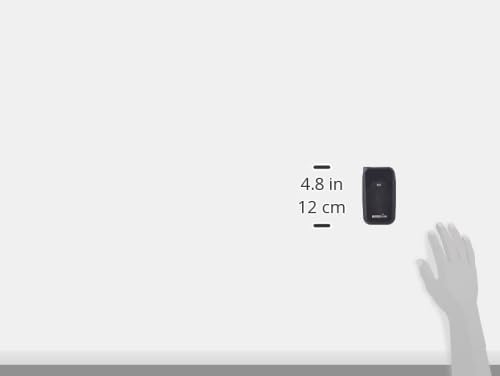
Image 7.1: Approximate dimensions of the RodeLink FM units (example shown for transmitter).
| Feature | Detail |
|---|---|
| Brand | RØDE Microphones |
| Model Name | RODELINKFM |
| Connectivity Technology | Wireless (Digital Series II 2.4GHz) |
| Connector Type | 3.5 mm TRS |
| Included Components | TX-BELT, RX-CAM, RØDELink LAV |
| Polar Pattern (Lavalier) | Omnidirectional |
| Color | Black |
| Recommended Uses | Filmmaking, Videography, General Audio Recording |
| Operating Range | Up to 100 meters (328 feet) in optimal conditions |
8. Warranty and Support
RØDE Microphones products are covered by a manufacturer's warranty. For specific warranty terms, registration, and technical support, please visit the official RØDE Microphones website or contact their customer service directly. Keep your proof of purchase for warranty claims.
Official Website: www.rode.com


