
1. Introduction
The Doro Primo 401 is a user-friendly GSM mobile phone designed for straightforward communication. It features a large, illuminated color display and a clamshell design, making it practical and easy to handle. This manual provides essential information to help you get started and make the most of your device.
2. What's in the Box
Upon opening the package, ensure all the following items are present:
- Doro Primo 401 Mobile Phone
- Power Adapter
- Quick Start Guide
3. Setup
3.1 Inserting the SIM Card and Battery
Before using your Doro Primo 401, you need to insert a standard SIM card and the battery.
- Carefully remove the back cover of the phone.
- Insert your standard SIM card into the designated slot, ensuring the gold contacts face downwards and the cut corner is correctly aligned.
- Place the battery into its compartment, aligning the contacts.
- Replace the back cover until it clicks securely into place.
3.2 Charging the Phone
For optimal performance, fully charge the phone before first use.
- Connect the power adapter to the phone's charging port (Mini-USB).
- Plug the adapter into a wall socket.
- Allow the phone to charge for approximately 1 hour, or until the battery indicator shows a full charge.
3.3 Powering On/Off
To power on the phone, press and hold the red receiver button (power button) for a few seconds until the screen illuminates. To power off, press and hold the same button until the power-off option appears, then confirm.
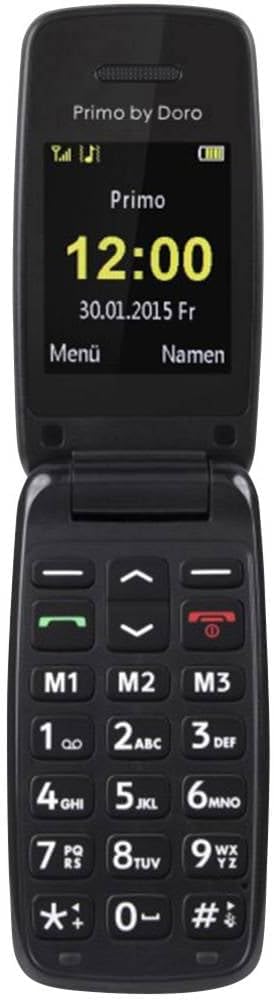
Figure 1: Doro Primo 401 with its clamshell open, showing the large color display and keypad.
4. Operating Instructions
4.1 Making and Receiving Calls
- To make a call: Enter the phone number using the keypad and press the green call button.
- To answer a call: Press the green call button when the phone rings.
- To end a call: Press the red receiver button.
4.2 Using Direct Dial Keys (M1, M2, M3)
The Doro Primo 401 features three direct dial keys (M1, M2, M3) for quick access to frequently called numbers. To set these up, navigate to the phonebook settings and assign contacts to each key.
4.3 Phonebook
The phonebook can store up to 200 contacts. You can save numbers to the phone's memory or to the SIM card. Access the phonebook via the 'Menu' button and select 'Contacts'.
4.4 FM Radio and Bluetooth
The phone includes an FM radio, which can be accessed through the main menu. Bluetooth functionality allows for wireless connection to compatible devices such as headsets.

Figure 2: Close-up of the Doro Primo 401 keypad, highlighting the M1, M2, and M3 quick-dial buttons.
5. Maintenance
5.1 Cleaning the Device
Use a soft, dry cloth to clean the phone's exterior. Avoid using liquid cleaners or abrasive materials, as these can damage the device.
5.2 Battery Care
To prolong battery life, avoid exposing the phone to extreme temperatures. Charge the battery regularly, but avoid leaving it fully discharged for extended periods.
5.3 Storage
When not in use for an extended period, store the phone in a cool, dry place. It is recommended to charge the battery partially before storage and recharge it every few months to prevent deep discharge.
6. Troubleshooting
If you encounter issues with your Doro Primo 401, refer to the following common solutions:
| Problem | Possible Solution |
|---|---|
| Phone does not turn on | Ensure the battery is correctly inserted and fully charged. Press and hold the red receiver button for several seconds. |
| Cannot make or receive calls | Check if the SIM card is properly inserted. Verify that you have network coverage. Contact your service provider if the issue persists. |
| Battery not charging | Ensure the charger is correctly connected to both the phone and the power outlet. Try a different power outlet or charger if available. |
| No sound during calls | Check the volume settings. Ensure the phone is not in silent mode. |
For more detailed troubleshooting, please refer to the official user manual available as a PDF: Doro Primo 401 User Manual (PDF).
7. Specifications
| Feature | Detail |
|---|---|
| Brand | Doro |
| Model Name | Primo 401 |
| Display Size | 2 Inches |
| Dimensions | 46 x 19 x 91 mm |
| Weight | 74 Grams |
| Battery Capacity | 500 Milliamperora (mAh) |
| Talk Time | 4 Hours |
| Standby Time | 192 Hours |
| SIM Card Slots | Single SIM |
| Connectivity Technology | 2G GSM, Bluetooth |
| Camera | Rear, 2 MP (no flash) |
| Features | Large illuminated color display, 3 direct dial keys, 200 phonebook entries, FM Radio, Calendar |
8. Warranty and Support
8.1 Product Warranty
The Doro Primo 401 comes with a 2-year manufacturer's warranty. Please retain your proof of purchase for warranty claims. The warranty covers defects in materials and workmanship under normal use.
8.2 Customer Support
For further assistance, technical support, or warranty inquiries, please visit the official Doro website or contact their customer service. You can also find more information on the Doro Brand Store: Doro Brand Store.


