Introduction
The Apple iPad Air 2 is a powerful and versatile tablet designed for a wide range of tasks, from productivity to entertainment. This renewed device has been inspected and tested to ensure it functions like new. It features a stunning Retina display, a robust A8X chip, and advanced camera capabilities, all within a remarkably thin and light design.

Figure 1: Front and back view of the Apple iPad Air 2, showcasing its sleek design.
What's in the Box
Upon unboxing your Apple iPad Air 2, you should find the following components:
- Apple iPad Air 2 (16 GB, Space Gray)
- Lightning to USB Cable
- USB Power Adapter
Setup
- Charge the iPad: Before initial use, connect the Lightning to USB Cable to your iPad and the USB Power Adapter. Plug the adapter into a wall outlet. Allow the iPad to charge until it reaches a sufficient battery level.
- Power On: Press and hold the Power button (located on the top right edge) until the Apple logo appears.
- Initial Setup Assistant: Follow the on-screen instructions to set up your iPad. This includes selecting your language and region, connecting to a Wi-Fi network, setting up Touch ID (if desired), creating a passcode, and signing in with your Apple ID or creating a new one.
- Restore or Set Up as New: You will have the option to restore from an iCloud or iTunes backup, or set up the iPad as a new device.
Operating Your iPad Air 2
The iPad Air 2 runs on iOS, providing an intuitive and user-friendly experience. Below are key features and how to interact with them.
Display and Navigation
The 9.7-inch Retina display offers a 2048-by-1536-pixel resolution, providing sharp and vibrant visuals. It features Multi-Touch technology for gestures and a fingerprint-resistant oleophobic coating.
- Home Button: Press once to return to the Home screen. Double-press to open the App Switcher.
- Touch ID: Use your fingerprint for secure unlocking and purchases.
- Gestures: Swipe, pinch, and tap to navigate apps and content.
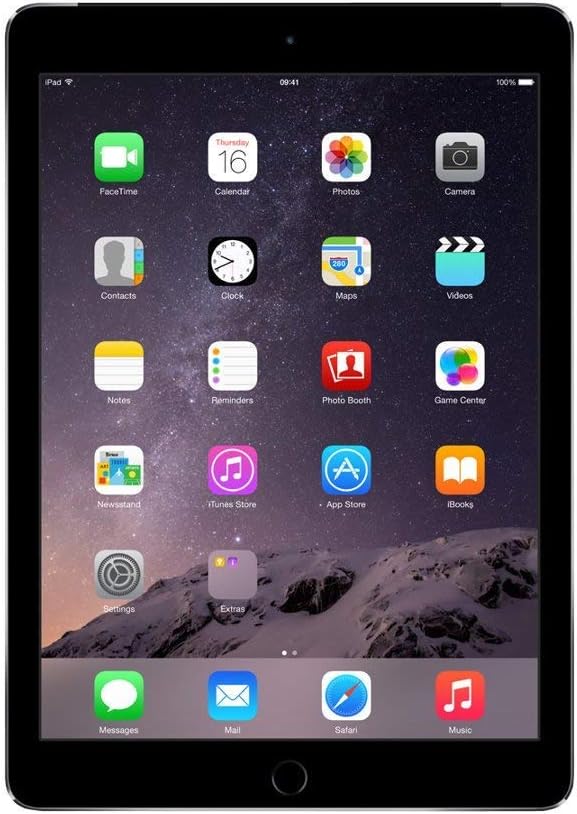
Figure 2: The iPad Air 2 home screen, showing various application icons.
Camera Functions
Your iPad Air 2 is equipped with two cameras:
- 8MP iSight Camera (Rear): For high-quality photos and videos. Features include autofocus, ƒ/2.4 aperture, five-element lens, hybrid IR filter, backside illumination, improved face detection, exposure control, panorama (up to 43MP), burst mode, tap to focus, photo geotagging, and timer mode.
- FaceTime HD Camera (Front): Ideal for video calls and selfies.
Video Recording: Record 1080p HD video at 30 fps. Additional video features include Slo-mo (120 fps), Time-lapse video, video image stabilization, 3x video zoom, and video geotagging.
Connectivity
- Wi-Fi: Supports 802.11a/b/g/n/ac with dual channel (2.4GHz and 5GHz) and HT80 with MIMO for fast wireless internet access.
- Bluetooth 4.0: Connect wireless accessories like headphones and keyboards.
Performance
The iPad Air 2 is powered by the A8X chip with 64-bit architecture and an M8 motion coprocessor, ensuring smooth performance for apps, games, and multitasking.
Maintenance
- Cleaning: Use a soft, lint-free cloth to clean the screen and exterior. Avoid abrasive cloths, towels, paper towels, or similar items that could scratch the screen. Do not use aerosol sprays, solvents, or abrasives.
- Battery Care: To maximize battery life, avoid exposing the iPad to extreme temperatures. For long-term storage, charge the battery to about 50% and power off the device.
- Software Updates: Regularly check for and install iOS updates to ensure optimal performance and security. Go to Settings > General > Software Update.
Troubleshooting
If you encounter issues with your iPad Air 2, try the following common solutions:
- Device Unresponsive: If the iPad is frozen or unresponsive, perform a force restart. Press and hold both the Home button and the Power button simultaneously until the Apple logo appears (approximately 10 seconds).
- Wi-Fi Connectivity Issues:
- Ensure Wi-Fi is enabled in Settings > Wi-Fi.
- Forget the network and reconnect.
- Restart your Wi-Fi router.
- Battery Draining Quickly:
- Check battery usage in Settings > Battery to identify power-consuming apps.
- Reduce screen brightness.
- Disable Background App Refresh for non-essential apps.
- Passcode Issues (for Renewed Devices): If your renewed iPad prompts for an old passcode that you do not know, this indicates the device was not properly reset by the previous owner or refurbisher. In such cases, you will need to contact the seller or Apple Support for assistance with device activation or a full factory reset that bypasses the previous owner's Apple ID.
Specifications
| Feature | Detail |
|---|---|
| Display | 9.7-inch Retina display, 2048x1536 resolution at 264 ppi |
| Processor | A8X chip with 64-bit architecture, M8 motion coprocessor |
| Storage | 16 GB Flash Memory Solid State |
| RAM | 2 GB |
| Rear Camera | 8MP iSight camera, ƒ/2.4 aperture, 1080p HD video recording |
| Front Camera | FaceTime HD Camera |
| Wireless | Wi-Fi (802.11a/b/g/n/ac), Bluetooth 4.0 |
| Battery Life | Up to 10 hours |
| Dimensions (HxWxD) | 9.4 x 6.6 x 0.24 inches (240 x 169.5 x 6.1 mm) |
| Weight | 0.96 pound (437 g) |
| Operating System | iOS 8 (upgradable) |
Warranty and Support
As a renewed product, your Apple iPad Air 2 comes with a minimum 90-day supplier-backed warranty. This warranty covers defects in materials and workmanship under normal use.
- Warranty Claims: For any issues covered under the warranty, please contact the seller directly. Refer to your purchase documentation for specific contact information.
- Technical Support: For general technical assistance or questions about iOS, you can visit the official Apple Support website or contact Apple Support directly.
- Returns: The product is eligible for a refund or replacement within 90 days of receipt, as per the return policy.


