
Introduction
The Energizer Vision HD+ Focus LED Headlamp is designed to provide brilliant and precise illumination, offering hands-free lighting for various activities such as morning jogs, camping, or during power outages. It features 400 lumens on high mode, a beam distance of up to 85 meters, patented Digital Focus technology for seamless beam width transitions, and a pivoting head for directional lighting. This headlamp is also IPX4 water-resistant and impact-resistant up to 1 meter, ensuring reliability in diverse conditions.
What's Included
- One (1) Energizer Vision HD+ Focus LED Headlamp
- Three (3) Energizer AAA Alkaline Batteries

Setup
Battery Installation
- Locate the battery compartment on the back of the headlamp unit.
- Gently open the battery compartment cover.
- Insert three (3) AAA alkaline batteries, ensuring correct polarity (+/-) as indicated inside the compartment.
- Close the battery compartment cover securely until it clicks into place.
Adjusting the Headband
- Place the headlamp on your head with the light unit positioned on your forehead.
- Use the adjustable buckle on the elastic strap to tighten or loosen the headband until it fits comfortably and securely.

Operating Instructions
Power On/Off and Mode Selection
- To turn the headlamp ON, press the power button located on the top of the unit.
- Press the power button repeatedly to cycle through the different light modes: High, Low, Flood, and Red.
- To turn the headlamp OFF, press the power button after cycling through all modes, or hold the power button for a few seconds.
Digital Focus Technology
The Digital Focus technology allows you to seamlessly transition between beam widths. Press and hold the dedicated focus button (often red, next to the power button) to narrow or widen the light beam according to your needs.
Pivoting Head Function
The headlamp unit can be pivoted up or down to direct the light exactly where you need it. Gently tilt the light unit to adjust its angle.
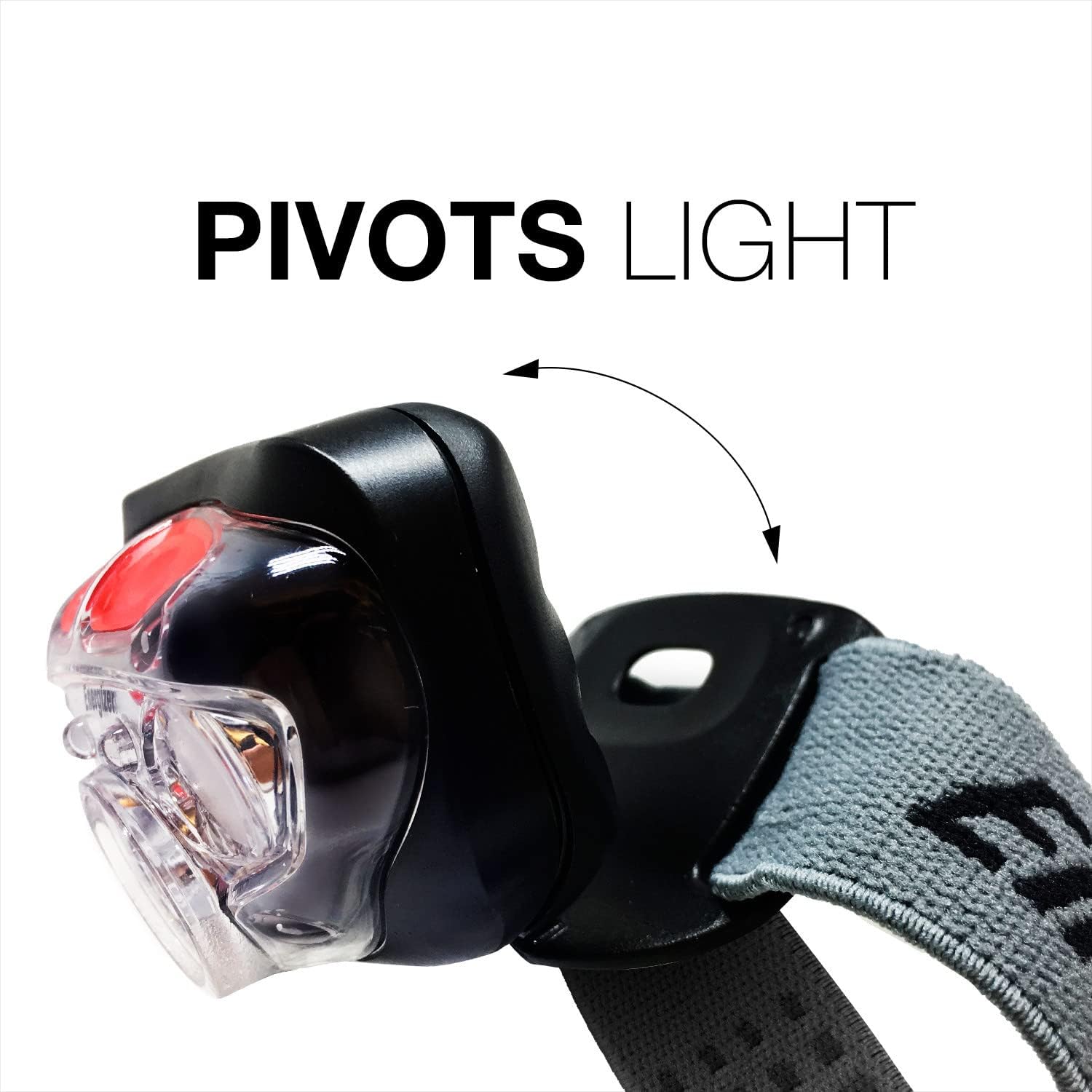
Memory Recall
The Memory Recall technology allows the headlamp to remember your last used focus setting (on low, spot, flood, and red modes) and activate it the next time the headlamp is turned on.
Key Features
- 400 Lumens: Provides powerful illumination for various tasks.
- Digital Focus Technology: Seamlessly transitions between wide and narrow beam widths.
- Pivoting Head: Directs light where needed.
- IPX4 Water-Resistant: Withstands splashing water from any direction.
- Impact-Resistant: Durable design, withstands drops up to 1 meter.
- Multiple Light Modes: Includes High, Low, Flood, and Red light options.
- Memory Recall: Remembers your last preferred focus setting.


Maintenance
- Cleaning: Clean the headlamp with a soft, damp cloth. Do not use abrasive cleaners or solvents.
- Battery Care: Remove batteries if the headlamp will not be used for an extended period to prevent potential battery leakage and damage to the device.
- Storage: Store the headlamp in a cool, dry place away from direct sunlight and extreme temperatures.
Troubleshooting
| Problem | Possible Cause | Solution |
|---|---|---|
| Light does not turn on | Dead or incorrectly inserted batteries | Replace batteries with new ones, ensuring correct polarity. |
| Light is dim or flickers | Low battery power or loose battery connection | Replace batteries. Check that batteries are seated firmly. |
| Headband feels loose | Improper headband adjustment | Adjust the elastic strap using the buckle until a snug fit is achieved. |
Specifications
| Specification | Detail |
|---|---|
| Model Name | Vision HD+ Focus LED Headlamp |
| Model Number | HDD32E |
| Brand | Energizer |
| Light Source Type | LED |
| White Brightness | 400 Lumens (High Mode) |
| Special Feature | Digital Focus, Pivoting Head |
| Power Source | Battery Powered |
| Battery Type | 3 AAA Alkaline Batteries (Included) |
| Water Resistance Level | IPX4 Water Resistant |
| Impact Resistance | Up to 1 Meter |
| Material | Plastic |
| Item Weight | 0.18 Pounds |
| Product Dimensions | 1.55"D x 5.75"W x 7.5"H |
| Manufacturer | Energizer Battery Company, inc. |
Warranty and Support
The manufacturer states that warranty information is not applicable for this product. For any product inquiries or support, please refer to the contact information provided on the product packaging or the official Energizer website.


